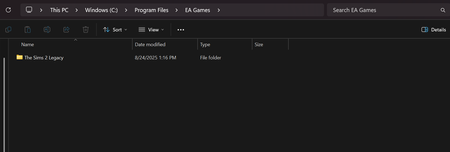
No Sims 4 Folder In C:\Program Files\EA Games

KaylaEstella But the game does run? If you have a Steam install (I know you mentioned the EA App, but maybe you've used both at times), this is the default install location:
C:\Program Files (x86)\Steam\steamapps\common\The Sims 4
Otherwise, the game of course has to be somewhere, so let's find it.
Open a File Explorer window, click This PC in the left panel, and enter TS4_x64 in the search field in the upper-right corner of the window. The search will take a little while to run (you'll see a progress bar). Underneath each result, you'll see the file path; expand the window sideways if you need to in order to see the full path. TS4_x64 will be in [install location]\The Sims 4\Game\Bin, and the Data and Delta folder you're looking for are directly inside this same Sims 4 folder.
I've never played sims on steam, but I did look there and didn't find a folder.
The game does run so I figured it was installed on my PC.
I did the search that you said and did find the folder, however, it's in the Origin Games folder in my D drive for some reason. Thank you.
Is there any way to have my computer to create an EA Games folder in my program files? considering Origin isn't an app anymore. It's not a big deal if not.





