Forum Discussion

5 Replies
@lorelei5 I would suggest running a malware scan. I'm not saying your computer definitely has a virus, only that it's a reasonable possibility when a new Windows account works at first and then doesn't. And it's best to find out either way. Please download Malwarebytes (the free trial is fine) from here:
https://www.malwarebytes.com/mwb-download
Open it, click Scan > Custom Scan > Configure Scan, check all the boxes both for all scan types and for all your drives, and let it do its job. This could take anywhere from a few minutes to several hours, depending on the amount of data and whether the scan finds anything., so you may want to set it to run while you're doing something else. Please attach its report so I can take a look.
Whatever Malwarebytes finds, please run a couple of basic checks of your Windows system files next.
- Hit Windows key-X
- Choose either “PowerShell (Administrator)” or “Windows Terminal (Administrator),” whichever option is offered
- Inside the window that appears, copy and paste “DISM.exe /Online /Cleanup-image /Restorehealth” without quotes, and enter
- The system will start validating soon. If it throws an error, please list it here
- After it reaches 100%, hit Windows key-X again
- Again, choose “PowerShell (Administrator)” or “Windows Terminal (Administrator)”
- Inside the window, copy and paste “sfc /scannow” without quotes, and enter
- Post the message you receive here
Restart your computer, hit Windows key-i, select Update & Security, and click the box to check for updates. If any install, restart again afterwards.
Beginning verification phase of system scan.
Verification 100% complete.Windows Resource Protection did not find any integrity violations.
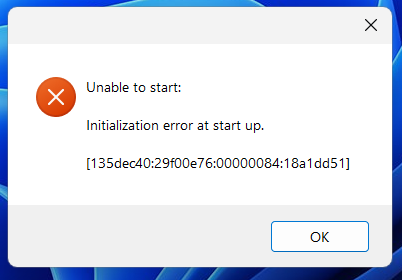
PS C:\Users\katem>@lorelei5 As it's been a while since your previous post, let's review everything here. Are you still getting the same error message? Are you still not using OneDrive? (Make sure it hasn't enabled itself after a Windows update.) Please also post a new dxdiag.
I've followed these instructions and installed all updates for Windows and still get the error message...
@lorelei5 I'd still like a new dxdiag. Please also let me know what antivirus you're using at the moment. And please test in another new admin Windows account, a local one, just to be thorough. It would be a shame to miss an easy fix now because it didn't work before.


Featured Places