Save files - need info, please
 1 month ago
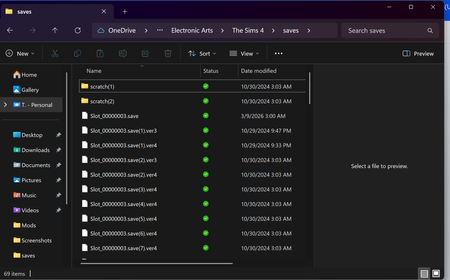
TA1111 The scratch folders contain the data for whatever save you currently have loaded and should be deleted when you quit. But it appears that OneDrive uploaded a couple of these folders and preserved them long after they should have vanished. So yes, you can delete them.
A save file with a .verx extension is an automatic backup of the save with the same internal number. The .ver0 file is the newest and the .ver4 file the oldest. I wouldn't delete all your backups, but it's fine to remove some of them, or to store them elsewhere. The files with an extra number are OneDrive backups of the backups, some probably quite old, and can be removed too.
I would suggest keeping a backup copy of your saves folder somewhere (ideally not on your computer) in case you need it, but I can't tell you whether the copies you currently have are new enough that you'd want to use them. After all, some people play one save for a while and abandon it, and others have a rotation and will come back to an old save after a year or two.
If I saw this setup, my first step would be to nuke OneDrive to oblivion. It's not doing you any favors now and may end up deleting files you'd like to keep around. There are intermediate options too, and even with OneDrive not syncing your files, you can always upload them manually to onedrive.com if that's your preferred cloud storage service. Various options are covered here: