Forum Discussion

Anonymous's avatar
Anonymous
9 years ago

Sims 4 Pets - Error Code 123

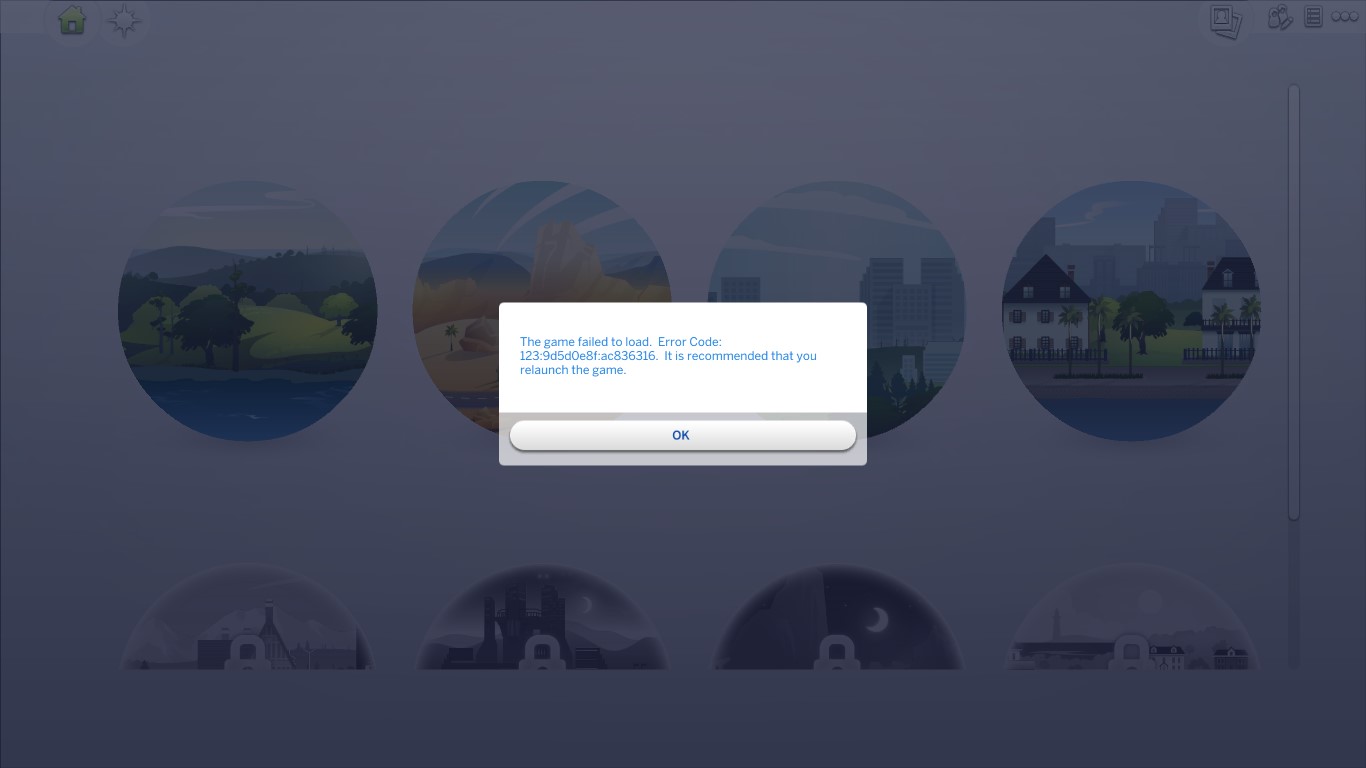
I'm absolutely gutted that I've waited two months for this expansion pack only to install it and it completely mess up my Sims 4 game. I can load my Sims 4 game not a problem, but as soon as I attempt to load a household - Error Code 123 pops up and takes me back to the main menu. I then try and go into one of my households AGAIN and this time it doesn't even let me press the play button to try and load the household. I know that the pets expansion pack has caused this because my game worked perfectly fine before. I have repaired my game, removed my mods, cleared my cache. I have tried EVERYTHING I could possibly think of. It's rubbish because I don't want to lose this game or have to re-install the whole game because I have a family on there I have been playing for two years, my generation expands right up to 10 generations, I can not lose this game. My inner child is so so sad because I've spent so much of my time playing this particular family.

I'm hoping for a new update to help with this issues and I'm hoping for one soon because I've seen I'm not the only one experiencing this.

If anybody has any ideas to help me resolve this issue then please share (anything that won't let me lose my game)

I will keep everybody updated and let you all know if I find a solution.

29 Replies

  • I'm having a similar problem. My game at first wouldn't open due to some mods that broke after the newest patch update. Then, when I open the game and try to play a world it comes up with "Error 123:9d5d0e8f:ac836316" and then something about restarting my game. I removed my mods and tried to remove more mods that I never use or may be broken, but it never seemed to work. I repaired the game, uninstalled my game, removed all my mods, everything. I turned off my script mods and the error still showed up. I don't know what to do anymore. Please help.

  • CMeki's avatar
    CMeki
    Hero (Retired)
    8 years ago

    @Zgyrl11

    Reset your files to factory settings.

    • Make a backup; copy your The Sims 4-folder from C:\Users\Username\Documents\Electronic Arts to an external drive or somewhere else on your computer, for example your desktop.
    • Rename the The Sims 4-folder in C:\Users\Username\Documents\Electronic Arts to The Sims 4_backup
    • Start the game, make a new save, and see if the error is gone. 
      (The game will have created a new The Sims 4-folder in your documents, this is supposed to happen)

      • If yes, continue
      • If no, post a reply telling us the error is still there
    • Start putting folders back in the new The Sims 4-folder. Observe! After every file/folder, start the game and make sure it still works, before putting in the next one.
      • Options.ini - your game settings
      • Saves - your old saves. The sub-folders are not needed. If putting these back causes problem, try putting one back at a time.
      • Screenshots
      • Custom music - if you have any
      • Tray - your library objects; like lots, rooms and sims
      • Mods - your mods and cc, might cause problems when putting back

    If putting back one of the folders was problematic and you did not work it out, please post a reply and we'll see if we can find what your problem is!

    Source: https://help.ea.com/en-us/help/the-sims/the-sims-4/backing-up-and-resetting-the-sims-4/

    Good Luck! 🙂

  • Okay, so I made a backup of my sims files and then deleted all the current ones. I made a new game and tested travelling and moving, it was fine. Then I added my mods in groups of 20-30. It turned out to be a few buggy mods that I had issues with before and thought I had solved and a corrupt save file (RIP the Shaprio family, it took me a few weeks to get to where they were before the corruption 😢). My game works okay now, I still get a similar message when I have one of my played houses attempt to travel to another one of my played houses, but it only happens when I'm travelling in world edit so I just don't do it that way anymore. Thank you for the help! 🙂

  • I am too! Have you figured out what's wrong? It's really frustrating for me. Every time I go to play a game it loads for a few minutes and goes back to the world selection page.
  • crinrict's avatar
    crinrict
    Hero+
    8 years ago

    Hi @UselessBaguette

    seems this is currently caused by an not updated version of MC Command Center. Are you using that mod ? If so, make sure you get the current hot fix version for it.

  • Anonymous's avatar
    Anonymous
    8 years ago

    Im having the same problem but not with The Sims 4 Cats and Dogs but with The Sims 4 Seasons. I recently downloaded it and it allowed me to create a household but when i want to click on the household to play with them i get a error code 123. Can someone please help me.

  • crinrict's avatar
    crinrict
    Hero+
    8 years ago
    Hi @Kean8712

    the situation is the same as for C&D: A lot of mods/cc are outdated and need updating.

    If you're using MCCC, head over to deaderpool's site and get the newest version.

    Also check your other mods/cc
  • Anonymous's avatar
    Anonymous
    8 years ago

    If by any chance, could you go through my Sims 4 files, and see the problem? The problem is most likely in my mods folder, so maybe check there first.

  • Anonymous's avatar
    Anonymous
    8 years ago

    And the thing is I do not own Cats and Dogs.