Forum Discussion

3 years ago
And also I can see that even the console players have it, so it's not related to our PC.
I have Rtx 3080 and I7, this game should be easily 60 fps. It doesn't have problems running it, but when this lag appears it just goes crazy to 10 fps. Makes you dizzy and cannot play a thing. i think this should be a top priority since it's making players having motion sickness with 10 fps, if you rotate the camera, you want to throw up.
All of these happened just after Get famous release, even James Turner had the same lag on his Let's play on Get famous. It is a very old lag, that is being ignored and unacceptable. Same as LGR Eco lifestyle videos had the same problems. so please stop telling us to change things on our ends, when even consoles players have the lag, it means that the game is broken and the only way to fix it's for the official team to work until they fix it.
If they cannot recreate the bug, it means they are not playing it as a normal player with origin in the background. Or they are just ignorant, and don't care, since it's a costly bug, it's difficult to find why it's happening, better save the cost and just ignore its existence. They said that the sims4 will be for many more years, i am very curious how in the world we will play it? if right now it's unplayble?

puzzlezaddict
3 years agoHero+
@Serraphiell I can't reproduce the issue either, and I do run Origin (and other programs) in the background. Given the moderate but not overwhelming number of posts about this issue, it's clear that not everyone is affected. Pair that with the fact that most affected players see the issue in new saves as well, and it's clear that this is at least in large part a system issue.
Some players in this thread saw improvements when closing or uninstalling Razer software or other helpful but not critical programs, if you're interested in troubleshooting further. Otherwise, I don't know what to tell you.
- 3 years ago
Hmmm, what about the consoles? how is their system problem?
Also I tried on 3 different PCs(2 windows 11, 1 windows 10) and 1 mac. all of them have exactly the same problem. it's impossible to be from the system only. The problem is in their source code that conflicts with the systems. I am a computer engineer myself (I can prove if needed). And I can see clearly, that the game is poorly optimized with the latest packs. The system will not have the game as a priority when the lag happens, and switch back to normal whenever player is pressing the UI Escape menu or something to re-prioritize the processing power. All of these because of the game being poorly optimized lately.
I do not own any Razer software, and all my devices are clean boot. So your "fixes" will do nothing. Pair that with console players, that cannot have any Razer software or any other conflicting software.
And also, I do not lag with any other game except sims4. I do own Rtx 3080, and i7, also rtx 3070 and i7 on others. and latest Mac model. It behaves exactly the same, on all devices.
People are not vocal enough, because they press the Escape button, to fix it, but this should not be a feature!!!!!!!!! For 2 months wages game.
Also, I did a little survey of myself. And asked game changers from YouTube and Twitch in comments. "Fantasia, Pixelade, James Turner, LGR…" and many others, all confirmed they have this lag, and have the temporary fix of Escape button. I can show proofs if needed.
Also it depends on the game style of each simmer. How they play. Maybe that’s one of the reasons some people don’t have the lag. Or many other variables. Still the sims team should prioritize this as first priority! Or it will end up just like sims 3 at the end of its life. Worst is that they said, sims 4 has many more years ahead, but it’s already broken. - 3 years ago
I also followed the thread from the beginning, and many people @JeanVW and others thought they fixed it by doing the suggested things u mentioned, but after a while, the lag also came back. So none of those fixes were the reason, just maybe making it worst, but the core problem was never fixed in this thread. people always came back and told you the lag was back.
And why sims team developers are not doing their own survey directly and see what’s happening? @puzzlezaddict I do understand that you want to help people, but you can see that now, we really need an official sims 4 dev, to troubleshoot and finally admit and fix this problem. Is going on for far too much time, since the pack of Get Famous.
Also I did contact the EA troubleshoot team, and spent a few days to keep sending them reports and do whatever steps they wanted me to do, Like DxDiag and clean boot, no internet, re-install LAN driver, sound and many other fixes. After I wasted many many hours, they finally replied "We are aware of this issue and it is widespread across many platforms, please wait for an official patch".
Why did I have to go with all these troubleshooting when they already know what is happening? Waste of my time.My conversation was one and a half year ago!!!!! And we are still waiting for the patch?
Also they never admitted publicly for this lag, or told us they are working for a fix....
- puzzlezaddict3 years agoHero+
@Serraphiell Consoles have had performance issues for years that are clearly separate from the problems in the PC and Mac versions. As a computer engineer, you must know how different a console version of a game is to its Windows counterpart. If you look through the console forum, you'll see that those issues are much closer to universal and much more severe on last-generation consoles, which isn't surprising considering the improvements in hardware of the current generation. Players who know how the game runs say that the only real workaround on older consoles is to run the game with just a few packs.
That's not really the point though; the point is that when a problem happens on some but not all systems, and even the same setup (or the same saves) run better on one computer than another, it cannot by definition be purely a game problem and must have at least something to do with the various systems running the game. For your own issues, I don't know whether you have the same software running on all your computers, or there's something about your router or ISP that doesn't get along with Origin, or something else entirely.
But I do know that for all the people who report this issue, there are just as many who don't see it. Sure, some players are probably just working around it, but plenty of us have tried to reproduce the issue and can't no matter what we do. I've benchmarked Sims 4 at least half a dozen times at different patch levels and seen only mild framerate drops at worst, barely dropping below 100 fps. That's not to say the problem is only due to system issues, just that it's also not only the game itself.
As for Sims 4 not being optimized, I'm not going to argue with that.
I understand why you want developer attention, but it's not like the devs don't care, they're just working on a number of issues at the same time. I couldn't tell you whether anyone's working on this particular problem, but I do know the devs are tracking several performance issues, including the fps drops when entering Build/Buy. They're also tracking a very large pile of other issues; check out the bug forum and the periodic laundry lists if you want to see how much is on their plate.
For what it's worth, Sims 3 runs great on my computer, no performance issues whatsoever in three years.
- 3 years ago
My conversation was one and a half year ago!!!!! And we are still waiting for the patch?
Also they never admitted publicly, or telling us they are working for a fix....
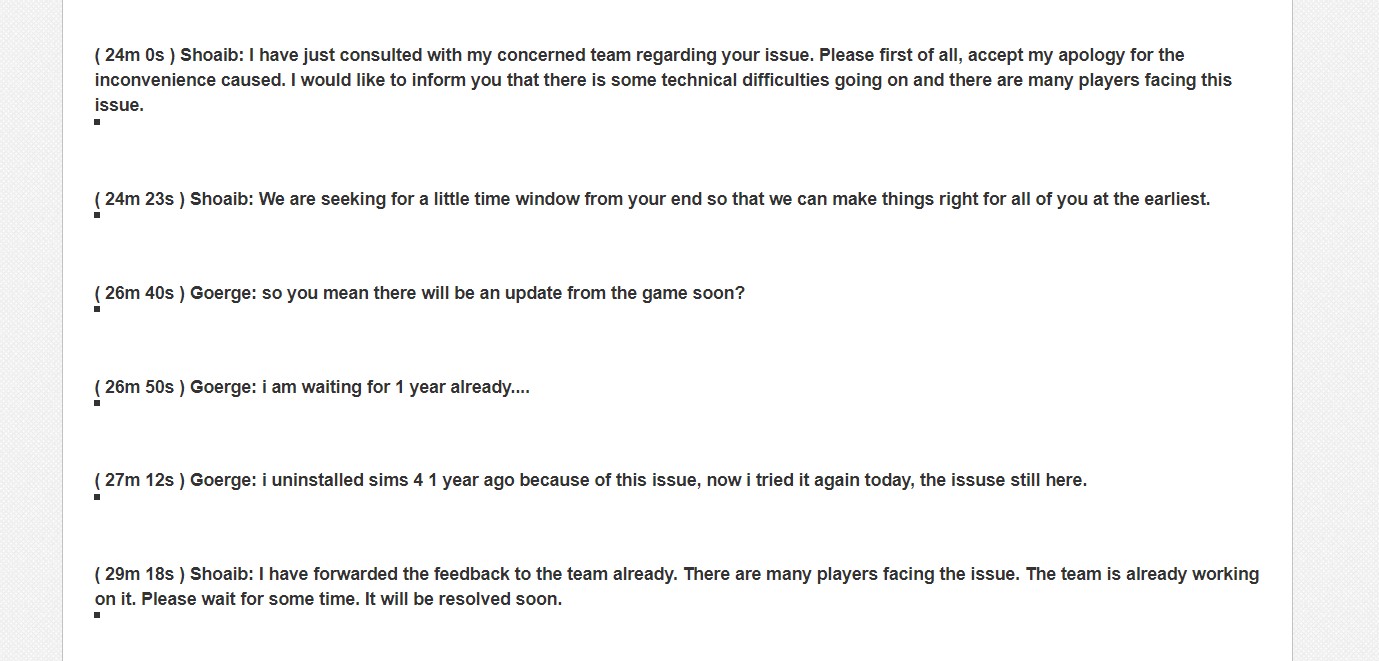
This is my official conversation with the EA team, as you can see they are completely aware of this bug. But since my last conversation, it passed 1.5 years. You can see they said with their own words “
( 24m 0s ) Shoaib: I have just consulted with my concerned team regarding your issue. Please first of all, accept my apology for the inconvenience caused. I would like to inform you that there is some technical difficulties going on and there are many players facing this issue.
( 29m 18s ) Shoaib: I have forwarded the feedback to the team already. There are many players facing the issue. The team is already working on it. Please wait for some time. It will be resolved soon. (if needed i can attach the whole conversation, name of person, date or any information you want.)
I am not going to argue with you how consoles or computer works. (since we will spend days). The thing is that this specific lag is universal on all platforms. I am not saying that the normal performance lag on consoles is the same as this specific lag. The console can lag indeed because of their reduced power, but this specific lag when it happens on consoles makes the game under 10Fps. And you know it is the same lag since you “fix” it in the same way of pressing the “Escape button”. And game will go back to let’s say on 30 fps on consoles.
I also have access to many computers, with different settings, the 3 PCs I mentioned are in different places, different internet. All of them are clean booted and I tried many “fixes” of not having internet at all and all the list the official sims team told me to do.
CLEAN BOOT YOUR PC and then log in back to the Origin client and check if you're able to launch the game.
To Clean Boot the PC, I would ask you to follow the below provided steps:
1. Beside your start button, you'll see a magnifying glass icon. Click on it to open search.
2. Type msconfig in the search box, and press enter to bring up the System Configuration window.
3. Click on the Services tab.
4. On the window that opens, check the box to Hide all Microsoft Services, then click the Disable All button to the right.
5. Click on the Start Up tab, then on Open Task Manager.
6. Let the Task Manager list populate (this can take a few seconds), then right-click and choose Disable on each of the start up programs listed.
7. Close the Task Manager window to return to the System Configuration window.
8. Click OK to save your changes, then restart your computer.
FLUSH DNS CACHE: Clearing your DNS cache will help you get rid of outdated data in your internet that may be causing the connectivity issue that you are experiencing. Please see this link for the steps on how to do so: https://help.ea.com/en/help/pc/connection-troubleshooting-advanced-pc/ DISABLE FIREWALL AND ANTI VIRUS: http://windows.microsoft.com/en-ph/windows/turn-windows-firewall-on-off#turn-windows-firewall-on-off=windows-7 CLEAR BROWSER’S CACHE: Clearing your browser’s cache will help you eliminate any possible corrupted files in your browser’s cache which can cause crashing or launching issues. Please click on the link for the steps on how to do so depending on the browser that you are using: http://help.ea.com/en/article/clearing-your-browserscache/ Should you still be experiencing issues even after all these steps, please gather the following: DXDIAG: https://help.ea.com/en/article/how-to-gather-dxdiag-information/ MSINFO: https://help.ea.com/en/article/how-to-find-and-attach-your-msinfo/Sims 3 will stagger always when you rotate the camera or move around with the w,s,d,a keys. On every computer! So please don’t tell me that sims 3 doesn’t have performance issue.
 3 years ago
EA doesn't care about us, we've to accept it. I don't know if you've tried, but if you clean the bulletin board the lag disappears for a few minutes
- 3 years ago
Yes, it does disappear sometimes, also sometimes it doesn't. same as Escape button... but this should not be a fix, in the first place. It is more stressful than enjoyable to just wait for the lag to appear, for every few minutes and maybe fix it or not fix it with clear notification or escape button. so better to just quit the game, until Sims team will finally fix it, more than 2 years and counting 😊
- 3 years ago
Here we have the same lag experience, he just made a new save. Literally just bought the game for the first time with all DLCs, you can watch the whole video,
And the famous lag just appeared when he switched to build, buy mode after some time. I can copy the link that has exactly the time when the lag happened.
https://youtu.be/3KUSRv7zwpg?t=1511Have a look 🙂 IT is the FAMOUS BUILD BUY LAG, THAT HAPPENS ON MOST OF THE PLATFORMS! IT is urgent indeed! And we need a fix as soon as possible!
He has no mods, all the packs installed, and a starter house from EA. it is so wrong and frustrating. you can read his frustration if you watch the video until the end. He spent 500 Euro when the game and all the packs were 50% discount. that means that the game in Europe costs 1000 euro with all its DLCs. And this is the answer for the money we paid? We cannot even play it without motion sickness, because of the fps that drops below 10.  holger14053 years agoHero+
Serraphiell wrote:
My conversation was one and a half year ago!!!!! And we are still waiting for the patch?
Also they never admitted publicly, or telling us they are working for a fix....
This is my official conversation with the EA team, as you can see they are completely aware of this bug. But since my last conversation, it passed 1.5 years. You can see they said with their own words “
( 24m 0s ) Shoaib: I have just consulted with my concerned team regarding your issue. Please first of all, accept my apology for the inconvenience caused. I would like to inform you that there is some technical difficulties going on and there are many players facing this issue.
( 29m 18s ) Shoaib: I have forwarded the feedback to the team already. There are many players facing the issue. The team is already working on it. Please wait for some time. It will be resolved soon. (if needed i can attach the whole conversation, name of person, date or any information you want.)
I am not going to argue with you how consoles or computer works. (since we will spend days). The thing is that this specific lag is universal on all platforms. I am not saying that the normal performance lag on consoles is the same as this specific lag. The console can lag indeed because of their reduced power, but this specific lag when it happens on consoles makes the game under 10Fps. And you know it is the same lag since you “fix” it in the same way of pressing the “Escape button”. And game will go back to let’s say on 30 fps on consoles.
So you, a "computer engineer myself" believes that a Tier 1 Tech Support Rep has any real inside about this problem?
This guy just wanted to get rid of you. 😉
And yes, I like to see the proof you promised us about you being a computer engineer. 🙂
Be that as it may, @puzzlezaddict perfectly explained to you why this is not just a game issue, but at least partly a issue of the specific system.
So I would listen to her/him and start troubleshooting .
If the clean boot really did not helped, the problem is most probably with a driver, a system setting or your hardware.- 3 years ago
So this is the answer from another "Hero" of this forum? Not only EA that doesn't care about us... but I can see that "heroes" on the EA forums are being ironic and attack people, when they are proven wrong.
I think I already proved my point, that this lag can be fixed only by the dev themselves and nothing we can do on our sides can fix it.
I will gladly show all the documents u want as proof in private message, since i will not expose it here with my full name and so on.
It's very curious how all the "heroes" don't have this lag.... I suppose you don't as well. For the love of sims, please do your own surveys, test on many computers, ask many game changers, ask random twitch players and you will find the lag in 80% of cases.And do not attack players, that struggle with lag in a game that costs more than 1000 Euros, but instead help us to get a good end to this mess, and be the real heroes u claim to be on this forum 🙂
Do not tell us is a fault in drivers or many other things that is not related to this type of lag. (these solutions can fix other lags, but not this one).
And also, thank you for telling us that contacting "Tier 1 Tech Support Rep has no real inside about this problem", and we waste our time everytime we try to contact EA customer support!!!!! Because "These guys just want to get rid of us". 😉 A good information indeed.
 JeanVW3 years agoSeasoned Ace@Serraphiell furthermore, its absolute bogus that it would be a system vs software related issue. I bought a new gaming laptop of 1500euro. It has the exact same issue..
Also, i think that nit enough players voice their opinions because its a like "it isn't gonna be Fixed anyway" type of thing.
Its clearly visible in the streams of popular Simmers like James Turner, Deligracy etc.
The own dev team of The Sims even has the issue.
They KNOW what's up, because why did they release a patch a few weeks ago regarding this exact issue...- puzzlezaddict3 years agoHero+
@Serraphiell It very much sounds like you're not interested in troubleshooting anymore, so I won't bother you with any other suggestions. But since you brought up people being "proven wrong," I did want to point out that informal polls and surveys of online comments are not proof of anything. Aside from the lack of scientific rigor, it's just generally the case that people post more often to complain than to say everything's fine. I'm not a computer engineer, but I did learn this concept pretty early in school.
And since we're on the subject of certain people being wrong, I wanted to respond to this too:
@Serraphiell wrote:
Sims 3 will stagger always when you rotate the camera or move around with the w,s,d,a keys. On every computer! So please don’t tell me that sims 3 doesn’t have performance issue.
This absolutely does not happen on every computer. I don't know where you got this info, but luckily for me, it's easy to disprove an assertion like this.
Sims 3 does NOT stagger or drop framerates when I move the camera, whether with the WASD keys, with edge scrolling, or with right-clicking. It also does not have any issues when I rotate the camera with the middle-click, which I do quite a lot. The only issue I notice with camera movement is a delay when I've spent a significant amount of time (around an hour at least) in Build and Buy modes recoloring objects in Create a Style, but then I quit and reload and it's fine; this never happens in live mode. And just to be clear, I still play Sims 3 now—I was playing a couple days ago—so this is current information.
- Serrapphiel3 years agoNew Rookie
At this point I can see that you EA "hero"guys attack every player that told you tha EA games are broken. So I am wasting my time talking to the heroes. This will be my last message towards any "hero" that is rude, ironic and doesn't have any respect towards players that has problems with EA games, that can be fixed only by the EA and not by their "solutions". For this specific lag problem. Maybe other problems you are able to help and fix, but clearly not this one. (If you read the history of this thread)
"Informal polls and surveys of online comments are not proof of anything. Aside from the lack of scientific rigor, it's just generally the case that people post more often to complain than to say everything's fine."Every person I asked in my survey, I told them to enter Buid/Buy from Live mode and see if they have this famous lag, and 80% of the people had. Please do not tell me this needs more of scientific proofs. Also, if you studied higher education, you know how the research papers are done. You take a sample of people, from different backgrounds, different machines, and see if they have the exact same problem, if their answer is yes, and they proved that they "fix “this issue by pressing Escape button, it is clear as day that we have the same issue here.
Even the sims team tried to address this problem with their Patch in February this year, to fix the lag of buid/buy from live mode. You can see in their patch notes. (but of course it didn't work.) And you are still saying it's not because of the game, it is ridiculous by now. I would be quiet instead, if people want to listen to other advices of mine on this forum as a hero...
Also, be kind to record for us the sims 3, owning most of the packs, playing a household in Island Paradise, and move around with camera without staggering or drop in fps. This game is so famous for the worst optimization a video game can have. especially with all the packs. But again, you are taking care of the sims 3 forums as well, I can see... So no wonder why almost everything is perfect for all the sims you own. I must be a hero so everything will be perfect with my game then.
All the irony aside, as I mentioned above, it would be my last message towards you, I used irony too because you guys started to be very rude, when we tried to bring proofs that the game is broken. It is not polite I must say. I would listen what people have to say instead, and work together for a better game. If the game cannot be fixed by any of our suggestions, I would pe patient for the sims team to fix their game.
But clearly you guys are here, to just say everything is good, and the problem is with our machines, and no matter what we say or bring to the table, it is against your “policy “as a hero on this forum.
- puzzlezaddict3 years agoHero+
@Serrapphiel For the record:
- You previously wrote that 80% of players have this issue, not everyone you asked. Just saying.
- It's standard in the scientific process to gather a random sample of participants whenever possible. Any study that doesn't do this is by definition not as rigorous as one with a random sample, and the authors of the study will acknowledge as much. And I do read some of these studies.
- The Sims 3 world of Isla Paradiso is broken enough to be unplayable. This is a well-known fact, and anyone who's been helping with Sims 3 issues, myself included, will tell players not to use an unedited version of the world. This does not mean that the game engine itself is broken, though it of course has its issues. I was referring to playing in well-made worlds that don't get in the way of the game running smoothly.
- I have never said, in this thread or anywhere else, that Sims 3 or Sims 4 is perfect, only that they run much better for some of us than you've described.
- My "policy," if I even have one, is to try to help anyone who asks nicely. I have no stake in the outcome here other than wanting players to have a good experience with the game of their choice.
- Serrapphiel3 years agoNew Rookie
With this being one of the hottest topic on this forum,
together with another thread that is mentioning this same lag in build/buy mode [OPEN] [PC/MAC] Massive Lag when entering and exiting BuyBuild Mode, I wonder where are all the EA official Community Managers? And why they don't have a say on this matter? This silence has its own answers...
They also can reject the fact that is their game that is conflicting with vast majority of platforms, or they can say that it's currently working on the fix for this lag. Well...
 3 years ago
Try save game after switching mods. It works for me.
Featured Places