Forum Discussion


3 years ago
My conversation was one and a half year ago!!!!! And we are still waiting for the patch?
Also they never admitted publicly, or telling us they are working for a fix....
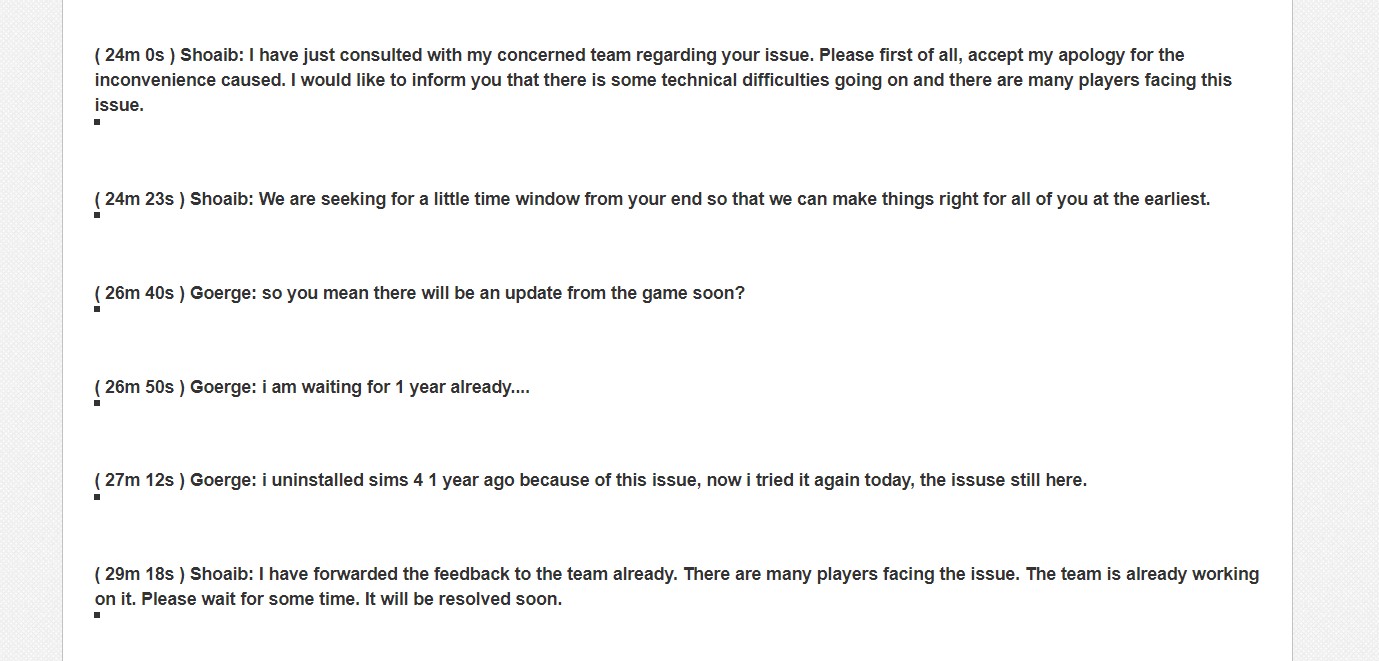
This is my official conversation with the EA team, as you can see they are completely aware of this bug. But since my last conversation, it passed 1.5 years. You can see they said with their own words “
( 24m 0s ) Shoaib: I have just consulted with my concerned team regarding your issue. Please first of all, accept my apology for the inconvenience caused. I would like to inform you that there is some technical difficulties going on and there are many players facing this issue.
( 29m 18s ) Shoaib: I have forwarded the feedback to the team already. There are many players facing the issue. The team is already working on it. Please wait for some time. It will be resolved soon. (if needed i can attach the whole conversation, name of person, date or any information you want.)
I am not going to argue with you how consoles or computer works. (since we will spend days). The thing is that this specific lag is universal on all platforms. I am not saying that the normal performance lag on consoles is the same as this specific lag. The console can lag indeed because of their reduced power, but this specific lag when it happens on consoles makes the game under 10Fps. And you know it is the same lag since you “fix” it in the same way of pressing the “Escape button”. And game will go back to let’s say on 30 fps on consoles.
I also have access to many computers, with different settings, the 3 PCs I mentioned are in different places, different internet. All of them are clean booted and I tried many “fixes” of not having internet at all and all the list the official sims team told me to do.
CLEAN BOOT YOUR PC and then log in back to the Origin client and check if you're able to launch the game.
To Clean Boot the PC, I would ask you to follow the below provided steps:
1. Beside your start button, you'll see a magnifying glass icon. Click on it to open search.
2. Type msconfig in the search box, and press enter to bring up the System Configuration window.
3. Click on the Services tab.
4. On the window that opens, check the box to Hide all Microsoft Services, then click the Disable All button to the right.
5. Click on the Start Up tab, then on Open Task Manager.
6. Let the Task Manager list populate (this can take a few seconds), then right-click and choose Disable on each of the start up programs listed.
7. Close the Task Manager window to return to the System Configuration window.
8. Click OK to save your changes, then restart your computer.
FLUSH DNS CACHE: Clearing your DNS cache will help you get rid of outdated data in your internet that may be causing the connectivity issue that you are experiencing. Please see this link for the steps on how to do so: https://help.ea.com/en/help/pc/connection-troubleshooting-advanced-pc/ DISABLE FIREWALL AND ANTI VIRUS: http://windows.microsoft.com/en-ph/windows/turn-windows-firewall-on-off#turn-windows-firewall-on-off=windows-7 CLEAR BROWSER’S CACHE: Clearing your browser’s cache will help you eliminate any possible corrupted files in your browser’s cache which can cause crashing or launching issues. Please click on the link for the steps on how to do so depending on the browser that you are using: http://help.ea.com/en/article/clearing-your-browserscache/ Should you still be experiencing issues even after all these steps, please gather the following: DXDIAG: https://help.ea.com/en/article/how-to-gather-dxdiag-information/ MSINFO: https://help.ea.com/en/article/how-to-find-and-attach-your-msinfo/
Sims 3 will stagger always when you rotate the camera or move around with the w,s,d,a keys. On every computer! So please don’t tell me that sims 3 doesn’t have performance issue.

puzzlezaddict
3 years agoHero+
@Serraphiell It very much sounds like you're not interested in troubleshooting anymore, so I won't bother you with any other suggestions. But since you brought up people being "proven wrong," I did want to point out that informal polls and surveys of online comments are not proof of anything. Aside from the lack of scientific rigor, it's just generally the case that people post more often to complain than to say everything's fine. I'm not a computer engineer, but I did learn this concept pretty early in school.
And since we're on the subject of certain people being wrong, I wanted to respond to this too:
@Serraphiell wrote:
Sims 3 will stagger always when you rotate the camera or move around with the w,s,d,a keys. On every computer! So please don’t tell me that sims 3 doesn’t have performance issue.
This absolutely does not happen on every computer. I don't know where you got this info, but luckily for me, it's easy to disprove an assertion like this.
Sims 3 does NOT stagger or drop framerates when I move the camera, whether with the WASD keys, with edge scrolling, or with right-clicking. It also does not have any issues when I rotate the camera with the middle-click, which I do quite a lot. The only issue I notice with camera movement is a delay when I've spent a significant amount of time (around an hour at least) in Build and Buy modes recoloring objects in Create a Style, but then I quit and reload and it's fine; this never happens in live mode. And just to be clear, I still play Sims 3 now—I was playing a couple days ago—so this is current information.
- Serrapphiel3 years agoNew Rookie
At this point I can see that you EA "hero"guys attack every player that told you tha EA games are broken. So I am wasting my time talking to the heroes. This will be my last message towards any "hero" that is rude, ironic and doesn't have any respect towards players that has problems with EA games, that can be fixed only by the EA and not by their "solutions". For this specific lag problem. Maybe other problems you are able to help and fix, but clearly not this one. (If you read the history of this thread)
"Informal polls and surveys of online comments are not proof of anything. Aside from the lack of scientific rigor, it's just generally the case that people post more often to complain than to say everything's fine."Every person I asked in my survey, I told them to enter Buid/Buy from Live mode and see if they have this famous lag, and 80% of the people had. Please do not tell me this needs more of scientific proofs. Also, if you studied higher education, you know how the research papers are done. You take a sample of people, from different backgrounds, different machines, and see if they have the exact same problem, if their answer is yes, and they proved that they "fix “this issue by pressing Escape button, it is clear as day that we have the same issue here.
Even the sims team tried to address this problem with their Patch in February this year, to fix the lag of buid/buy from live mode. You can see in their patch notes. (but of course it didn't work.) And you are still saying it's not because of the game, it is ridiculous by now. I would be quiet instead, if people want to listen to other advices of mine on this forum as a hero...
Also, be kind to record for us the sims 3, owning most of the packs, playing a household in Island Paradise, and move around with camera without staggering or drop in fps. This game is so famous for the worst optimization a video game can have. especially with all the packs. But again, you are taking care of the sims 3 forums as well, I can see... So no wonder why almost everything is perfect for all the sims you own. I must be a hero so everything will be perfect with my game then.
All the irony aside, as I mentioned above, it would be my last message towards you, I used irony too because you guys started to be very rude, when we tried to bring proofs that the game is broken. It is not polite I must say. I would listen what people have to say instead, and work together for a better game. If the game cannot be fixed by any of our suggestions, I would pe patient for the sims team to fix their game.
But clearly you guys are here, to just say everything is good, and the problem is with our machines, and no matter what we say or bring to the table, it is against your “policy “as a hero on this forum.
- puzzlezaddict3 years agoHero+
@Serrapphiel For the record:
- You previously wrote that 80% of players have this issue, not everyone you asked. Just saying.
- It's standard in the scientific process to gather a random sample of participants whenever possible. Any study that doesn't do this is by definition not as rigorous as one with a random sample, and the authors of the study will acknowledge as much. And I do read some of these studies.
- The Sims 3 world of Isla Paradiso is broken enough to be unplayable. This is a well-known fact, and anyone who's been helping with Sims 3 issues, myself included, will tell players not to use an unedited version of the world. This does not mean that the game engine itself is broken, though it of course has its issues. I was referring to playing in well-made worlds that don't get in the way of the game running smoothly.
- I have never said, in this thread or anywhere else, that Sims 3 or Sims 4 is perfect, only that they run much better for some of us than you've described.
- My "policy," if I even have one, is to try to help anyone who asks nicely. I have no stake in the outcome here other than wanting players to have a good experience with the game of their choice.
- Serrapphiel3 years agoNew Rookie
With this being one of the hottest topic on this forum,
together with another thread that is mentioning this same lag in build/buy mode [OPEN] [PC/MAC] Massive Lag when entering and exiting BuyBuild Mode, I wonder where are all the EA official Community Managers? And why they don't have a say on this matter? This silence has its own answers...
They also can reject the fact that is their game that is conflicting with vast majority of platforms, or they can say that it's currently working on the fix for this lag. Well...
 3 years ago
Try save game after switching mods. It works for me.
Featured Places