
UI Overlap & Texture Issues on AMD GPUs
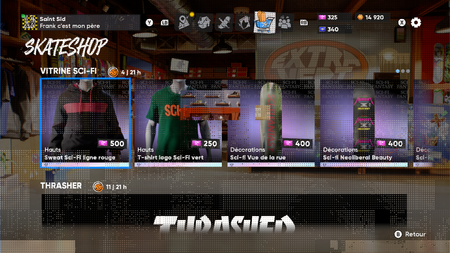

I've started experiencing a bizarre bug where some layers of UI seem to be persisting as a transparency and causing other UI items to be hidden behind that transparency. In the game menus it often makes navigating difficult if not impossible and in game world it causes a lot of the UI to disappear. I've captured a couple of videos for it. I'm playing on Steam, Windows 10 (ESU), 9800X3D and a 9070XT with the latest drivers. Only thing I can think of is there was a recent AMD driver graphics card update that was installed a few days ago. I've verified the games file through Steam and the issue persists.

I’m having the same problems. It just started out of nowhere. When I’m in the pause menu trying to navigate around to the shop or missions or anything really it’s all glitched and transparent. Really annoying EA please fix this. Thanks
Same
AMD 7900XT 26.1.1
I’m also on a 7900XT and I’m having the same problems and more. I’ve found that switching between full screen and borderless fixes it for like 30 seconds and switching Upscaling modes fixes it for like 1-2mins at a time.
Hi !
If you can, try to play the game on the EA App to see if you have the same issue.
Otherwise, you can try to rollback to a previous AMD driver and see if this is related.
Side note : Can't test on my side because I play on EA App with a RTX 4080
same issue on me with 7900xt on ea app.
I have a 7800xt and started having this same issue. Not sure what's going on. Reinstalled my drivers too. Might be something wrong with AMD's most recent driver version? I play the Steam version, and everything is up to date.
i have a 9060xt and play on the ea app, im having the exact same issue
i have a 7700xt and i am also having this exact thing happening. super annoying.
its been so long I've honestly just given up .been coming back here every so often to see if there's any progress I honestly don't think the little staff they have left can handle the dev/Bug fixing needed to even resolve this issue anymore Rip to game dev and Rip to Black box