Certain Items look broken/invisible (Intel Iris XE, DX9)
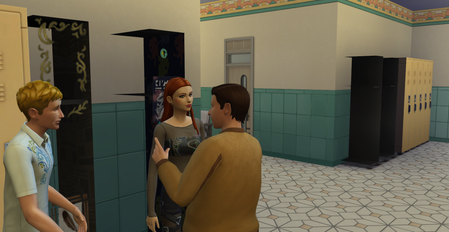


Product: The Sims 4
Platform: PC (Steam)
Pack: High School Years
Issue:
High School lockers appear completely black when placed indoors on High School lots.
The lockers place and display correctly outdoors, but turn black immediately when placed inside a building.
This issue occurs even in:
- Brand new saves
- Fresh user folder
- Official High School lots from the Gallery
- After reloading the lot and restarting the game
Because lockers are required to validate High School lot requirements, the lot cannot be saved or used properly when lockers are broken indoors. This makes High School gameplay progression impossible.
What I tried:
- New save files
- Replacing the lot from the Gallery
- Reloading and restarting the game
- Removing all mods
- Repairing the game
- Placing lockers in different rooms and buildings
Result:
Issue persists consistently.
Indoor lockers remain black and unusable.
Expected Result:
High School lockers should display normally indoors and correctly count toward High School lot requirements.
[CM - Edited formatting to remove excessive spaces/line breaks]

Looks like the known issue but to be sure, could you post your Computer's DxDiag?
Here is my DxDiag as requested. Thank you for checking.
Seems you have a different graphics chips than the one this usually occurs on but your drivers are very old. Not sure if there's newer ones for this particular card.
Can you check if Asus offers you new drivers ?
Thanks for checking.
I’ve updated the graphics driver using the latest one available on the ASUS support page for my model (X421DAP).
The driver version is now V30.0.13044.13001 (2022/06/30).
Unfortunately, the issue still occurs:
the High School lockers turn black when placed indoors, but display correctly outdoors.
Please let me know if there’s anything else I can test or provide.

 The Sims Team