Vibrations turning off on controller
Randomly in online races, usually when someone in the lobby is lagging, all vibrations either reduce to a low setting or completely stop on PS5 and it makes the car extremely difficult to drive. A quick fix is to pause and un-pause the game, bringing back vibrations momentarily until they break again, usually within a lap. An easy fix would be to make vibrations client side if possible to avoid lag breaking them. This has been happening for the whole of F1 25, but since the 2026 DLC released it seems to have gotten worse. As far as I know this only affects PS5.
Getting kicked out of multiplayer lobbies
Since the recent update, whenever I try to join a multiplayer lobby, whether random or invites , I stay in the lobby for a few seconds but I can't choose my driver or anything. After a few seconds , I get randomly kicked out and I'm the only one in the lobby. This happens so many timesOnline service error
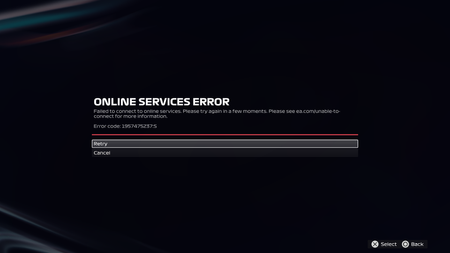
I experienced this problem 2 days ago and it's happening again. It just solved by itself at first time but now I'm not sure when it will be. I've also read all the messages in the mailbox. I retried to connect in the mailbox and got a connection one time but I lost connection again when I tried to enter f1 world. And the error code keeps changing. Please check and let me know what I can do. p.s. I got connection as soon as I edited this post... this is so random. this time, it took about 60~70 hours to get fixed. p.s. I lost it again. it just last 3 min wtf.[REPORT A BUG] Wheel freezes and cant do anything but turn and use my pedals
My wheel keeps freezing and, in my game, I can’t up shift or down shift and it goes from green mode (Xbox) to yellow mode and said it lost connection to my wheel in my game I have the csl base McLaren gt3 wheel and i can use my pedals perfectly fine and steer when the glitch happens but just can't use any buttons or upshift or downshift.Thrustmaster T248 doesn't work.
I have the Thrustmaster T248 and even though it’s listed among the compatible devices, it’s not detected by the game. I’ve already tried connecting the wheel to all peripherals, but it still doesn’t work. I don’t think it’s an issue with my device, since it works perfectly on Assetto Corsa and even on a previous F1 game.VR Disaster
The game has always had constant crashes in VR, both during loading and during gameplay, and I believe the cause is Javelin Anticheat. With the latest update, it's nearly impossible to play in VR. I've used both a 9070XT and a 5070 on a laptop, both SteamVR and Virtual Desktop, and even Quest Link via USB 3.2 cable. Error after error, crashes, and the inability to play. It's a rip-off! Javelin Anticheat, very often, stucks! Almost always the issue is whaile the game passes from flato to VR. I already wrote to EA, and they NEVER gave a serious, sensible response. I'm waiting for a solution.
'connecting to online services' bug
The game hangs indefinitely on “connecting to online services” and also infinite-loads when entering sessions. Local reinstalls, cache clears, and updates have not fixed the issue across multiple months. There are community reports suggesting a full in-game mailbox can cause this. Because I cannot access the mailbox in-game (due to the infinite-loads), I’m unable to clear it manually. Could my EA cloud profile, online save data, mailbox data, or account sync data for F1 25 be fully reset or removed server-side? If so, how do I actually get in contact with someone at EA. Live chat is useless as I just get stuck talking to an AI bot that asks the same 2 questions before closing the chat.
F1 25 keeps crashing during a race
So I have always noticed for awhile that the game keeps on crashing to the desktop and everytime it is the same thing in event viewer: The game f1_25.exe exited unexpectedly, exit code: 0xFFFFFFFF -------------- Exception code: 0xC0000005 Exception address: 0x14390BA24 Faulting module name: D:\Steam games\steamapps\common\F1 25\F1_25.exe, base: 0x140000000 Fault offset: 0x390BA24 I do not know what to do now,m I have enabled Simultaneous Multithreading for my AMD ryzen 9950X with also enabling the automatic overclocking in the Nvidia app for my 4090, the game should run fine or even perfectly but for some reason it always randomly crashes and it always happens during a race for some reason. I do not know what to do now.Error code PP65539
Whenever I try to play multiplayer online races with crossplay enabled, I am kicked out and get the message, “Error. Failed to join session. Error code PP65539.” I play on PS5 and the only way I can play online races is with crossplay disabled, this stops me from competing in league races and just against other platform players in total, anyone know any fixes? Would be much appreciated 🙏