Game crashes when trying to compare cards/ strategies etc from picks.
So after unlocking some a rare strategy choice card, the moment I try an compare any card to what I already have the game crashes right out to my home xbox series x screen. Doesn't matter which card I choose. Kicks me out of the game. Really annoying when trying to progress. Edited to add: the game also needs to be rebooted after starting almost all of the time after booting up. As soon as I choose UT and it shows any rewards, the screens instantly freeze. Tried waiting various times with no success. Always needs to be restarted.18Views1like0CommentsCan't download created team from Team Builder
My Madden 26 created team from Team Builder shows up in Creation Center > Shared Teams, but when I click to download it I get an error message saying "Error Downloading. Try again later." I've unshared the team, deleted it from the EA Madden Team Builder hub, and re-imported it from Madden 25. It will won't download while playing the Madden 26 game.1.9KViews8likes34Comments
Accessibility Filters Not Applying Online + Limited HUD Color Customization
Platform: PC Modes affected: Ranked, Franchise (online) Issue type: Accessibility / Visual Settings Not Applying There are two separate technical problems with the current accessibility implementation. 1) Accessibility filters do not consistently apply in online modes. Colorblind filters function in offline play, but in online modes (Ranked and Franchise), the filters either: - Do not apply at all, or - Apply inconsistently between sessions If an accessibility setting exists in the global menu, it should apply at the engine level across all modes. There should not be a separate rendering path that bypasses accessibility filters during online play. This appears to be a mode-specific rendering override rather than a user configuration issue. 2) The current accessibility implementation lacks targeted control. The existing presets apply a global color shift to the entire rendered frame. This does not address the specific UI and gameplay elements that create visibility conflicts. There is currently no way to independently adjust: - Passing reticle color - Route colors - User indicator color - Catch indicator color - HUD highlight colors - Contrast levels for gameplay-critical UI The visibility problems are element-specific, not global color issues. Examples: - Yellow landing reticle blending into green turf - Red uniforms blending into stadium lighting - Blue-on-blue matchups lacking separation - White UI text becoming unreadable depending on background These are contrast mapping problems that require UI-layer color control, not full-frame hue adjustments. Suggested technical improvements: - Move accessibility filters to apply at a universal rendering stage so they function in all modes. - Add per-element HUD color customization similar to Battlefield’s system (reticle, indicators, UI highlights). - Implement adjustable high-contrast mode for UI elements only. - Allow local uniform overrides for visibility (display-side only, not gameplay-affecting). Other EA titles already support more advanced accessibility systems. Madden should not rely solely on global preset filters. Accessibility settings should function consistently across all modes and provide element-level control rather than full-screen color shifts.Madden 26 Teambuilder Helmet Color issue (2nd post for visibility)
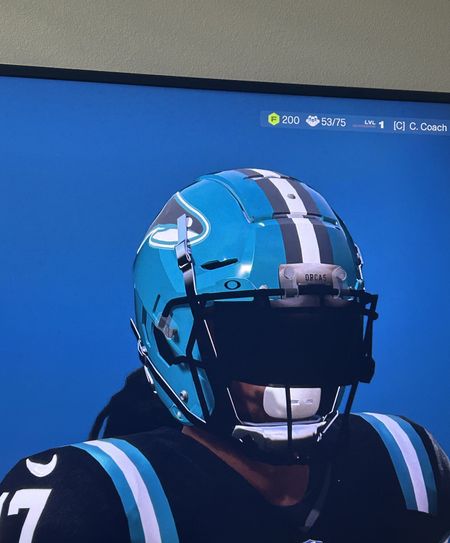
The helmet banners and chinstraps are appearing chrome/black in game instead of white (or any other color you choose) that it shows in Teambuilder. It even shows correctly in the preview in Download Center in game, but when you download the team and start a franchise, then play a game or view players in Adjust Lineup, the chinstraps and banners are chrome/black. Only 4 of the helmet types aren't having this glitch and appear normal (Axium, Vicis 2, Gladiator, and Light) - the rest of the helmets (f7, Speedflex, etc.) all have the glitch. It takes away from what our team is supposed to be. Last Madden, there was a similar glitch in that the banners and chinstraps would automatically match the color of the helmet chosen. This time it's a chrome black color regardless of the color. See below for example. It should be white banner where the Orcas is as well as the back banner, and the chin straps and cups should be white. Instead, you can see on the F7 they're showing up black/chrome. The Axium displays correctly in-game. There are several other things I'd love to see added to TB, but ultimately, this glitch is the biggest concern as of now. Can this please be addressed as it must not be that hard to fix. It seems to have started occurring in the past week or so since the last major Madden update. Even teams that I made a month ago prior to the glitch are having the same bug.947Views5likes16Comments