EA App - Can't Connect to Server (Mac)
I see that others have had this issue before and most look unresolved. I have a boatload of money tied up in my Sims 4 games and extras and I can't access any of it. I've tried everything that was suggested in previous posts. I can't access the EA Help page at all, it tells me that I don't have access to that. So I tried on my phone and could get there but there was no available live chat option. I have deleted the cache, restarted my modem, reinstalled everything, even updated my OS! Nothing works! At this point I've lost all my saved games and will have to start over IF I ever regain access. The EA App is garbage! Please fix or help me fix!
Someone Hacked My Account
I just started wanted to play Battlefield 5 and it asked me to relog into my EA account. So I did by connecting with my Steam Account. Which from doing that it says that my account has been connected to this "@outlook.com." account. Where I don't recall having one. I keep trying it through the EA app it still doesn't allow me to log in. So I try another method by logging into my EA account through the EA website. So we try linking our Steam Account and Google account to see whether it helps or not. At the end, just by linking accounts through the EA website. It still shows that the account was originally connected to an "@outlook.com." account. So I hope that the EA teams and everyone else will be able to help solve this problem with me 😭 . I wish to play battlefield 5 with my friends again.SolvedEA app has not let me download enchanted by nature
I am unable to download enchanted by nature. on the internet it says I dont own it while i do in the app. I went for a live chat support and they kicked me out after 6 hours in quene and wont let me back in with my ticket. It says its open in another window it isntEA app acts like there are no installed games
I can't get the EA app to recognize my installed games. I got a new computer and used specialized software to move everything from old to new. Then in the EA app, I went to settings > downloads > install location to make sure it was looking for the games in the right place. Then I used help > app recovery, restarted the computer, and tried app recovery again. The EA app still does not recognize that the games are installed, so I am currently completely unable to play all EA games. While most games can be re-downloaded if there's no other option, it's important that I keep my current install of the Sims 3; I'm using mods to reduce bugs and I don't know if they'd be compatible with the 25th anniversary update. For the past couple days, I've been trying to get help on EA's official help website, and I've managed to talk to a human a couple times. Both times, I've been told they need to transfer me to a technical team advisor, but the transfer never ends up working. It will say that there's an estimated wait time of 10 minutes, and then sit there for hours until the chat window bugs out and disconnects. I've been told that there is no possible way for me to speak to the technical team besides the buggy chat window. Who do I contact for help about the functionality of the help website?
FC 27 Pre-order Pre-download EA app issue
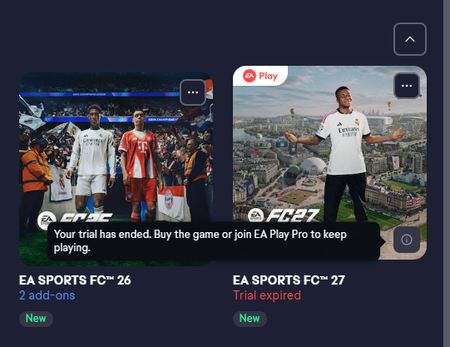
I bought the EA-play 10 hour trial and played it normally.After it ended I deleted the game and then pre-ordered the Standard edition.I even got an email saying I can pre-download the game but when I try to go to the EA app and download it I cant.It says I do own the game but when I go to download it I get a message that my trial has ended and I need to either buy the game or upgarde to EA pro.
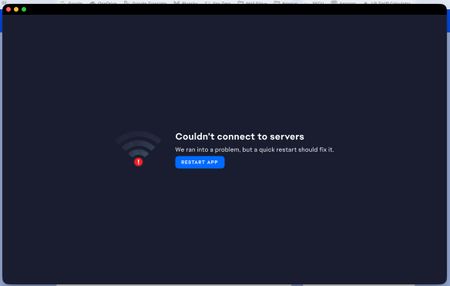
EA app: Couldn't connect to servers
"Couldn't connect to servers. We ran into a problem, but a quick restart should fix it. Restart app." Restarted multiple times. Tried App Recovery. Nothing worked. Also get: "Your error report encountered an error. We are aware of the excruciating irony of this moment. Bear with us, and try again a little later."Solved228Views2likes8Comments