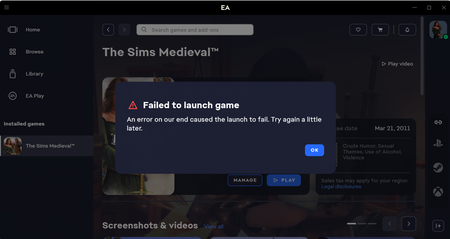
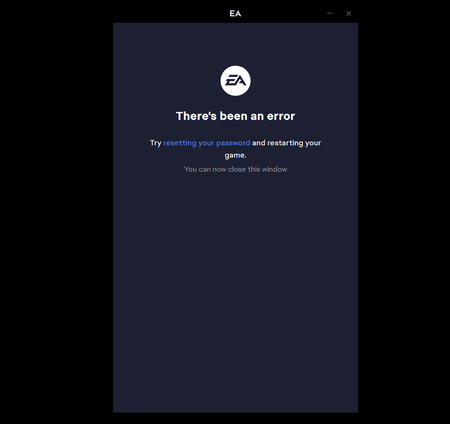
'Failed to Launch Game: An Error on Our End' for Multiple Games. Any Fixes?
I read all the forum messages about this issue from 3 years ago and tried all their solutions. I sent in a ticket to EA Games. I cleared the cache, restarted everything, went into the EA Games folder in my program files, tried running as administrator, tried everything else people mentioned. I forced a game update, an app update, and all produced no results. What is the point of having a game you can't open? I never had this problem before the app. Yes, my new laptop meets and exceeds all requirements. Running Windows 11. What else can I do? And if the error is on EA Games end, why can't they fix it? CM title editSolved33KViews49likes338Comments
[INFO REQUEST] "Service Limitations Apply" Error In EA app Or Online
Hi everyone, Over the past week, we’ve seen a small uptick in reports from players encountering a “Service Limitations Apply” error in the EA app on PC and Mac. This error appears during login, when launching a game via a third-party launcher (like Steam or Epic), or when trying to link those launchers to an EA account. To help us investigate and hopefully resolve this for those affected, please share the following information in your reply: Your region/country of residence Whether you are located in or connecting through a country listed under EA’s restricted regions (see: "EA games unavailable in some countries or regions") Are you using a VPN? If so, please disable it completely (make sure no VPN-related processes are running), reboot your device, and try again. Your EA app Error Reporter ID You can generate this from the EA app and post it here in the thread. See [INFO/GUIDE] Index - Troubleshooting the EA app. Once we have these details, we can investigate the issue further and try to identify its cause. Thanks for your help!30KViews9likes218Comments
[UPDATE] EA app Friends List, Invites, Cross-Play — What's Going On
Hi all, For last few weeks, the right side of the EA app is in indefinite loading screen. My profile pic, status and friend list are a part of this infinite loading screen, PFA. Because of this, in game friends who are online don't show up as well as I don't show as Online for my friends. I have no issue playing the game but I am no longer able to play with my friends. Tried the following but nothing helped: App uninstall and re-install. Delete reg edit entries, clear local data after EA uninstall and reinstall. Delete Apex legends and EA app, delete all involved folders, local data, reg edit entries and reinstall. Restart router. Also tried installing EA app in D: drive(custom location) but it keeps installing in C: drive. Not sure if this helps though.20KViews41likes453Comments
My EA App is showing friends offline when they aren't
So I logged in EA and my friends list is showing that they all are offline when I know they aren't and they aren't blocking me from seeing them. I can run Battlefield fine, but I cannot join their squad. I restarted the app, logged out and back in, restarted my computer, cleared my cache and went offline and back online. What else could I do to fix this?11KViews23likes54Comments
[INFO REQUEST] Error Code: EC:10005 In EA app
For days now, I’ve been reaceiving this error code on my PC. I repaired the EA App, uninstalled and reinstalled it, checked my Norton firewall, reset my router, ran as Administrator and tried other fixes, but the error persists. This has never happened before, and it only affects the EA App—my Steam games run without issue. PLEASE FIX THIS PROBLEM ASAP!!8.1KViews20likes228Comments
EA app closes itself/crashes when trying to open
Hi, Things I have tried: Running as administrator Uninstalling the EA app Running the repair tool from the uninstaller Running the 'recovery' tool when it's working (it just stops working again when i try to open it a second time after running it). Description of problem: It takes around 20-50 tries to get the EA app not to crash when I try to open it so I can play Sims 4, or update games, etc. What happens is it starts to open, nothing loads, then it closes. Sometimes it's faster, sometimes it looks like it's working and then suddenly closes. I can't predict when it will decide to work or under what conditions because nothing is consistent, but it's really annoying. Please help. :( I've attached a screenshot of how it looks before it crashes because that's all I really have. Every now and then it will say it crashed and ask me to send a crash report but almost every time it just crashes with nothing else. It also crashes when it lets me get into it occasionally and I try to run Sims 4.Solved6.6KViews6likes33Comments
My game (Alice: Madness Returns) won't launch (error message)
Hello, I installed the game "Alice: Madness Returns" but every time I try to launch the game, I get an error message that says that there was a problem with the installation of the game, and that I should re-install the game. I've tried this several times, as well as repairing the game, clearing EA app cache and re-installing the EA app. None of this worked. I've contacted EA help three times now but none of them have been able to help me. Does anyone know how to fix this? More info: I use the EA app, I have Windows 11, I get this error message every time I try to open the game, I haven't been able to actually play it before because of this.Solved6.2KViews0likes10CommentsHow to Fix EA app Error Code EC:10001
I have an issue in my EA APP, i cant login with my account the app says ,"there's a problem with your account, it might be our side but double check your account detail and try again" Error code : EC 10001" I had clear chace, clear internet setting and reinstall EA APP thats issue still remain. please help guys CM title editSolved5.2KViews7likes45Comments