The Sims 2 + The Sims 2 Packs no longer downloadable or Playable
Hey I tried to get contacted with Epic games support either but they did not take any resposibilty and one and other live support directed to me here afterall. I did purchased EA play thru Epic Games. When I try to play The Sims 2 Legacy Edition it directing me to different game called The Sims 2 + The Sims 2 Packs and seems like this is no longer valid allocation.34Views0likes0Comments
Ea Help Message: "This issue isn't supported by advisors"
Currently attempting to open a case using EA Help to verify my identity but keep getting this reloaded page stating: "This issue isn't supported by advisors." I had a previous case opened roughly 2 weeks ago that was unable to verify. Is this the reason that message keeps showing up? I want to try again due to unsatisfactory effort on behalf of support team member Alternatively, is there an EA support email address available to assist me in verifying account? Ultimately, I want to join EA Play Pro, currently Game Pass Ultimate with access to EA Play on EA app for PC. Unbeknownst to me at the time of joining Ultimate 1 month ago, these two accounts were linked YEARS ago and I no longer have access to the email address I used when creating my EA account. I don't want to lose the progress I've made in the EA games I've play thus far Any help would be appreciated56Views0likes0Comments
FIXED EC:10607 & Error: 6 (unable to load cloud save or create a new save)
After troubleshooting for 3-4 hours while trying to play NFS Unbound after playing perfectly fine 4 months prior. I identified the root cause. In an effort to keep this Post straight to the point, I will go into more detail after explaining the solution. Solution: 1) Open File Explorer, right-click on your document folder 2) Click the "Location" tab 3) Verify the directory shown is accessible 4) Navigate to the folder, Right-click and make sure it is NOT Read-only or requires special permissions to write into. Ensure Admins have the ability to write/read the folder as well. 5) [If Installed] Open OneDrive, Go to Settings 6) and toggle off the backup for the documents folder. 7) Even if your One Drive was backing up a "document" folder in a non-C-Drive whenever it's set. It actually changes Windows 11's default location for "user\username\Documents" 8) Once the above steps are complete. EA Play should be able to write Saved Data again. Addressing the root issue behind EC: 10607 & EC: 6 Please reply with any questions, concerns, or suggestions.👍 And yes! Your Cloud Saves will be retrieved from EA and placed on your PC, provided you did not override them by signing in on another PC that did not have write issues. 🙌 [Details for those who care] The REAL problem & cause of both EC: 10607 & 6 (while in game) When you try to start a game and see --> EC: 10607 "Cloud save may be corrupted...please create a new save" - This could be the case, but it REALLY means "We attempted to download your cloud save and paste it in %USERPROFILE%\Documents\[Game name] folder AND then we read that location to confirm that the save data was INTACT, but discovered that it was NOT, so we are showing you this error as we believe OUR copy of YOUR cloud save must be corrupted." - Aka, your folder is either deleted, or permissions are not allowing the EA Play app to write to the directory. - This is commonly an issue after people upgrade to Windows 11, their pc or install new cloud management software. Why? Well, because typically people get new Storage devices, sometimes removing the original one, installing - Windows 11 could also rename the drive Letters, leading to a "misplacement" of the saves, or Cloud Storage management software like Google Drive or OneDrive could be manipulating your computer registry to point to an old location. My Personal Experience --> In my case, my original HDD failed, so I upgraded to Windows 11 & installed OneDrive. All over the course of 5 months. When the game landed on a Steam sale, I thought it was a great opportunity to secure a copy and play with friends. - But every time Steam would launch the EA APP, the EA App would forcefully try to read or write to my documents folder, crashing the game even after selecting the "create new Save" option. - EA Play UNLIKE Steam, ONLY saves to that variable Address, it does not care where the document folder is located, but is HARD-coded to save to what your OS considers to be the "document" folder, even if it's non-existent. In Conclusion EA did a poor job of providing clear error feedback to the user and completely misled them due to inadequate error checking & handling. Which led to so much confusion in the beginning. Not receiving access to a folder or seeing that the directory has ZERO files after "attempting a write" is very different from a file being written successfully to the local drive and then being corrupted...343Views0likes6Comments
Game wont :install you dont have access error:
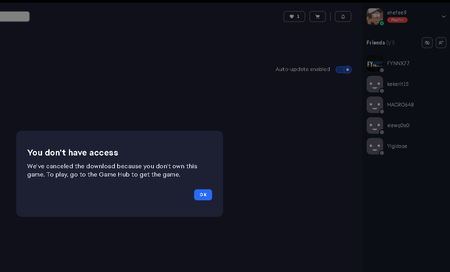
Hello, I don't know how many times I have complained about this issue anymore, but I haven't been able to play any games for days. I reset my computer, uninstalled and reinstalled the EA app, cleared the cache, but I still can't download any games. I have done everything you suggested, but the problem persists. When I try to download a game, it says "you don't have access" and asks me to purchase the game again. However, I already purchased EA Play Pro. I haven't been able to play any game. Please help me solve this issue or refund my money.102Views0likes1Comment
Payment failed, but money was charged. Support is more than unhelpful.
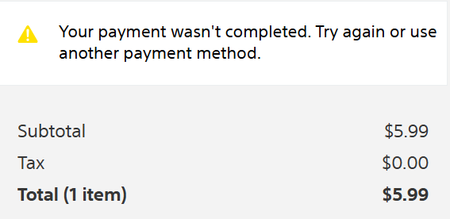
I paid for the EA Play Pro subscription but did not receive any access to it. The support team told me that I was “not charged,” yet my subscription appears as active on their end — which makes no sense. When I check my profile, nothing is enabled and I still cannot play any games.When I requested an invoice for the payment, support refused to provide one. So at this point, I’ve paid for nothing — I was charged and received no service in return.This feels like a scammy business practice, and I strongly advise others not to purchase EA Play Pro until EA addresses this issue.I have already contacted the European Consumer Centres Network (ECC-Net) regarding this matter, and I encourage anyone in a similar situation to do the same.I expect a formal apology from EA Support and the entire EA staff for this unacceptable experience.213Views1like4Comments- 28Views0likes0Comments

no subscription, money taken.
my money was just taken on my first attempt to buy ea play pro. withdrawn but came up with an error and now my money is gone and no subscription. bought a secound time and has worked. want my first attempt of cash back or a annual subscription!!!!!!139Views0likes3Comments