Broken and Updated Sims 4 Mods and CC: patch 1.124, May 12, 2026
About This Thread This thread tracks Sims 4 mods and CC that have been "broken" or made obsolete by game update 1.124, May 12, 2026, or declared unsupported by their creators. It also tracks updated game mods, important updates to custom content, general news from/about creators, and new bugfix mods. SORT THE THREAD FOR WHAT YOU NEED: For the COMPILED LISTS, sort by Oldest For the MOST RECENT INFO, sort by Newest … or FOLLOW to receive notifications of new posts! Click on the bell symbol 🔔, top right. Notifications can even be sent right to your email! Some things are NOT covered here: Early-access content and anything else behind a paywall Content outside the T (for Teen) game rating (no adult mods! including alcohol, violence) Creators/mods outside the EA and EA Answers HQ rules (especially trademark or copyright infringement and having permanently paywalled “exclusives”), and the Maxis guidelines for Sims 4 content creators. NOTE: The Marketplace is not a paywall: it’s items published by EA. The paywall rule is about content that creators self-publish. Creators who update active creators' CC/mods without permission, who upload folders of other people's mods and CC, who copy other modders' code without permission, or who make tools that will break your mods Separate translation files Loading screens, CAS backdrops, main menu backgrounds, and poses unless the creator says an error is fixed Sims 4 Multiplayer Mod updates that don’t change the version number CAS and Build/Buy CC unless the creator says they're fixing an error or catching up pack content Mods and CC hosted on sites that are mostly adult content or that require joining an 18+ site NEW: Updates to complex mods and tools from new creators will not be reported here unless I’m satisfied they know what they’re doing as Sims modders, not just AI-coding. In addition, news for mods/CC hosted only on Mod the Sims may be selective and/or delayed due to recent security incidents. In the end, YOU are responsible for your mod use. Because not all content and creators are covered on this official forum, many of you should be following creators directly for news. The pinned topic How to Use Mods and CC includes advice about game updates, mod management, finding broken mods, and how to avoid downloading broken and malicious content. And remember… Back up your Saves folder! Index for This Topic Newly Broken/Obsolete Game Mods and Tools Updated Game Mods and Tools, sorted by creator Newly Broken CAS and Build/Buy Updated CAS and Build/Buy Creators Clearing Mods for This Patch - gameplay mods reported by the creator or their testers to be compatible with the game update Core, Injector, Testing and Protection Mods Status: what you should be on for mods like ModGuard, Better Exceptions, venue lists, Lot51 Core, XML Injector, and MC Command Center Creator News New Bugfix Mods Start of Ongoing Reports - scroll down or sort replies by NEWEST Other Resources Previously Broken/Obsolete Mods and CC: up to patch 1.123 [MASTER POST] Common Symptoms of Mod/CC Issues, with Known Causes, including links to earlier Broken/Updated Mods threads. The previous Broken/Updated Mods thread, for patch 1.123 and its mini-patches. Patch Notes for this game update. How to use Mods and CC: including how to test for broken mods/CC ("vanilla" testing and the "50-50" method) Malicious Scripts and Malware19KViews11likes20Comments
Accessory Sub-Category Causing Infants to Zoom
the update failed to fix this. Issue is still happening for Gloves, Rings and Bracelets. Very disappointing. The expectation is that none of these categories should zoom in because it distorts the infant and create a sim screen. Edit By crinrict: Adjusted Title56Views6likes1Comment
Game won’t save
When is that I had with the game was I would load into cast and try to go load a shirt and it wouldn’t even move. The second issue is when trying to save the game. It was stuck on a loaded screen couldn’t say it couldn’t pause the game. It was just stuck in two times instead of pausing so I had to turn off the whole game and then the game just didn’t wanna crash. It just stopped working and this is after I updated with the 150+ “bug fixes“ the game is not looking for an Xbox player. I don’t even have any mods or anything cause I put on Xbox in my game just won’t work.18Views0likes1Comment
Packs/Worlds showing as deactivated in-game/Not active after purchase
I downloaded the For Rent pack and in my game files it says the pack is there but in CAS and in build mode etc it says I don't own it, I have repaired sims and the EA app but the issue is still not fixed. Thanks Edit By crinrict: Adjusted Title24KViews100likes821CommentsBlack screen in main menu
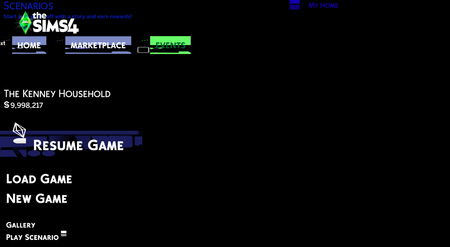
I was playing a couple days ago and everything worked fine, but then I turned on mods and restarted the game and it launched to the main menu, but the background was completely black and I cant interact with anything. I looked up the issue on the internet and apparently many people are having the same experience and it has something to do with mods, but I removed all the mods I have (TOOL and Betterbuildbuy) and it still doesnt work. I tried pretty much everything people said might work (remove mods, delete cache, run game on dx9 and dx11, turned off script mods, repaired the game, restarted my pc a billion times, uninstalled and reinstalled the whole game) and it still looks exactly the same. I also can still hover over everything and I get the little "animation" (the color of the text changes) as if it would work but nothing happens when I click on it and I also cant close the game I need to restart my pc for it to close.Build Mode: Time Toggle Always Appears As Morning
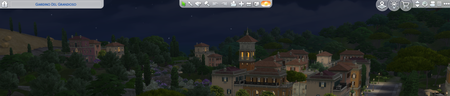
if you open build mode, the icon here will ALWAYS say it is morning even if it is not. Clicking it causes it to fix itself but the icon and text should display the correct day / night cycle. Here it is nighttime and it is a sunny icon. Happens in all worlds.60Views0likes1CommentVarious Skills Missing Icons from Description
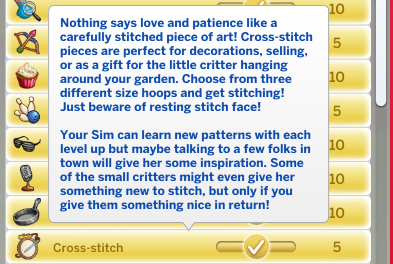
Majority of the skills available in the game all have various icons under their descriptions this is however missing for the following skills: Acting, Cross Stitching, Fabrication, Media Production, Skiing, Snowboarding, Robotics, Rock Climbing Every other skill has icons that appear after the text here79Views9likes3Comments