Stuttering Temporary Solution? - Yes 60 fps Capped Gameplay
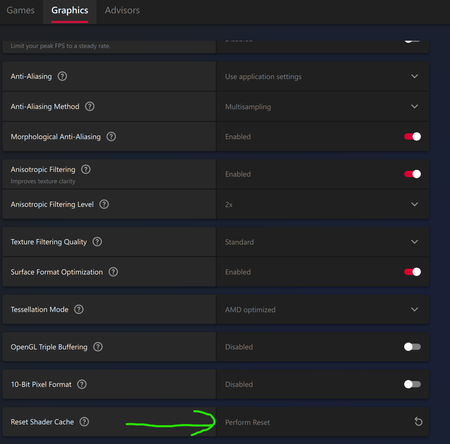
Hi all I have a possible solution for stuttering issues on a PC, with or without a multimonitor setup ( I have 3x 4K monitors). I am unsure of the correct actions for an Nvidia card, as I have an AMD GPU. I was getting ridiculously high FPS (up 160 fps) even though I was using a custom graphics setting in 4K, Fade-touched textures, and ultra ( I think ) with Ray Tracing turned off. I am running the AMD beta drivers. Resetting the Shader Cache seems to have fixed the cause of my specific stuttering issue. However, I have saved my game now, so I will be keen to see if the stuttering reappears at any time to see if it is related to the Shader Cache. In Adrenaline software, find the setting under "Global Gaming Experience." I have attached my DxDiag in case it helps Bioware and EA / AMD patch in some permanent fixes. I hope by sharing my experience, I can share a possible workaround for the time being with my fellow gamers suffering from stuttering problems, albeit a temporary solution. RegardsSolved
Veilguard stuttering
Hi all, I finally got around to purchasing Dragon Age: The Veilguard a week ago. It ran great at first, but then it started stuttering. I have to turn V sync on to stop the screen tearing, but that's not what's causing the stuttering. I have tried pretty much everything to stop it. I keep thinking I've done it, only to have the stuttering return. A few days ago, my CPU cooling system crapped out, and I had to get a new one, and the stuttering is now worse than it was before (the occurrences themselves aren't worse but they're happening more frequently now). Things I have tried: *Deleting shader cache *Increasing available space for shader cache *Adjusting every display / graphic option in the game (one by one) *Capping the frame rate to 60 fps *Disabling fullscreen optimizations *Running the Nexus Mods registry edit *Giving the game high priority *Switching to a high performance power plan *Uninstalling and reinstalling the game *Scanning for and fixing corrupt system files *Verifying game files via Steam *Updating my BIOS *Updating (and rolling back) my Nvidia graphics drivers I have used MSI Afterburner and RivaTuner to determine that the CPU usage spikes just before a stutter and then everything drops. CPU and GPU temps stay stable or drop, so nothing is overheating. I've used LatencyMon to determine that some DirectX and Nvidia drivers are having the biggest DPC latency during the game, but not to the point of being red or yellow. The only thing I haven't tried yet is messing with the voltage or over/under-clocking my CPU. I don't want to go near that with a ten-foot pole! I've attached my Dx Diag file. Anyone got any other suggestions? (FYI: There are undoubtedly other things I've tried that I've forgotten to include in the above list.) I am loving this game otherwise and really want to play all the way through. So far I am persevering despite the stuttering, but it is taxing my patience.
Arthaland Forest Mire Waterfront Glade Missing Bridge Bug
I have completed solved this puzzle and my Rook says, "Look at that!" you can see the bridge form up then completely disappear. I have tried several times and get the same result. You can see the Island guardian ready to fight and my companions can even get to the island and fight but since I cannot switch to my companion like past games I cannot loot items or fight on the island. Please advise how to resolve. What is your EA ID or Console ID (PSN ID/Gamertag)? Cynarra What platform are you playing on? EA Origins app on PC What is happening? (and what do you expect to happen instead?) The bridge should stay up once puzzle is solved so Rook can access the small island, fight the guardian and loot the chest. Does this happen in a specific area of the game? Arthaland Forest Mire Waterfront Glade Please share any steps you've tried so far to resolve the issue: Reloading previous save, completing other quests then going back and attempting again. If possible, share a Screenshot or Clip... Screenshot of solved puzzing with missing bridge attached. If on PC, please share a DxDiag file and an EA app Error ID Number d85354a0-06f7-40db-80d8-afd465e5b7fa
Nostalgia Trip not unlocking
Hello, I have been trying to get this achievement for 2 days now, the first time I tried I was near end game, I rotated the statues, did the wisps then jumped off the balcony and didnt get the achievement, I reinstalled the game, verified game files, rebooted my pc, started a brand new playthrough where I rotated the statues as soon as I was in lighthouse, then did the wisps after I did necropolis, the achievement still won't unlock. Anyone have any advice for this? Really want to 100% this game..
Shout out to EA
Shout out to EA for making bioware release a game before it was ready. Im not even mad at bioware for dragon age veilguard. I know they had plans to make it so much better and actually match the rest of the franchise. Bit, EA is so money hungry that they just want to push out unfinished products so that people get all disappointed and mad at the game itself for being such a let down. You suck, EA. Seriously. Why wont you let people finish their games? I waited like 10 years for this game to come out just to be frustrated. The ending was absolutely trash. The writing was poorly written. It was so obviously unfinished. It felt like a bunch of rough drafts smashed together in order to make a deadline because that's exactly what it is. The combat is crap. Even on story difficulty im getting spammed like crazy. Can't dodge roll because the hit boxes are so massive I could be feet away from the enemy and still get knocked down. Then you get 4 reavers in one battle while their all spamming the same 3 moves over and over again. The romances are crap. Most of the plot made no sense. Like the Harding thing. Why go through all those quests with her having those unique powers all for them not to be used at all. You get one whole kiss scene with a love interest and at the end of the game you dont even get a celebration scene. It just fades to black. Seriously? The only entertaining part in the whole game was Solas turning into the wolf, and the only reason that was kept was because it was in the trailer, otherwise EA would've mostly likely had them change that too. Like they changed everything else. Like bro, let bioware cook. They dont need your bullcrap or your deadlines. I love bioware, but I'm beginning to hate EA. Between this is and the Sims, you guys are failing so badly I'm surprised you are even profiting. Good luck in the future, because there are a lot of people like me, ready to drop EA completely and never spend another dime on your trash. K, thanks bye. Hope you have the lives you deserve!Dragon Age Veigluard Freezes Pc
Hello everyone. I have a problem with the game. At random moments and after a random amount of time, the game freezes my entire computer and requires me to shut it down. I've tried searching forums for help and have done almost everything I could. Deleting one of the folders that players often report, changing settings, disabling RTX, and other such things. Regardless of the settings, the game simply freezes my entire computer after about 3 minutes, 15 seconds, or an hour. This doesn't happen at certain moments with a lot of effects, because it can even happen in the menu. I dont know why i have that problem but please help... im tired of that...Dragon Age Veilguard Load errors...nothing works ;-;
My game is having issues loading. My game is on SSD like the internet suggests but enemies do not load in, i have load errors every time I try to play the game. I have over 300hrs on the game and i have yet to complete it due to the constant loading issues. My graphics settings are set as low as possible to help with loading. I have tried loading manual saves but I only get load errors. I have tried creating a new game and I have again the same issues. Is there any updates as to if this is going to get patched or repaired otherwsie I have wasted 80euros on the game. Any help would be appriciated