[OLD] Broken and Updated Sims 4 Mods and CC: patch 1.122, March 17, 2026 +
About This OLD, OUTDATED Thread This thread tracks Sims 4 mods and CC that have been "broken" or made obsolete by game update 1.122, March 17, 2026, and the March 18 and March 23 hotfixes, or declared unsupported by their creators. It also tracks updated game mods, important updates to custom content, general news from/about creators, and new bugfix mods. FOR THE NEW THREAD SEE Broken and Updated Sims 4 Mods and CC: patch 1.123, April 16, 2026 | EA Forums - 13337074 -------------------------------------- FAILED TO LAUNCH ERROR: "Failed to Launch" message plain black screen on launch (no words) sometimes you can launch but are missing CC in CAS A patch for these specific issues was released March 23, 2026. If you have them, please update. If you still have them after that, it's possible that there are other causes. Please do a vanilla test. If the issue persists, please update your ReShade; if you don't use that or other mods that aren't Mods-folder content, go to the Bug Reports forum. ---------------------------------------- SORT THE THREAD FOR WHAT YOU NEED: For the COMPILED LISTS, sort by Oldest For the MOST RECENT INFO, sort by Newest … or FOLLOW to receive notifications of new posts! Click on the bell symbol 🔔, top right. Notifications can even be sent right to your email! Some things are NOT covered here: Early-access content and anything else behind a paywall Content outside the T (for Teen) game rating (no adult mods! including alcohol, violence) Creators/mods outside the EA and EA Answers HQ rules (especially trademark or copyright infringement and having permanently paywalled “exclusives”), and the Maxis guidelines for Sims 4 content creators. NOTE: The Marketplace is not a paywall: it’s items published by EA. The paywall rule is about content that creators self-publish. Creators who update active creators' CC/mods without permission, who upload folders of other people's mods and CC, who copy other modders' code without permission, ***NEW*** or who make tools that will break your mods Separate translation files Loading screens, CAS backdrops, main menu backgrounds, and poses unless the creator says an error is fixed Sims 4 Multiplayer Mod updates that don’t change the version number CAS and Build/Buy CC unless the creator says they're fixing an error or catching up pack content Mods and CC hosted on sites that are mostly adult content or that require joining an 18+ site In addition, news for mods/CC hosted only on Mod the Sims may be selective and/or delayed due to recent security incidents. In the end, YOU are responsible for your mod use. Because not all content and creators are covered on this official forum, many of you should be following creators directly for news. The pinned topic How to Use Mods and CC includes advice about game updates, mod management, finding broken mods, and how to avoid downloading broken and malicious content. And remember… Back up your Saves folder! Index for This Topic Newly Broken/Obsolete Game Mods and Tools Updated Game Mods and Tools, sorted by creator Newly Broken CAS and Build/Buy Updated CAS and Build/Buy Creators Clearing Mods for This Patch - gameplay mods reported by the creator or their testers to be compatible with the game update Core, Injector, Testing and Protection Mods Status: what you should be on for mods like ModGuard, Better Exceptions, venue lists, Lot51 Core, XML Injector, and MC Command Center Creator News New Bugfix Mods Start of Ongoing Reports - scroll down or sort replies by NEWEST Other Resources Previously Broken/Obsolete Mods and CC: up to patch 1.121 [MASTER POST] Common Symptoms of Mod/CC Issues, with Known Causes, including links to earlier Broken/Updated Mods threads. The previous Broken/Updated Mods thread, for patch 1.121 and its mini-patches. Patch Notes for this game update How to use Mods and CC: including how to test for broken mods/CC ("vanilla" testing and the "50-50" method) Malicious Scripts and Malware, including information about the March 2026 incident at Mod the Sims.88KViews24likes52Comments
No Pregnancy test to take & other pregnancy issues
So My sim is ready for a baby. But after they tried... when I wanted to see if she actually got pregnant or not. No options for any tests. I don't use any mods or cc... Did the general sims shop ran out of pregnancy test? did they all spoil befor the new shipment arrived? On a smallbuissnes/resedention lot or how it's spelled.72KViews1402likes326Comments
[PLEASE READ] Save Game Corruption
Please read the first post carefully and post in the thread that reflects your issue best. Go in order from top to bottom if you see multiple of the symptoms. The top ones are more specialized as the bottom ones. Please feel free to use this thread for general discussion of the issue, but note that this thread is NOT being tracked by Maxis any longer. The threads linked below are being actively investigated. Please follow them for any updates. Problem The save game starts to disintegrate itself. Lots start to get deleted, causing endless loading, loading into empty lots or Error Codes 800/801. Where to post It seems that in order to better track the causes for this issue, separate threads are needed. You do not need to repost any info you already posted here. There are currently different issues so please use either of these going forward. Make sure to read through the first post of each to be sure you’re posting in the correct thread. If you get a White screen after loading into world with an R-rental, please use this thread: White Screen when loading world (Patch 1.109.207) If your save is corrupting and you have a lot of r-rentals in your save game, please use this thread: [FR] Corrupted Lots/Houses disappear in saves with lots of rental units If you get Load Error 800 or 801, please use this thread Load Error Code 800/801 If your game shows all the neighboring lots as default/empty instead of the correct lot, use this thread: Neighboring Houses show as Default/Empty | EA Forums - 11903590 If you downloaded a specific lot from the gallery and that gives you endless loading/crashing when leaving the lot or trying to load into it, please use this thread: Endless Loading/Crashing when trying to load a certain lot (broken object(s). Please be aware that this issue isn't a corrupted save game. It's a corrupt lot. If you downloaded a few random lots from the gallery and you start to get endless loading with them, please use this thread: Placing lots from the gallery freezes game/endless loading If you're buildings are disappearing but the furniture is still there, use this thread: Floating furniture and building completely gone If you’re buildings are disappearing/reverts to base, you have exclamation marks or lamas on the map or the houses are different on the map and in the game (even after loading into the lot), please use this thread: Houses/Lots Disappear If you want to discuss repro steps with others, there's a thread you can use here: Save Game Corruption - Testing and Findings From 10 Years of Experience | EA Forums - 12541920 Troubleshooting The issue is really hard to pinpoint but there are a few things that can accelerated the issue. This issue is not mod caused but it can be influenced by mods and cheats, especially if you create lots of Residential Rental units in your save game. Save Game Size. The issue usually typically happens on larger save games. There are a few factors that contribute to save game size that you can keep an eye on Lots of huge houses with lots of objects: Try to keep those down. Consider using empty houses for set decoration if you don't play certain lots but want houses to make it look nicer Photos Sims take ingame. Try to only keep the photos you really like and that contribute to your gameplay. Delete everything else. Photos take up a lot of space in the save. Lots of Sims. The game creates Sims at abundance. Delete the ones you don't use from time to time. Usually there's nothing you can do once it starts happening. Update 2025/04/24 by Crinrict This is currently not on the laundry list yet but Maxis listed it as something that needs extended investigation Laundry List - April 24th, 2025 | EA Forums - 1211120658KViews150likes302Comments
[S] Weather Effects Occurring Inside Structures
When it rains, rain falls in the house has a roof. Edit By Crinrict: Adjusted Title to fit archived thread, Added tag. Archived thread had around 187 me toos Update 2025/06/17 by crinrict See this link for more details on the current status of this issue: [S] Weather Effects Occurring Inside Structures | EA Forums - 5051547 and [S] Weather Effects Occurring Inside Structures | EA Forums - 5051547 Update 2025/04/24 by Crinrict This is currently not on the laundry list yet but Maxis listed it as something that needs extended investigation Laundry List - April 24th, 2025 | EA Forums - 1211120648KViews1974likes762Comments
Drag No Longer Working for several objects
With the New Update and Patch fix the Drag to Trash and Sink interaction is NOT working. A very important tool considering that sims tend to be extremely messy and not clean up after themselves. Diapers will likely not drag to trash either. Certainly hope they get on this ASAP. No Mods or CC are enabled as i do not use them. Testing cheats is enabled but to no avail. Resetting sim does not work for it has nothing to do with the individual Sim. Edit by crinrict: Adjusted title to make more general Update: Hey all, The team is aware of and investigating this issue as we speak and we hope to have a fix for this released soon, please keep an eye out for any further updates in this thread. - EA_Cade44KViews2215likes640Comments
Can't Water Plants
I click "Water All" and the Sims goes to the plant and does nothing. The queue prompt simply disappears. I've tried this with multiple Sims. "Tend Garden" also doesn't allow plants to be watered. This is game-breaking because it means without cheats/debug gardens are untenable. Without the ability to grow gardens, it breaks several aspects of gameplay. Edit By Crinrict: Adjusted Title Edit my crinrict: Mod fix for PC/Mac: http://www.simfileshare.net/download/5353157/36KViews687likes262CommentsSims wear default underwear/AA shorts when naked
When sims are supposed to be nude or have more revealing clothing the salmon colored (hideous btw) underwear from CAS body edit mode is showing. Edit By Crinrict: Adjusted Title Note from EA_Solaire: Hi all, This issue was fixed for Child, Teen, Young Adult, Adult, and Elder Sims, however it is not a retroactive fix and any previously made Sims will still have clothing visible under their privacy mosaic. While this issue is still being investigated, you can fix this for pre-existing Sims by first uploading your impacted households into the Gallery to save them, deleting the household from your world, then replacing the household in your world from the Gallery. Once you replace them from the Gallery, that will clear up any issues with the privacy mosaic. Note by Crinrict: For PC/Mac users you can use this mod to fix all your already broken Sims with a simple command: https://www.curseforge.com/sims4/mods/other-mods-reset-bathing-outfit You can remove the mod after doing so.34KViews878likes338Comments
[HSY] Prom disappears from Calendar
I started a new saved game after the last update, switching between two families with teenagers, and I noticed that the prom disappeared after switching from one family to another. I didn't change any lifespans or anything like that, it simply vanished from the calendar. My teenage Sim received the invitation to the date before the prom, but the prom didn't happen. I also couldn't invite anyone to the prom. Any suggestions on how I can solve this? Edit By crinrict: Added Tag to Title, Adjusted Title Note from EA_Solaire: Please check your in-game calendars before posting to ensure you're posting in the correct thread. If Prom does appear on your calendar, but is not taking place, please use this thread: [HSY] Prom not taking place but is showing in calendar (Patch 1.116)28KViews931likes548Comments
Eyes/Eyelids Issues (Patch 1.110.265/2.01)
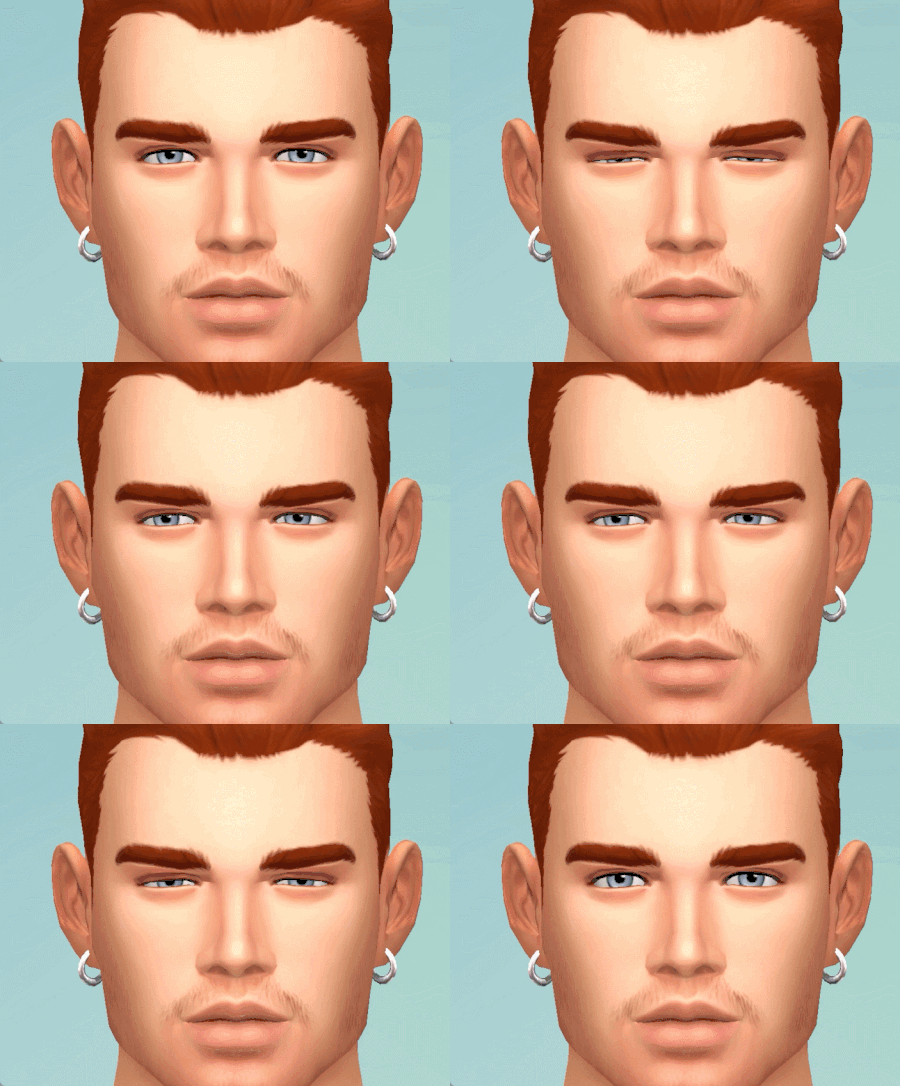
Hello, Since my bug report been archived and lost in the deep mountain, I restart a new one with all the updated ressources. TESTED WITH AND WITHOUT MODS/CLEAN SAVE, THIS BUG OCCURS ALL THE TIME. I am a modder and an animator and it seems that the eyelids doesn't translate correctly in the game like it used to be since this bug was introduced, and it's still there with the new patch. When the sim looks downside, the bottom eyelids don't move at all, making sims looks creepy (the eyes go inside the eyelid). I did some animations with the eyelids moving down while the eyes are looking down, and the animation from the eyelids doesn't translate correctly in the game at all. It affects any animations in the game right now. This is an example using CAS with maxis animations, where the eyes aren't closing completely due to the eyelids animations not translating correctly in the game. Before the eyelashes patch, they were closing just fine. Gifs with the bug : This is a gif from 2022, so without the bug : Maxis animations : Custom animation : For developpers/animators : I did another test, just to show you how terrible this thing is. For this test, I did a simple sleeping pose I will use to demonstrate the bug, because unfortunately it's the only way to explain the issue more properly, by comparing in an animating program and then how it translates in the game. To achieve this result in the game with the eyes being closed like this : In a posing/animating program, I had to do this : There is clearly an error of how the eyelids translate in the game since the lovestruck patch. I'd like to know if maxis is aware of this issue and if they will fix this, as it affect every animations in the game. If I'm closing the eyes as usual in the program, this is the result I get in the game : And no, it's not the program fault. This happens since the lovestruck patch and again, it affects all the animations from the game, even the vanilla ones. I believe a data from the eyelids or something similar has been touched and it needs to be reverted back. Edit By Crinrict: Adjusted Title23KViews717likes226Comments