EA app Library Customization & Favorites Feature Request
I would love to see more customization options added to the EA app game library. One feature I would especially like to see is the ability to favorite games. Favorite games could appear in a dedicated “Favorites” section or automatically be displayed at the top of the library, making it much easier to quickly access the games we play most often. It would also be great to have additional library customization options, such as: Adding games to Favorites Displaying favorite games at the top Manually organizing games in a preferred order Creating custom categories such as “Favorites,” “Recently Played,” and “Installed” Hiding games that we are not interested in seeing Choosing how games are sorted and displayed in the library The EA app already has a large game library, so these features would make it much easier for users to organize and personalize their experience. These may seem like simple features, but they could make the EA app feel much more personal and user-friendly. I hope EA considers adding more library customization options in a future update. Thank you!💙20Views0likes2Comments
EA please add a real offline option to EA APP!
Please EA I beg of you add a real offline setting! I miss being able to play games offline without internet! You make amazing games and I have bought many of them over the years ever since Origin! For the good of the world and players around it please add it! Thanks and keep making good games!15Views0likes0Comments
Games Libraries across Mac and Windows should match
I (using Windows app, which is apparently superior in this area) was hoping to play It Takes Two with my long-term partner because we both love games and want to be able to play together even when we're apart. However, he only has a Mac computer (no option to get Windows either, nor should he be forced to because of this), and we have discovered that most of the games available in the Windows EA App are simply not available in the Mac EA App. Which is, frankly, ridiculous! He tried restarting, reinstalling and refreshing his app and still had only a small fraction of the games I can browse, which - importantly - did not include It Takes Two. Adding to the frustration, I can no longer get a refund for this game that has been rendered completely un-playable, as an exclusively two-player game. As an additional aside, while they are bringing the Mac App up to level with the Windows one, they should adjust the refund policy for those games rendered completely un-playable by their own lapse in judgement, including ALL games that are exclusively two-player that are available on only one version of their PC App.Solved26Views0likes1Comment
EA App needs a User quality of life update.
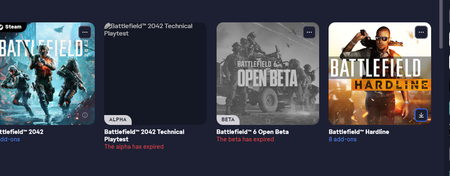
I'll start by saying I've been using EA's digital platform from the very beginning, Using EA Download manager and EA Downloader in the very Early days. I was an EA insider for a number of years (and a number of community managers ago) who helped with feedback and testing of the Origin app. I have also been an early adopter of the new EA app. That being said, I can no longer ignore little issues that are not being addressed. I like the app overall and think fixing these things will help to make it the best EA app possible. More User options needed for organization and layout. I will give the most noticeable example. This is an eye sore and I hate looking at it when browsing my library. In past apps I could delete or remove them, hide them, or organize them into a folder that I could close and never look at. In the current app, I can't do any of that. Assuming the game data was being pulled from steam, I figured I'd delete it there, but that is also not an option. Notice there is no option to remove the Battlefield 6 Beta. I'm sure I can go through support perhaps, either through EA or Steam or both to have this removed and cleaned up, maybe, But I don't want to waste my time dealing with it and I shouldn't have to. Box Art options needed as well Also, why can users not edit their box art? Past apps allowed us to, and so do several competitors apps. Some might think the feature is nice but unnecessary, and I could see that point of view. I wouldn't have a problem with that so long as all available Box Art was updated and worked well. This example shows the one I have In my library that shows this isn't the case. Again, I have no option to hide or edit the Pinnacle station dlc and it just looks bad. Friends list's Needs updates to how it gathers and displays friend data For some unknown reason, I have several friends who's name is listed as a number. If I click on the name to open the next screen, it will show the user name below the number as shown here: Why can't that just be the populated name in the friends list? Where is this number coming from and why is it being shown over the user name that the friend listing was made from? These are just a few things I've been looking at for some time that I have been hoping would be fixed but they have not been since launch of the new app. I realize I have a larger EA library than most and many people may never see these issues but that doesn't mean they don't exist. Please make a pass on the current build and address these issue. Cleaning up the usability of the app on the user side would make things so much better as we could fix these issue on our own if you gave us the ability to. Having the ability to delete/remove or edit items in the library, to include box art, would have allowed me to fix most of these issue myself.26Views0likes0Comments
Xbox Game Pass Ultimate EA Play Family Sharing Limitation on PC
I am writing to express my immense frustration regarding the lack of family sharing support for EA Play titles on PC via Xbox Game Pass Ultimate. As a paying subscriber to your highest tier service ($22.99/month), I expect the family sharing benefits to be uniform across all platforms. While the "Home Xbox" feature works flawlessly on consoles—allowing my son to play EA titles securely under his own child profile—this functionality completely breaks down on Windows PC. Because the EA App requires a 1:1 account link, my son cannot access EA Play games on his own PC profile. Forcing parents to choose between sharing their adult credentials (which completely bypasses parental controls, exposes payment methods, and overwrites cloud saves) or paying for a second identical subscription is unacceptable for a service marketed around family ecosystem value. Please prioritize updating the PC Xbox App and EA App integration to allow child accounts within a Microsoft Family Group to access bundled EA Play benefits. Thank youSolved34Views0likes2Comments
I can't find my games collection on EA web
Its so stupid and unprofessional I don't see the games I have already on EA app over any web page for pc my account or any page showing the games in my library I already have from the EA store. Unlike the other platforms this site is a fragmented mash I just don't understand the simple fact I cannot see my own games library on my phone and web besides the app on pc. And that is why I'll use the other stores instead where I can see the games collection I already have rather that a shop front all over. Its just insulting to use the store as is, when I can't find my own library and games I have a license for like the many other platforms so I don't feel like using this platform or buying anything on it as is when I don't see what ganes and games addons I have or have not when I use my phone where I usually buy things too.Solved31Views0likes1CommentEA账号绑定的QQ邮箱被注销
你好,我的[Snip],这个邮箱已经被腾讯注销,导致我无法通过邮箱接收任何验证码或重置密码的链接。我可以通过提供 《战地 2042》(Battlefield 2042) 的购买凭证来证明我是此账号的主人。该游戏是我约3年前在 Steam购买的。 我的诉求:请帮助我将EA账号绑定的邮箱,从已注销的[Snip] 更换为我现在能正常使用的 QQ邮箱:[edit: email address removed]。 我已尝试过的方法: 1. 尝试通过“忘记密码”功能找回账号,但因无法访问原邮箱而失败。 2. 尝试在EA帮助中心寻找解决方案,但问题仍未解决。26Views0likes3Comments
Feedback about the EA App (Mobile & PC)
Feedback about the EA App (Mobile & PC) On mobile, the EA App works really well. However, on PC there are issues: friends who are online and actively playing are not shown correctly. Even in Battlefield 6 itself, those players do not appear as online — while in the mobile app they do. On Discord, they also confirm that they are online and playing. The chat feature in the EA App works perfectly fine. Another suggestion for improvement: It would be great if the EA App allowed users to expand their profile with additional information about themselves. This would help other players see who they are interacting with and would improve the overall community experience.142Views0likes1CommentDon't change the visibility of the EA app icon or launch it at every update!
I always set game launcher icons visible in the system tray so I can see if they're running and close them if needed. Every single time the EA app updates itself, it will reset the setting and stay hidden so the only way to see it is clicking on the arrow to check all icons. Every single time, I set it to visible again and it will inevitably revert that setting a couple of days later. Please, respect my settings and keep the app icon visible if I set it like that. That's especially important since the EA app has been updating several times a week, often taking over the screen at very inopportune times and taking me out of games, video and work. Keeping apps updated is important, I get it. But if the app launches itself automatically with every update, that's digital **bleep**. Allowing the app to automatically update should mean it updates when I open it, not whenever it wants. At best, it should update in the background without starting up. DO NOT LAUNCH AN APP BY ITSELF EVER, it's not your PC to go around opening stuff without my explicit command.39Views0likes1Comment