Battlefield 6
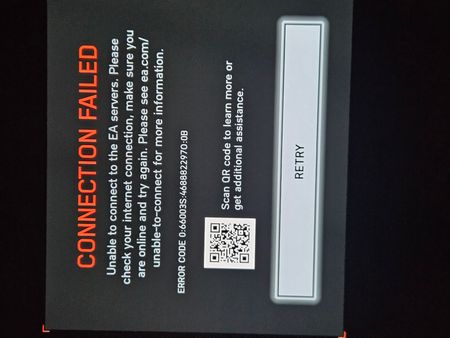
Hello, I just purchased the game of the year edition for battlefield 6 and it’s saying that transaction failed but yet the money already came out of my account so I’m confused as to why I still got charged for something that’s not allowing me to be able to play it if it’s saying transaction failed .Middle East server issues
Middle East server is shutting down?? ,, from 3 days me and my friends,, and our Middle East community we playing in another server,, I hope this message reaches the responsible people for this issue,, we tried everything but still putting us in different servers,, thanks9.7KViews63likes486CommentsBad Matchmaking
This game seems to always put me into the losing game. It feels like the game is rigged against every team that I am on. I would think this just happens to be random and that I am just put onto bad teams but everytime I play without fail I get long losing streaks. I know that I am not the only one this is happening to because I was in a match with someone who was making comments that he was on a losing streak as well. I understand losing a few times in a row but when it starts to get to 10-15 times in a row something is definitely wrong with the way this game does matchmaking and it is starting to get unbearable. Even if I leave the game and try to rejoin or do a different game mode this still persists.
Battlefield 6 Technical Readiness Report Season 4 Season 5
The objective of this report is to consolidate persistent technical issues identified throughout Battlefield 6 up to and including Season 4, providing the development and QA teams with a structured overview of problems that may still require investigation or further optimization.Any FPS, frame-time, latency, server-performance, or stability metrics mentioned in this report should not be interpreted as fabricated or guaranteed performance gains. The purpose of these metrics is to propose measurable technical indicators that EA and Battlefield Studios can validate internally through controlled testing, profiling, and telemetry.Before the release of Season 5, I respectfully recommend conducting a comprehensive Technical Readiness Pass across performance, networking, server stability, rendering, frame pacing, memory utilization, asset streaming, audio, physics, UI, and overall game stability.For greater transparency, remaining issues could be classified using clear development statuses such as: FIXED /PARTIALLY FIXED / INVESTIGATING /REPRODUCED.The goal is not simply to achieve higher FPS, but to establish a more stable, consistent, responsive, and technically reliable Battlefield 6 experience before Season 5 introduces additional content and systems. Platform: PlayStation 5 Current reference version: 1.4.2.5 Period covered: Battlefield 6 launch through Season 4 Report date: September 11, 2026 I am submitting this as a consolidated technical report rather than an isolated bug report. Battlefield 6 has received numerous fixes since launch, including the Season 4 updates, but there are still technical inconsistencies reported by PS5 players that deserve further investigation. 1. Performance consistency / frame-time Please investigate frame-time consistency on PS5, particularly during intensive multiplayer situations. Average FPS alone does not represent the entire performance experience. Short frame-time spikes can create visible stutter and inconsistent controller response even when the reported frame rate appears acceptable. Expected behavior: Performance Mode should prioritize stable frame delivery and consistent input response throughout a match. Suggested investigation: CPU/GPU frame-time telemetry during large engagements, destruction, vehicles, water simulation and high-player-density situations. Potential benefit: More consistent frame pacing would improve perceived smoothness and input responsiveness without necessarily requiring an increase in the maximum frame-rate target. 2. Dynamic Resolution Scaling / Performance Mode reliability Earlier Battlefield 6 known-issues documentation acknowledged that Dynamic Resolution Scaling on consoles was not operating as intended in Performance Mode and could require Performance Mode to be toggled again after entering a session. Please verify that DRS activation and its state remain completely reliable across matchmaking, returning to the main menu, changing servers/maps and extended play sessions. Expected behavior: The selected performance configuration should remain active automatically for every session. Potential benefit: Correct DRS behavior can allow the renderer to reduce GPU workload during demanding scenes rather than allowing GPU pressure to translate into unstable frame delivery. 3. Network/server performance warnings and perceived lag Season 4 PS5 players have continued reporting lag and in-game performance/network warnings. This does not establish that every occurrence is server-side, but the reports justify additional telemetry-based investigation. Please examine server frame-time, packet delivery consistency, packet loss, jitter and client/server synchronization during high-load situations. Expected behavior: Stable simulation and predictable network synchronization throughout a match. Potential benefit: Improved server consistency could reduce situations perceived as delayed movement, inconsistent interactions or sudden corrections. 4. Vehicle third-person camera instability Battlefield communications acknowledged a third-person vehicle camera issue where the camera could suddenly jump or snap while driving. This should be treated as more than a visual inconvenience because sudden camera displacement can interfere with aiming, spatial awareness and perceived input consistency. Expected behavior: Camera movement should remain continuous and correspond predictably to player input and vehicle movement. 5. Ping/spotting reliability Battlefield communications previously acknowledged that pings might fail to appear correctly, particularly while players were using vehicles or drones. Please verify this system under current Season 4 conditions and across different modes. Expected behavior: Successful player inputs should produce consistent visual/network feedback for the squad. 6. Collision and geometry anomalies Season 4 PS5 community reports have described situations involving players passing through roofs or walls. These cases should be investigated per map and coordinate because collision failures can affect both gameplay integrity and presentation. Suggested telemetry: map name, coordinates, player state, movement state and server/client collision result whenever an abnormal penetration is detected. 7. UI / class-selection reliability PS5 Season 4 reports have also identified cases in Ranked Battle Royale where the loading interface does not correctly display classes for selection. Expected behavior: All required deployment/class-selection information should load before player interaction becomes available. 8. Character/vehicle presentation Reports have described the player character not displaying correctly in some helicopter situations. Please verify character visibility, animation state synchronization and vehicle-seat transitions. 9. Weapon-state consistency Community reports have described unexpected weapon-selection behavior after switching away from the knife, where the game may return to the secondary selection instead of the previously used weapon. Expected behavior: Weapon switching should consistently follow the intended previous-weapon logic. 10. Season 4 regression testing Season 4 introduced substantial changes to water gameplay, physics, vehicles, maps, UI, audio and other systems. Future updates would benefit from regression testing that specifically compares performance and functionality before and after major seasonal updates. I recommend collecting comparable PS5 telemetry for: • CPU frame time • GPU frame time • frame-time spikes • dynamic-resolution state • server simulation performance • packet loss and jitter • memory utilization • streaming stalls • map/coordinate information when collision errors occur This would help distinguish client rendering problems from network/server problems rather than treating every report simply as “lag.” Final request Battlefield 6 has received many fixes and improvements since launch, and this report is not intended to claim that every historical issue remains unresolved. The request is for the development team to reassess persistent and potentially recurring PS5 issues using telemetry from the current 1.4.2.5 build and to publish an updated Known Issues list identifying: Confirmed / Investigating / Fix in Development / Fixed / Unable to Reproduce for the remaining technical problems. A more transparent status for persistent issues would help players provide better reproduction data and would help distinguish already-fixed bugs from genuine regressions introduced by later updates. TECHNICAL PERFORMANCE TARGETS BEFORE SEASON 5 With Season 5 approaching, I believe Battlefield 6 would benefit from a dedicated technical stabilization pass before another major expansion of maps, systems and features. Rather than evaluating performance only through average FPS, I suggest measuring the following indicators before and after each major fix: Client Performance • Average FPS • 1% low frame rate • frame-time consistency and frequency of frame-time spikes • CPU frame time • GPU frame time • Dynamic Resolution Scaling behavior and minimum/average rendered resolution • frequency and duration of stutters • memory utilization and streaming-related stalls Server / Network Performance • server frame time • packet loss • latency variation/jitter • client/server synchronization corrections • frequency of network-performance warnings • server workload during destruction, vehicles, water simulation and high-player-density combat Stability • crashes per gameplay hour • black-screen occurrence rate • matchmaking/lobby failures • UI failures • abnormal collision events PROPOSED SEASON 5 QUALITY GATE Before Season 5 is released, I recommend running regression tests comparing the final Season 4 build against the Season 5 candidate build. The objective should not simply be a higher peak FPS. The priority should be lower variance and greater consistency. A technically successful optimization pass should demonstrate: Lower frame-time variance → smoother gameplay Fewer severe frame-time spikes → less visible stuttering Reliable DRS → better GPU load management Lower server workload → greater simulation stability Lower jitter/packet-loss incidence → more predictable network behavior Fewer synchronization corrections → more consistent multiplayer interactions Lower crash/black-screen rate → improved overall reliability WHY THIS SHOULD BE ADDRESSED BEFORE SEASON 5 Season 5 will add additional maps and systems. Every new system potentially increases the number of interactions that must be regression-tested. Fixing underlying performance and reliability problems before that expansion would provide a cleaner technical baseline for future Battlefield 6 development. Update 1.4.2.5 already demonstrates why this approach can work. The developers reduced unnecessary water-related processing specifically to improve server performance. Applying the same profiling-driven methodology to remaining CPU, GPU, networking, streaming and simulation bottlenecks could further improve consistency. I therefore suggest an internal “Season 5 Technical Readiness Pass” covering PS5 and the other supported platforms. Ideally, EA could publish before/after telemetry where appropriate and classify outstanding issues as: FIXED | PARTIALLY FIXED | INVESTIGATING | REPRODUCED | UNABLE TO REPRODUCE This would allow the community to provide better reports while giving developers measurable evidence of whether each optimization actually improved Battlefield 6.
PS5 – Severe FPS Drops, Texture Loading Issues and Repeated Crashes.
Title: PS5 – Serious Battlefield 6 / REDSEC Performance Issues Hello EA Support, Since the latest update, Battlefield 6 / REDSEC has been running very poorly on my PS5 Digital Edition. I am experiencing severe FPS drops, stuttering, delayed loading of grass, buildings and textures, occasional black screens and frequent game crashes, sometimes three times in a row. Before the update, the game ran perfectly. Other games work fine on my PS5, and my internet connection is stable (133.97 Mbps, 15 ms ping). I have already cleared the PS5 cache and rebuilt the database, but nothing helped. These issues are ruining my gaming experience, lowering my KD and preventing me from progressing in Ranked. I have also received Ranked penalties because the game crashed and disconnected me from matches. Please investigate these problems, forward this report to the development team and review the unfair Ranked penalties caused by crashes. Is the team aware of these PS5 issues, and when can we expect a fix? Thank you.BF6 PS5 Online Multiplayer Fails to Load
I've been unable to load any online multiplayer games on BF6 from my PS5. I click to join a game (i.e. breakthrough), the screen goes blank then the BF6 loading screen pops up and returns to the menu without an error message. I have also completed the following trouble shooting: Disabled crossplay Deleted then reinstalled the whole game and add ons. Deleted my local PS5 cache from safe mode Changed my automatic DNS to manual 8.8.8.8 etc Checked for updates Restored my licences Turned the router on and off LOL Followed all of the instructions from EA support. They have logged a ticket as their solutions did not help and they acknowledged this is a bug. The only thing I have found that worked for 1 day was to unlink and relink my ea account from my PS5. The next day, once again, Im unable to play online. There is a 1 year cooldown on unlinking and relinking your ea account to PlayStation and support would not allow me to do it again. FC26 works online just fine. This only seems to effect BF6. I can play BF6 offline though I just cba for campaign. Has anyone else encounter this issue and have a solution?297Views2likes7Comments
Cannot play a single game
I bought this game over a month ago. I've tried uninstalling, restoring licence, removing several parts of install, tried changing and disconnecting my PS5 and EA account, changed Playstation Online ID and nothing has worked. If I click any game mode, it counts to around 5 seconds and then starts loading then the BF6 logo comes up and I'm straight back to the main menu lobby. Can someone explain or does anyone have an answer as to how I can play this game? It's literally unplayable and I cannot find any solution or details anywhere.184Views0likes18Comments