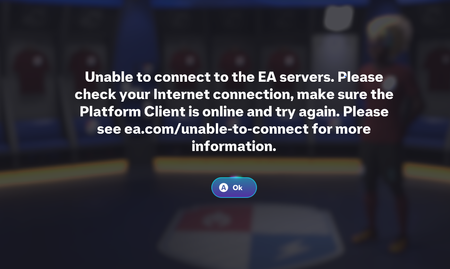
Always disconnected every game when playing season
Hi, my EA FC26 got but when I play Seasons I always got diconnected suddenly even though i checked the internet ping it's all fine. This happens since 2 days ago until now. I find the solution everywhere seems can not fix my issue. Could anyone knows why this happens?226Views2likes21CommentsFC26 won't launch
An unexpected game shutdown was detected. Please relaunch the game or contact EA Help if this continues. (0xFFFFFFFF) Session ID: 0X08USG057Dx3drqss3KGUtjlXN8RfidQ3Sa6YTai+M++4so Previous Session ID: gyowVHXrurXxh47q5s3KTOmYm+if+ST67FgA3VzIFlvZHFk/ Previous Service Session ID: gyowVHXrurXxh47q5s3KTOmYm+if+ST67FgA3VzIFlvZHFk/ i got this error after the update with a new option under it that says copy error info, i have already said this many time but i will say it again. EA_Barry please man if you can not help me any further to fix this then give my case to someone higher, and i really appreciate your help man, but i just want to play the game on my pc. Here is what I completed: DDU clean-installed my AMD RX 9070 graphics driver. Returned my GPU/CPU settings to stock. Disabled EXPO and PBO/CPU tuning. Updated my ASUS ROG STRIX B650E-F GAMING WIFI BIOS to 3881. Updated my AMD B650 chipset drivers. Disabled Steam, EA, Discord and AMD overlays. Closed monitoring/tuning utilities. Reinstalled EA Javelin AntiCheat and received "Install success." Ran DISM /Online /Cleanup-Image /RestoreHealth — completed successfully. Ran sfc /scannow — "Windows Resource Protection did not find any integrity violations." Restarted the PC and tested FC 26 again. The game still fails to launch with the same error (0xFFFFFFFF). Also, I am not currently enrolled in the Windows Insider Program. Windows shows version 25H2, OS build (KB5124008) (26200.9445), and the Windows Insider page says I would need to turn on optional diagnostic data to join the program. here is my dxdiag file aswell, i would be thankfull if i could actually play the game that i bought. i hope i dont get ignored either. best regards25Views0likes1CommentEafc26 force close on start menu fix
The only thing that works is disabling xmp at bios and launch the game. If the game works, kindly go back to bios. Enable xmp and change the mhz to -400mhz below your ram advertised speed and run the game again. If that works, you then uninstall anti cheat and reinstall it again. Then you boot into bios and change your ram and CPU clock speed to the speed you want. That worked for me14Views0likes0Comments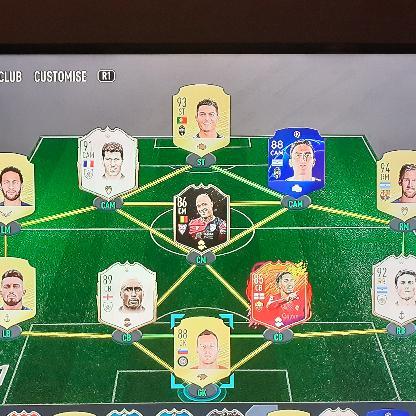
FINAL SEASON FC26 FUT 👏👏👏
I noticed that the was introduced very recently, and I can now see the new Season Pass added to the FUT Hub as well. First of all — THANK YOU EA! 👏 I genuinely appreciate that FC26 is getting another pass. I am not complaining about it at all. I’m actually very happy to see that there is still something for those of us who want to continue playing FC26. But I do have one question: WHAT ABOUT THE CONTENT IN PACKS? Are you planning to add the Rewind promo cards, or perhaps eventually bring back previous promo cards into packs? And maybe give us a few more Evolutions as well? 🙏(Pretty Please) (In the Token store) I completely understand that FC27 is now arriving and naturally most of the new content will move there. However, I and many other players don't plan to simply discard FC26 and immediately move to FC27. After all, what was the point of spending months building our clubs and finally getting some of the best 98/99-rated players in the game, only to abandon everything and start again from scratch? I've gone through that cycle many times already. As much as I would love to get my hands on the new game, it simply doesn't make sense to me personally to abandon all the amazing players I've only just obtained. I want to actually ENJOY MY END-GAME TEAM! I'm planning to continue playing FC26 for several more months. Personally, I don't even need many new players anymore — I've built the team I wanted. But I'm also thinking about people who might start playing FC26 later. Someone joining Ultimate Team in a few months should still have an opportunity to obtain great promo cards (NOT at the same level as during the live cycle of this game) and eventually build an amazing team. It would be a shame if packs effectively returned to mostly Gold cards while all those incredible promo cards became permanently unobtainable. MY SUGGESTION FOR THE TRUE FC26 END GAME: Eventually put ALL previous promo cards back into packs permanently, obviously with different pack odds depending on their rating and rarity. And make it fun! Add different promo packs (winter wild cards, TOTY, TOTS, etc.) in to the token store every week or at least every month There’s no need for new SBCs, but if there is a way to automatically repeat or rotate some existing ones, that would be a great bonus. However, this is certainly not essential, as I completely understand that setting up an automated process like this may not be possible. That way, even 3, 6 or 9 months from now, somebody could still open a pack and have that small chance of pulling an incredible 98 or 99-rated card. Keep some repeatable SBCs available. Give us a few fun end-game Evolutions. Again, in the token store. And then simply let us PLAY AND ENJOY THE CLUBS WE SPENT AN ENTIRE YEAR BUILDING! ❤️ The new Final Season Pass is already a very welcome surprise. Now I'm just hoping there might be a little more FC26 content coming tomorrow. 🤞 P.S This would definitely encourage me to get FC27 at a later stage, knowing that I could do the same there — build my ultimate team throughout the year and then actually have the time to enjoy it long after the cycle ends. TY!22Views0likes0CommentsMy EA account was hacked
Hi EA support team, My laptop was recently under session steal Trojan attack. My Steam and EA was hacked. I have recovered my original emails and my steam account and secured my laptop. I had purchased FC 26 on my steam account and had linked it to my original EA. But the hacker seems to have changed the email from my email to a hotmail which I don't have access to so I can't get any verification code. Also when i tried to login via google using my original email It created a new EA account with a new username(a6lb365ivOsi) but still I received no mail in my original account. My this is a new EA account I have created with my secondary gmail. So in short my current status: 1. My original EA account (rijuplays) hacker has changed the registered email to a hotmail locking me out of any verification code. 2. My original email/google account: I tried signing in via google to ea using this but instead created a new account and I am not receiving any mail from ea in this mail. (I have checked spam and ea is not blocked) 3. My second google account: Created a new EA and using this to write this discussion. I have all thee record of my steam purchase and have also contacted the customer care as a guest but received no reply. Please help me recover my original account.Solved23Views0likes1CommentReproducible BSOD Caused by eaanticheat.sys – SYSTEM_SERVICE_EXCEPTION (0x3B)
Title: FC 26 - eaanticheat.sys BSOD - SYSTEM_SERVICE_EXCEPTION (0x3B), 0xC0000005 at Offset 0x18905d9 I am experiencing a consistently reproducible BSOD when launching EA SPORTS FC 26 through Steam. WinDbg analysis shows: SYSTEM_SERVICE_EXCEPTION (0x3B) Exception: 0xC0000005 FAILURE_BUCKET_ID: IP_MISALIGNED_eaanticheat.sys Failure.Exception.IP.Offset: 0x18905d9 Failure.Hash: {ba758836-7880-e66a-acd0-8452c9260e6f} The faulting instruction is: eaanticheat+0x18905d9: mov rbx,qword ptr [r14+8] At the time of the crash, r14 = 0x28, so the driver attempts to access address 0x30. I have reproduced the exact same crash multiple times. Different minidump files consistently show the same eaanticheat.sys offset (0x18905d9) and the same Failure Hash. Troubleshooting already performed: Reinstalled EA AntiCheat. Removed Riot Vanguard and rebooted. Disabled XMP. Updated ASUS B760M-P BIOS from version 1002 to 1836. Loaded BIOS default settings. Confirmed Windows is not enrolled in the Windows Insider Program. Memory Integrity is already disabled. Performed a clean boot with only Microsoft services and required EA services enabled. The issue still reproduces with exactly the same BSOD. System information: CPU: Intel Core i5-13600KF Motherboard: ASUS B760M-P BIOS: 1836 RAM: 32 GB DDR5 OS: Windows 11 25H2, Build 26200.9168 Platform: Steam I am attaching the latest minidump, WinDbg analysis output, and DxDiag information. Could this issue please be escalated to the EA Javelin / AntiCheat engineering team for investigation?69Views0likes2CommentsPlayer height/weight scaling bug in matches
After starting a game of an academy tournament, music sliders stop working and volume goes crazy, and then player models start growing and shrinking significantly over the course of the game. The same player will start at normal height, shrink to 2ft, and grow to 11ft over the course of the game. opposition keeper grew to 11ft. then if I play a regular career mode match it continues until I restart my game, and toggle the height scale from imperial to metric and then back to imperial. This makes the game unplayable as crosses/headers are undefendable.17Views0likes0Comments