My EA account mail is changed by hackers. Please help.!
Dear EA Team, I am writing to request urgent assistance in recovering my EA account, which has been compromised. The primary email address has been changed without my authorization, and I am currently locked out of my account. Chronology of the Incident: I only discovered this issue on September 10, 2026, when I attempted to log in to play online and found that my credentials no longer worked because someone had changed the registered email. Upon checking my Gmail account, I discovered that a hacker had compromised my email on September 3, 2026. The hacker requested several security codes and moved all EA-related emails directly to the Spam folder, which is why I did not notice any security alerts at the time. I have never owned or used the new email address currently attached to my EA profile. I strongly believe someone has hacked into my account and changed the email address without my permission. To prove my ownership, here are my original account details and the purchase information for EA SPORTS FC™ 26: Original Email Address: [edit: email address removed] EA ID (Username): bebenanjay (right now became atinanjay because bebenanjay already been used) Device Type: Nintendo Switch 2 Purchase Details: Purchased Item: EA SPORTS FC 26 The World's Game Edition Transaction ID: 52537890880 Transaction Date: 7/8/2026 18:26:53 (24H PDT) Unit Price: $15.99 Total Amount: $15.99 I want to recover my account and link it back to my actual email as soon as possible. I have attached the relevant screenshots (the error screen). Also I have the the purchase and platform information. Please let me know what steps I need to follow to prove my ownership and get my account back. Thank you for your support, and I look forward to your urgent response. Best regards, Benny [CM Edit] Removed personal email address and transaction information for privacy and security.Solved35Views0likes3Comments[Switch 2] Unplayable 30 FPS & Frame Pacing (Needs 60 FPS / DLSS Patch)
Platform: Nintendo Switch 2 (Docked mode / TV) Issue: Severe performance issues, 30 FPS cap, ball teleporting, terrible visuals Hi Everyone and EA Community Team, I am writing this to express major frustration with the Switch 2 version of FC 26. To be direct: when playing docked on a TV, the game looks terrible, blurry, and is practically unplayable at a competitive level. Key technical issues: • Ball Teleporting & Severe Motion Blur: Due to the 30 FPS cap and terrible frame pacing, fast passes and shots look like the ball is teleporting across the screen in steps. It causes instant eye strain. • Unacceptable Input Lag: A fast-paced sports simulator locked at 30 FPS with high input lag completely ruins gameplay and crossplay competitiveness. Hardware & Market Potential: • The Switch 2 easily outperforms a PS4 (which ran FC smoothly at 60 FPS) and its hardware capabilities are not far behind an Xbox Series S. • The console literally features dedicated NVIDIA DLSS hardware upscaling, yet EA has not implemented a 60 FPS Performance Mode. • If EA optimized this game properly with DLSS, 60 FPS, and solid graphics, the Switch 2 could easily become one of the top platforms for FC sales worldwide due to its portability and massive player base. We are begging the dev team to prioritize a 60 FPS Performance Mode utilizing DLSS upscaling as soon as possible. If you are facing the same issues on Switch 2, please hit the "Me Too" button below so the CMs can flag this to the developers!14Views0likes0CommentsNintendo Switch EAFC26 Child Account
Has anyone else managed to sign in to their Childs account on EAFC26 on Nintendo Switch? Without this my son can't download the latest squads which to be honest is putting him off playing. The only solution is to use my adult account which completely defeats the purpose of having a child's account.416Views0likes10CommentsBlack screen in Rivals!!!
My screen went fully black in a rivals game and I then got a red card whilst trying to play. Then after forfeiting the game I got punished for forfeiting when it was not my fault. This one match may cost me my division and I am not happy nothing has been done to stop this as this has happened to me many times in the past. I am not happy and hope this will be dealt with in FC27!6Views0likes0CommentsSeason 10, Level 8, Evo “Hard Yards” Missing
Hi, I reached level 8 on the season pass, and I claimed the evo, the game crashed and the evo is now missing even though it shows as claimed. I have tried re-starting the game, even the companion app but no luck. Console Nintendo Switch 2 username 1010chu50 Thanks a lot!8Views0likes0CommentsMaximum prize of some players 30k on switch 1
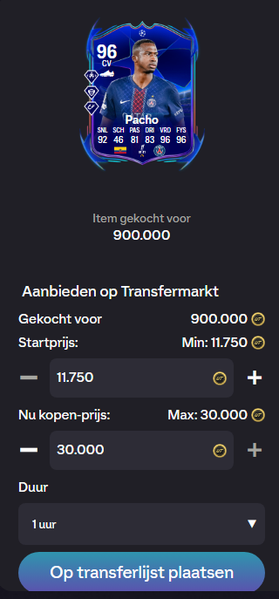
Hello there, i have 3 players, worth over more than 3 a 4 million coins and since several weeks the maximum prize is adjusted to 30k max. This is unacceptable, i have trade a lot, a lot of hours, earned this way many coins, but now i will lose very much of this profit. Hereby i send 3 pictures of the current players: PLease fix this prblem!! NB: the Maradona 95 is still selling for 1 million on switch 1, so the MAradona 96 must be higher, 30k is a scamm.244Views0likes13Comments
Game either freezes or crashes
This Fc26 "game" is the worst on yet. It lags, freezes and/or crashes even now, towards the end of it!! All the other online games i play, patch things up ASAP and after a year the games (usually) are bug-free and run with no interrutions, crushes etc. This one here, FC26 IS THE WORST! After 11 months, it still has sooooo many problems and it is unplayable in many instances EaSports has become one of the worst game developers in the market!33Views0likes1Comment