Forum Discussion

AmbearSims's avatar
2 years ago
Solved

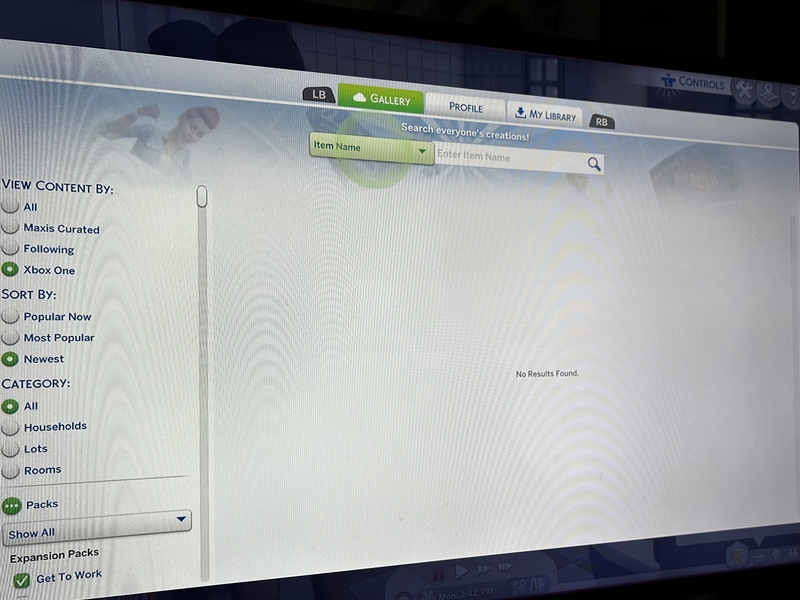
Gallery - “No Results Found”

I started playing on Xbox about 2 weeks ago and the gallery has allowed worked once. It keeps saying “no results found”. I have restarted my WiFi and I’ve restarted my Xbox. I’m pretty sure I’m logged into my EA account. Please help, this is so frustrating.

  • EA_Solaire's avatar
    EA_Solaire
    2 years ago

    @AmbearSims 

    Thanks for checking, please go ahead and run through the following steps:

    • Please run through the connection guide here as well as the steps from Xbox 
    • Change your DNS settings (You can use the public google DNS primary: 8.8.8.8, secondary: 8.8.4.4, unless there is a different DNS you would rather use) 
    • Try removing and re-adding your gamertag from your Xbox
    • Check that you have an open NAT type on your console 

5 Replies

  • EA_Solaire's avatar
    EA_Solaire
    Icon for Community Manager rankCommunity Manager
    2 years ago

    Hello @AmbearSims 

    Have you cleared all the Gallery filters on the left-hand side before you search? 

    Please attach a screenshot to your post of what you're seeing when you try to search an item.

  • AmbearSims's avatar
    AmbearSims
    2 years ago

    Hi! This happens immediately when I open the gallery, before searching or anything. The pop up shows it’s loading then immediately says “No Results Found” instead of showing me any content at all. 

  • EA_Solaire's avatar
    EA_Solaire
    Icon for Community Manager rankCommunity Manager
    2 years ago

    @AmbearSims 

    Try setting the "View by Content" filter to all, let me know if you see any results then. 

  • EA_Solaire's avatar
    EA_Solaire
    Icon for Community Manager rankCommunity Manager
    2 years ago

    @AmbearSims 

    Thanks for checking, please go ahead and run through the following steps:

    • Please run through the connection guide here as well as the steps from Xbox 
    • Change your DNS settings (You can use the public google DNS primary: 8.8.8.8, secondary: 8.8.4.4, unless there is a different DNS you would rather use) 
    • Try removing and re-adding your gamertag from your Xbox
    • Check that you have an open NAT type on your console