Forum Discussion

Re: Game language doesn't change

@SEUL2222_Bebe  To be clear, are you saying you installed Sims 4 in Korean, or that the EA App is running in Korean?  The only supported way to change the language of Sims 4 in-game is to uninstall it and reinstall in the preferred language.  If you haven't tried this yet, please do so now.

Please also let me know which language options you see when you try to install Sims 4.

12 Replies

  • SEUL2222_Bebe's avatar
    SEUL2222_Bebe
    2 years ago

    @puzzlezaddictHere's what I did: I had my EA App settings in Korean and was playing the game in Korean.

    However, one day, the language of the game suddenly changed to English, so I uninstalled and reinstalled the game. When this didn't work, I uninstalled the EA App, made sure that the EA App's application settings were in Korean, and restored The Sims.

    However, the issue was still not resolved.

  • puzzlezaddict's avatar
    puzzlezaddict
    Hero+
    2 years ago

    @SEUL2222_Bebe  Right, you need to install Sims 4 in Korean.  The EA App language setting is entirely separate.

    Please uninstall Sims 4, and when you click the button to reinstall, click Change next to the chosen language, and take a screenshot of the language options you see. 

  • SEUL2222_Bebe's avatar
    SEUL2222_Bebe
    2 years ago

    @puzzlezaddict I don't get any options when I right-click and the only thing I can do is change the application language setting...

    I tried the method you describe, and I did the best I could.

    I uninstalled from the game library, cleared the The Sims4 folder, and checked the language in the application.

  • SEUL2222_Bebe's avatar
    SEUL2222_Bebe
    2 years ago

    @EA_Darko 

     was experiencing an error where sims4 was suddenly running in English. To fix it, I deleted the EA Games - The Sims4 folder in the Program Files folder and the Electronic Arts - The SIms 4 folder in the Documents folder to reset it.

    I set the language back to Korean in the EA App and reinstalled The Sims. However, after reinstalling, I received the error shown in the photo and The Sims would not launch. After repairing the game, the game now runs in English again.

    PLZ HELP ME resolve this issue

  • puzzlezaddict's avatar
    puzzlezaddict
    Hero+
    2 years ago

    @SEUL2222_Bebe  When you clicked the Download button for Sims 4, you should have received a pop-up that lists the install location and the language the game will use.  It looks like this on my computer:

    You can see English is selected (red arrow) and there's a Change button (red box) if I want to use a different language.  This has nothing to do with the language of the EA App itself.

  • SEUL2222_Bebe's avatar
    SEUL2222_Bebe
    2 years ago
    @puzzlezaddict I changed the language via the above method and reinstalled it, but for some unknown reason the game itself wouldn't start.

    When you repair the game to resolve the error, the game starts normally, but the game language is again played in English.
  • puzzlezaddict's avatar
    puzzlezaddict
    Hero+
    2 years ago

    @SEUL2222_Bebe  The initialization error has a number of known causes, but most of them should apply equally to the Korean and English versions of Sims 4.  (The two share a user folder and most of the game's program files.)  Just to make sure there isn't some random EA App glitch, I uninstalled my own game and reinstalled in Korean, and it worked fine.  I repaired, and the game was still in Korean.  So what you're seeing is not normal or intended behavior.

    For now, I would suggest uninstalling both Sims 4 and the EA App with Revo Uninstaller (the free version is fine).  Here's a guide in case it helps:

    https://answers.ea.com/t5/Technical-Issues-PC/CURRENT-ISSUE-Sims-4-DLC-shows-as-installed-won-t-load-in-game/m-p/12942151#uninstall

    Reinstall the App in Korean, then if you use a third-party antivirus, disable it (temporarily) before installing Sims 4.  Launch the game once without reenabling the antivirus.  As long as you don't do anything else at the same time, your computer should be safe.

  • SEUL2222_Bebe's avatar
    SEUL2222_Bebe
    2 years ago

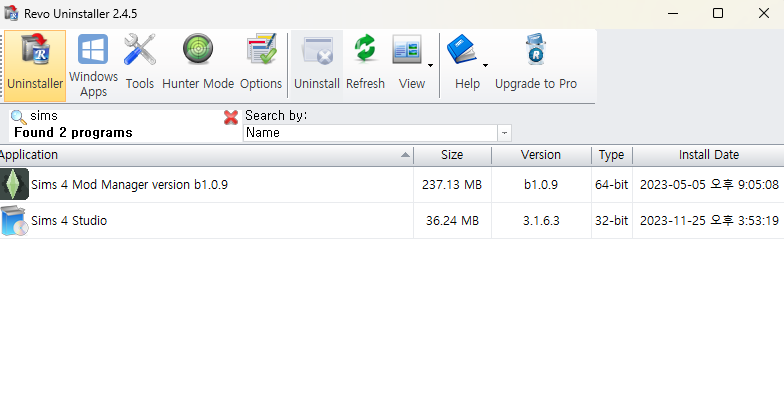
    Thank you very much for your kind reply, but I ask again because I followed your instructions and when I search for SIms4 in Revo, it doesn't come up. Do you know what to do in such a case?

  • puzzlezaddict's avatar
    puzzlezaddict
    Hero+
    2 years ago

    @SEUL2222_Bebe  Is Sims 4 currently installed?  If not, that's why Revo can't find it.  If it is installed, try repairing it in the EA App, then check Revo again.

  • SEUL2222_Bebe's avatar
    SEUL2222_Bebe
    2 years ago

    @puzzlezaddict Thank you so much for your kind reply, I'm really sorry to keep asking questions. I went through the game recovery in the EA APP and when I went back to Revo and looked for sims4, it didn't come up. I think something is wrong with the recovery process, because when I go through the game recovery, it still pops up in the options again.


    To check, I went into add/remove programs and found the sims popping up as shown in the picture. I think the problem is serious... I can't figure out how to fix it, can you help me?

  • puzzlezaddict's avatar
    puzzlezaddict
    Hero+
    2 years ago

    @SEUL2222_Bebe  I'm not completely sure from your screenshot, but does that mean that the name "The Sims 4" isn't present?  That would explain why Revo can't find the game and also why you need to repair in order to play.  It doesn't explain why repairing changes the language to English, but maybe that doesn't need to come into play at all.

    By default, Sims 4 is installed here:

    C:\Program Files\EA Games

    Please close the EA App and kill the EABackgroundService in the Task Manager.  Open the EA Games folder and see how the Sims 4 folder is named.  If it has a different name, try entering "The Sims 4" (in English characters) and see whether you can play without repairing.  Even if the name is correct, try writing it again.  If that doesn't help, try copying the name from my post here and pasting it into the field for the folder name.

    Even if you can't play, this should at least allow Revo to find the game, so you can use Revo to uninstall, then reinstall from scratch.

  • EA_Solaire's avatar
    EA_Solaire
    Icon for Community Manager rankCommunity Manager
    2 years ago

    Hi @SEUL2222_Bebe 

    What language is your Windows currently installed in, and what language do you use for your keyboard settings?