Forum Discussion

Re: Season 12 apex stuttering (pc)

Yeah, for me its the same, performance is just bad now and only in apex, any other game, like warzone, valorant, battlefield, my pc is performing just fine the way its always been, apex is the only game giving me problems, it seems like its something to do with how its using CPU now, as there are so many areas where my fps will dip  (doesnt dip too often but even when its high visually the FPS looks lower, like jittery and hard to look at) but GPU usage will be like 50% but I don't fully understand since CPU usage wont be exactly high either in those moments, as if its just not bothering to use all resources available, I go into warzone, a game known to be much more CPU intensive since its release and it performs just fine.

6 Replies

  • rAxec5107's avatar
    rAxec5107
    3 years ago

    me too after the warrior event update my fps drop a lot when in firing range i can stay stable189 fps but after this update i only can get around 100 fps and sluttering . please respawn faster fix this fps issue it bring a lots of trouble to mid end and low end pc player 

  • Since the new update i have 100% Cpu ussage some times.

    Control plays good but BR a lot of sttuters freeze

  • Cpu and GPU arent even at 100% for me. Just lots of micro stutters with no cpu/gpu spikes. No fixes so far. hopefully a EA dev sees this and is able to help all of us lols

  • This has been an issue for me since the game came out.

    I've tried every option availible, there must be a server - game problem aswell.

    Yesterday a few hours after the patch the game run insanely smooth, even shooting felt like butter.

    But apex being apex, its the same stuttery mess today.

    If you'd need a license to call your game a competitive shooter, apex would have its taken away...

  • xcoupx's avatar
    xcoupx
    3 years ago

    Hello everybody,

    after trying so many things I finally found the solution to fix my stuttering problems. After I deactivated IPv6 I had no more problems.

    1. Close Apex.

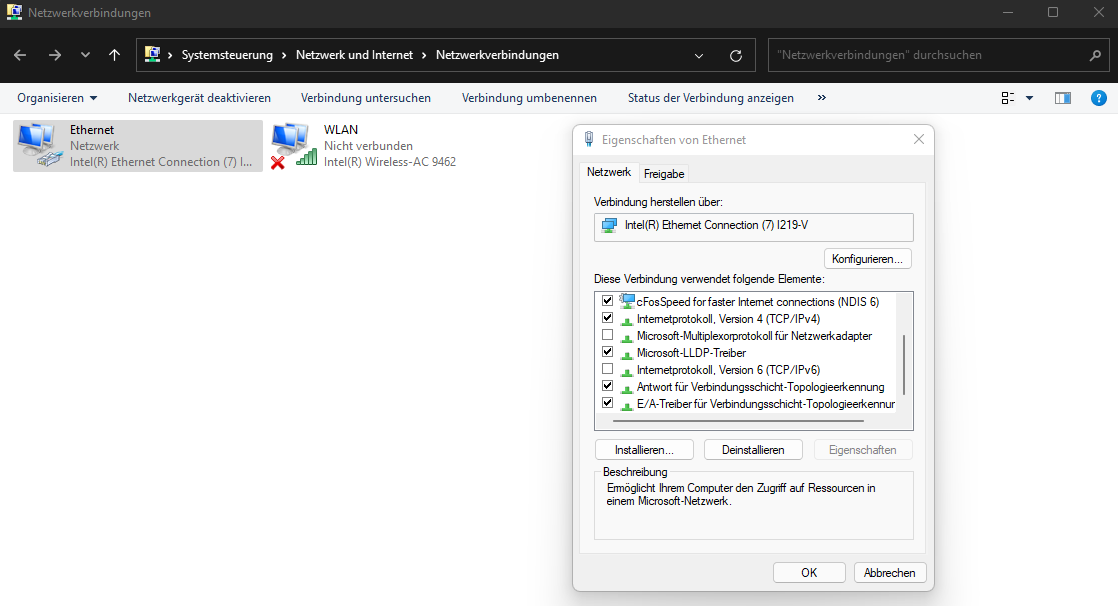
    2. Go to control panel -> Network Settings -> Adapter Configuration. I'm german so I'm not sure if the translation is right. This is the path in german:

    Systemsteuerung\Netzwerk und Internet\Netzwerkverbindungen

    3. Rightclick on the Adapter of your Internet Connection (mine is called "Ethernet") and deactivate "Internet Protocol, Version 6 (TCP/IPv6)".

    Snapshot in attachements

    I hope that helps most of you. Please let me know if it helped you :-)

  • Sadly, no this still didn't work. I however updated my game today and so far stuttering seems to be gone? I do have random crashes while loading into ranked games. On kings canyon ranked it hasn't stuttered consistently like before but its still there some games. Weird stuff

Featured Places

Node avatar for Apex Legends Technical Issues

Apex Legends Technical Issues

Having issues with Apex Legends? Join here to find help with connectivity, performance issues, crashes and more.Latest Activity: 52 minutes ago
39,236 Posts