Solved
Black Textures after Update


hi everyone,
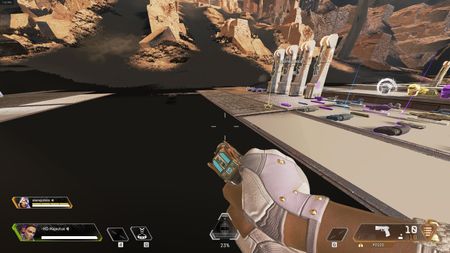
since the update my textures are kinda broken. everything is so dark, its hard to see as if there was one big cloud above me putting a huge shadow on the map.
what can i do? pls dont tell me my pc cant longer run apex :-(

I now had a bigger problem. I saw the blackened and distorted textures and thought the repair button will fix it. Then it made me download 16GB of files and arount 8GB it was crashing and saying resuming after every time it resumed it was starting again from 10% on. that happened a few times exactly the same way stoppi9ng at about 8Gb and starting over. Then I uninstalled the game and now i am waiting for it to install back again. My concern is when uninstalling it said that all bonuses will be lost and wanted to know if that's true and isn't it on the account?

S5 Day3:
Issue still persists.
Tried to lower some settings, texture filtering, anisotropic, aliasing, etc. None helped.
On loading in the game, at first countdown the view looks fine. Then after all textures loaded in, the game loads (I assume) light effects and light mapping and thats where stuff turn to black.
The game didn't freeze for me since S5, only once or twice I had the "application closing" effect, but luckily I was able to get back to the game, thanks for the new feature at least. Still a minute or 1.5 mins passed though while I got back, due to TREMENDOUSLY SLOW loading speed of the game.
So this serious bug, with black textures and blackened light effect (not to mention the objects that got textures with translucent areas are non-existent, its an invisible block on front of the character almost lol). There are objects broken all over the place...
I start to think that this is some file optimization error maybe? When the patch downloaded, maybe some bug occured while optimized new-old files? Do I need to re-download the game or something?
Ok I think I can confirm (tried one game after repair) that repair fixes the issue.
The update breaks the file structure guys, and not replacing the old files with new patch files, thats causing the issue. Repair re-downloaded 14GB data for me. After that the first try didn't give the texture and mapping error problem.
REPAIR YOUR GAME GUYS IF THAT DOESN'T FIX, REDOWNLOAD THE WHOLE GAME!





