Solved
Black Textures after Update



S5 Day3:
Issue still persists.
Tried to lower some settings, texture filtering, anisotropic, aliasing, etc. None helped.
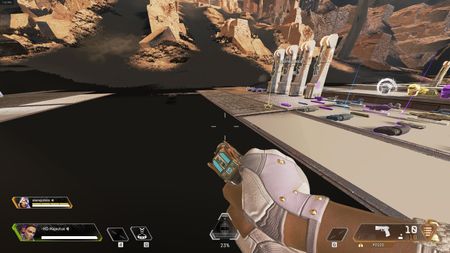
On loading in the game, at first countdown the view looks fine. Then after all textures loaded in, the game loads (I assume) light effects and light mapping and thats where stuff turn to black.
The game didn't freeze for me since S5, only once or twice I had the "application closing" effect, but luckily I was able to get back to the game, thanks for the new feature at least. Still a minute or 1.5 mins passed though while I got back, due to TREMENDOUSLY SLOW loading speed of the game.
So this serious bug, with black textures and blackened light effect (not to mention the objects that got textures with translucent areas are non-existent, its an invisible block on front of the character almost lol). There are objects broken all over the place...
I start to think that this is some file optimization error maybe? When the patch downloaded, maybe some bug occured while optimized new-old files? Do I need to re-download the game or something?
Ok I think I can confirm (tried one game after repair) that repair fixes the issue.
The update breaks the file structure guys, and not replacing the old files with new patch files, thats causing the issue. Repair re-downloaded 14GB data for me. After that the first try didn't give the texture and mapping error problem.
REPAIR YOUR GAME GUYS IF THAT DOESN'T FIX, REDOWNLOAD THE WHOLE GAME!

 Community Manager