Forum Discussion


sixty9sublime
7 years agoRising Newcomer
So I've been getting the same "bad module error" crash that also happens in pubg sometimes. Haven't been able to make it 10 minutes into a game yet. Anyone else having similar problems?
- 7 years agoSame here, was third on second game then crashed. Can't rejoin the squad!
 EA_Atic7 years ago
DICE Team
Hey @Andros2733 @sixty9sublime, What platform are you on and have you done any troubleshooting trying to solve it?
If you are on PC can you upload a DXDiag, so we can see what drivers and hardware you have. Make sure that all drivers for windows and your gpu drivers are up to date.
/Atic
- 7 years ago
Win 10 latest update, nvidia latest drivers, every game runs flaweless on gtx 1080ti i7 2600k ddr3 1866mhz ram. First game apex ran flawlessly got third place, second ok, third I got the memory allocation error randomly. Can't rejoin the match after restarting the game
 7 years ago
Good day. When I am trying to launch training or online match, game crashes to desktop. Need your help.
- 7 years ago
My games freezes and crashes every time I start a new game up, can't play for more than a minute. I dont get any error messages or anything, just suddenly freezes and exits the game. I get plenty of FPS over 100+, I have a:
AMD ryzen 7 1700
16GB ram
gtx 1080
is anyone else experiencing crashes?
 7 years ago
Hey,
I'm experiencing the same issue, but I crash on the loading screen. It also freezes, then the screen goes black and then it just closes. l have never even gotten into game. I go from lobby to loading screen and then crash. I've tried turning everything to the lowest video settings. Repairing the game and restarting my PC.
I do have a weak CPU and only 8gigs of RAM, but I have 1060 6gb. I can attach a dxdiag when home if necessary.
 7 years ago
Having the same issue as well.
- 7 years ago
Same: i've noticed that there's either a spike in the pagefile, going from 11gb to 18gb for example, or a cpu usage spike. Always resulting in a crash. Can't even complete a single game.
 7 years ago
@WALKMANyy wrote:Same: i've noticed that there's either a spike in the pagefile, going from 11gb to 18gb for example, or a cpu usage spike. Always resulting in a crash. Can't even complete a single game.
Try installing the latest Adrenalin 19.2.1 drivers, it solved the issue for me
 7 years ago
Random game crashing with no error. Just brings me to desktop
Ryzen 2600
GTX 1070
- 7 years ago
Same, crash to desktop without any errors while playing wraith and in the "invisible mode".
i3-8100
RX 470 4GB
Game runs very smoothly on most options on high except for AO and Volumetric lights (amazing work on the optimisation I must say)
- 7 years ago
Update : ok after a GPU update the issue seems to no occur for now
 7 years ago
Apex keeps crashing in the middle of the game.
Where can I look for error codes or logs?
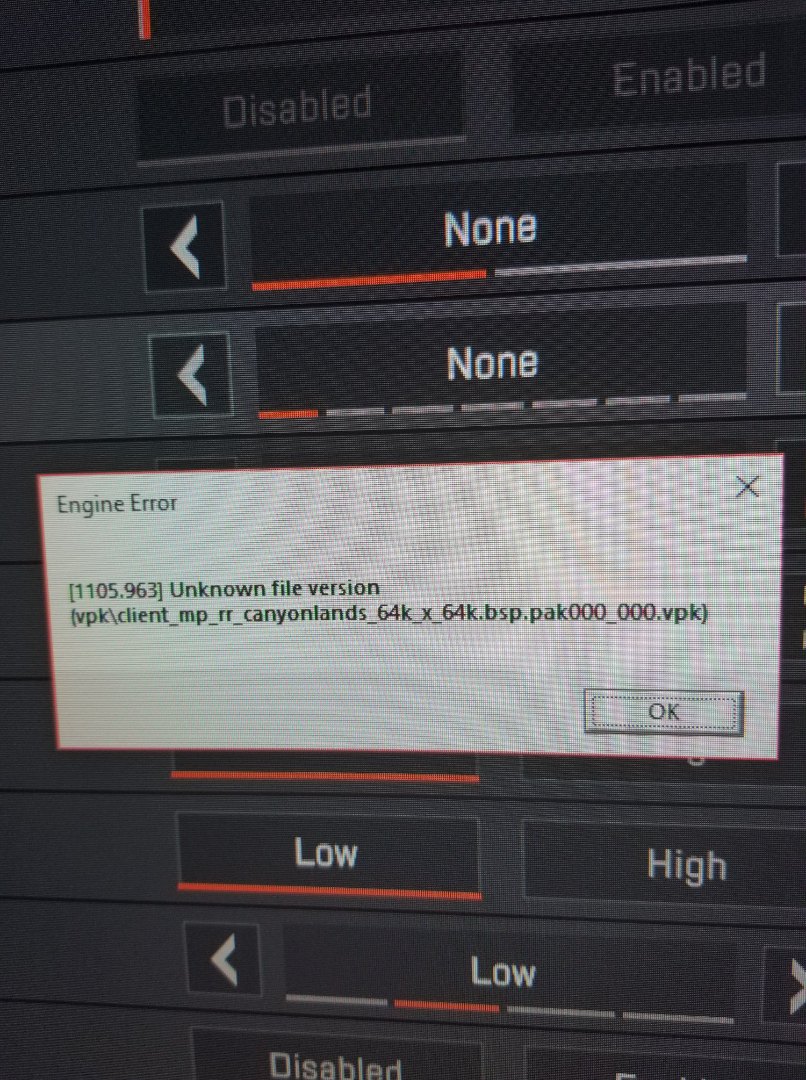
 7 years agoEngine Error? Same here, intel peeps have it too though so I doubt it's ryzen exclusive.
 7 years agoSame, Crash to Desktop seems random without giving any errors. Didn't really see anything in Event Viewer for Critical errors.
Running Ryzen 5 1600x, GTX 1070, 32 GB G Skills Ram at 2933HZ 7 years ago
I've got a 2700x and a 1080 as well, the game hasnt crashed for me yet and I've been playing all day. Are your drivers up to date?
- 7 years ago
after logging for about 1 minute into the game i get this problem and dont know how to fix it. i actually repaired the game and nothing helped. does anyone know how to fix this?
- 7 years ago
when i try to start a match,my game close,someone else with the same problem? how can i repair it? thx
- 7 years ago
I constantly crash to desktop during drop, the game hangs for 5 seconds and then crash. Usually there is no error, however 1 time it threw an error stating that the application sent an incorrect code and that it needs to be fixed.
The game is fun when it works. However when you can only play 3/15 matches I don't see myself purchasing the season pass and micro transactions.
- 7 years ago
Yeah me too, game randomly ctd's. Sometimes happens every 10 minutes, other times instantly. It's frustrating. I've noticed that there's either a spike in the pagefile, going from 11gb to 18gb for example, or a cpu usage spike. Always resulting in a crash. Can't even complete a single game.
FX6300, RX 570- 7 years ago
Yea I got the same issue, game just randomly crashs without error message. Very frustrating when it happens close to the end of a match :-(
- 7 years ago
same here, called support twice and had to reinstall game twice, no help
- EA_Atic7 years ago
Hey everyone for Nvidia players :
Try these steps, was recommend by college of mine that had this issue.
- Roll back Nvidia drivers back to 417.71.
- Disable Origin ingame.
Let me know how that works out for you.
For AMD players ( works for Nvidia users to) try what I suggest above and if that don't work,
Make sure that all drivers for windows and your gpu drivers are up to date and turn off any overlay programs for example Discord or Nvidia experience.
If that fails upload a Dxdiag so can see what drivers and hardware you are using.
/Atic
- 7 years ago
Everytime I launch into the game I load into the menu just fine then if I go into matchmaking or training it will freeze then crash with this error http://prntscr.com/mgt7b9
I am using 2 AMD Radeon R9 200 series with crossfire. and I'm not sure what else would be the problem could you please help.
- 7 years ago
im also crashing right after i matchmake im using a rxx 470 8gb oc edition gpu with a phenom 2 x4 at 4.0 ghz the lobby works fine but right as im about to lauch into match it crashes and gives no error or nothing
- 7 years agosame here.all good until start matchmaking ☹️
 AleksFrezen7 years agoNew Rookie
This is a known issue and the devs are already working on a solution.
A lot of new games, including Apex, are coded to support SSE 4.1 and newer, which is a set of instruction that tell the CPU how to operate.
Notice, how majority of people with the issue have an older CPU model, specifically AMD Phenom series, which supports only SSE 4.0.
All you can do right now is to either wait and hope they will address this somehow in the future (as the last two CoD did), or upgrade your PC, because this will keep happening more and more with each new game release.
- 7 years ago
I don't know what's the problem, my game closes every time I wanna play it. I'm joining the lobby it's all okay, but when it's get to the point when I try to actually play it it gets crashed. My PC is not that bad, I tried to set setting to low but it's not helping. Do you have any ideas or I need to wait the patch?
Featured Places

Apex Legends Technical Issues
Having issues with Apex Legends? Join here to find help with connectivity, performance issues, crashes and more.Latest Activity: 50 seconds agoCommunity Highlights
- EA_Blueberry7 years ago
Community Manager