Forum Discussion


EA_Mako Community Manager
1 month agoCommunity ManagerHey xicedlatte,
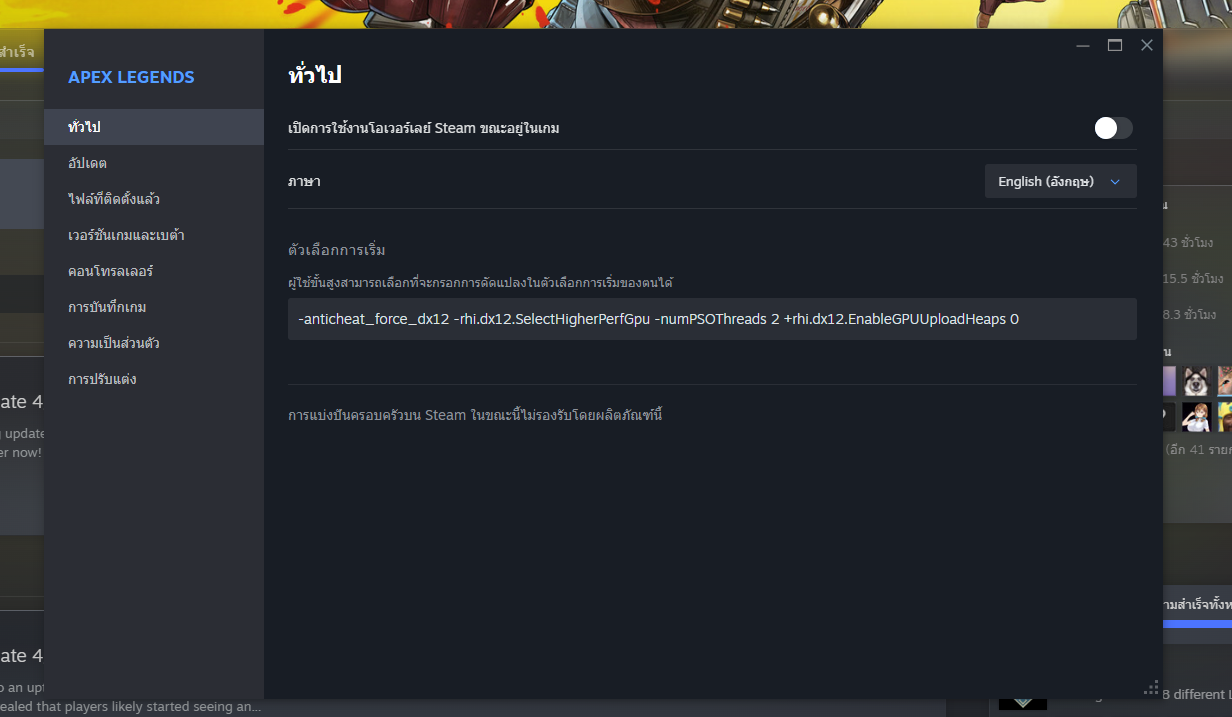
I do see you've mentioned trying both with and without the command line, but please be sure that's fully cleared before continuing to other steps. DX12 is currently the only option with DX11 support being removed a little over a year ago at this point, so these sorts of commands should be unnecessary and may contribute to issues.
To clarify, that should be Steam > Apex > Properties > Launch Options > clear anything that is still here.
After that, we'll want to use something like DDU to fully remove your current GPU drivers before performing a clean install. When reinstalling the drivers, be sure you're using the latest stable driver, and not optional releases.
Beyond that, if you're overclocking/undervolting your GPU please set that back to factory default and test again. It may also help to disable any overlays at this point before testing again, such as Discord, Steam, any Radeon or MSI overlays, etc.
Featured Places