Solved
Forum Discussion


5 years ago
I had this problem also
I followed the steps of:
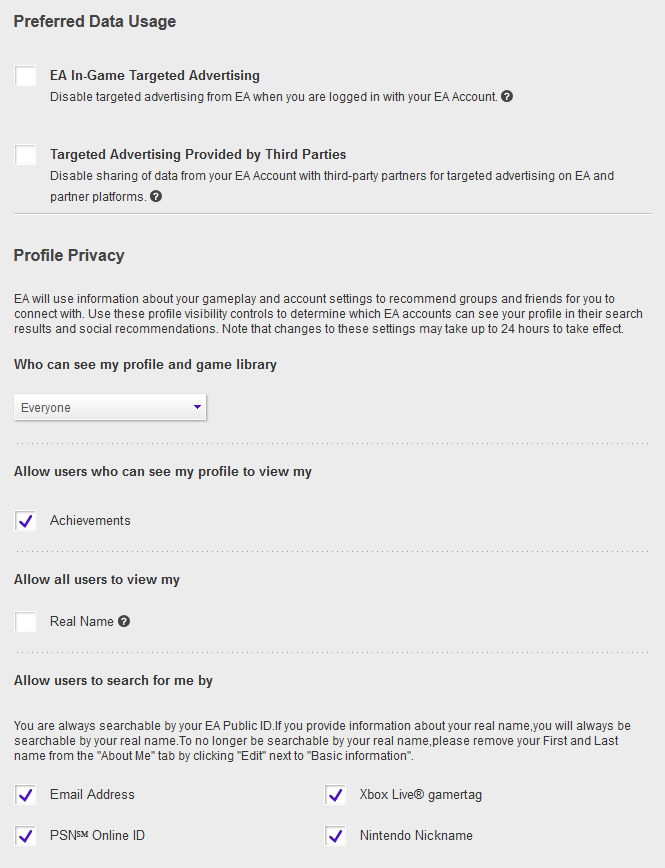
1) logging into your EA Account via web browser and then going to your profile (your Avatar icon top right of page) then clicking on "Account Settings")
2) Privacy Settings:
- Choose "Everyone"
- Allow other to see "Achievements"
- Allow all users to view my "Real Name"
NOTE: I followed all step prior and on Xbox still had warning. When I clicked to allow "Real Name" restarted Xbox APEX and logged in again, warning was gone and friends were visible.
- Allow users to search for me: (Check all devices)
Click on " Update" bottom right of screen
3) Email Preferences:
- Manage your email preferences
I click the "Yes, email me about EA products....."
- Frequency: I choose "Anytime"
Click on "Update" bottom right of screen.
P.S. Remember after saving to log out or quit your APEX game on your console and log back/load it up again.
P.P.S. For the "Real Name" in "About Me" I left that blank but I still allowed people to see it as it is blank.
Hope this helps someone.

4 years ago
Spoiler
Worked! Thz!
Featured Places

Apex Legends Technical Issues
Having issues with Apex Legends? Join here to find help with connectivity, performance issues, crashes and more.Latest Activity: 1 hour agoCommunity Highlights
- EA_Blueberry7 years ago
Community Manager