Forum Discussion

Re: Apex Legends Unable to connect to EA servers

Hi again, okay I have been since day 1 try to play and grind this game, but I got error after every match and can't connect servers again during next 5mim, I have been searching myself since devs have no fix for this yet, we hope they fix and open their servers like other games we have no issues, no matter what you going to do maybe it still get error  I will drop here everything I try and for some people this work for others like not work.

Ps4 only

- if you have connection with ipv4 and ipv6 you need to disable ipv6 on your router then try it again after restart ps4 and router  (I must contact my ISP provider for they try disabled ipv6 know my router, I tried via telnet disabled it on local network but still no work for me) 

- I tried port forwarding all ports for psn and Apex, it does not work for me, also try ps4 set to DMZ on my router, have gaming mode enable on router, tried also upnp disable with open ports, nothing fix it.

- I have rebuild data base of ps4, initialized ps4, reinstalled game, and nothing works

-my ISP provide me a 100/100mb Fiber connection  with ipv4 and ipv6  never had problems with any other games, Cod, Fortnite, fifa including EA titles aswell, only on Apex nothing works

I'm losing hope 2 or 3 patches already come out and not solved this issue affecting a few players who wants to enjoy the game too, but this way is impossible  

Peace guys, and let me know if anything of those step above have worked for you 

18 Replies

  • If you get kicked after every match, for you connect on servers again you must restart game and it let you connect again on 3min to 5min  but still a mess doing this every time 

    😔

  • i have also been having this problem since day one, disconnect after every match need to wait 5/10 mins to get in again or repair the game and get in instantly also no problems connecting to games or midway.

  • 1Caeta1's avatar
    1Caeta1
    7 years ago

    Exact same thing that happens to me. I open the game, connect without problems and play a match perfectly, but then when i'm coming back to the lobby i get disconnect. Having to restart the game every match and wait to connect is making me lose the willingness to play...

  • i have also now ipv6 disabled on router both local network and InternetGPON are with ipv6 disabled, and i keep getting the error, so i tried everything possible and nothing works, feels bad man

  • People have been having this issue since launch, so if youre just now having the problem consider yourself lucky. There is no work around, EA has said on twitter theyre looking into it. In the mean time either uninstall and wait for a fix or just relaunch after every game and wait 15 minutes. Fun times, yeah?

  • 1Caeta1's avatar
    1Caeta1
    7 years ago

    @W3s3d420  escreveu:

    i have also now ipv6 disabled on router both local network and InternetGPON are with ipv6 disabled, and i keep getting the error, so i tried everything possible and nothing works, feels bad man


    I've tried that too. I tried everything that I found on youtube, everything that I found around here and nothing works. Sad


    @Battle_Pope_II  escreveu:

    People have been having this issue since launch, so if youre just now having the problem consider yourself lucky. There is no work around, EA has said on twitter theyre looking into it. In the mean time either uninstall and wait for a fix or just relaunch after every game and wait 15 minutes. Fun times, yeah?


    I'm one of those people, I've never been able to play two matches in a row. Yes, so fun...

  • Honestly I have had the same problem for days but i uninstalled the game and reinstalled it and everythings been working perfect ever since 

  • pt_gunslinger's avatar
    pt_gunslinger
    New Novice
    7 years ago

    Are you guys still experiencing this issue. I am and I'm honestly getting kinda sick of it.. I have found some sort of work around. Change you PS4 IP's on the network settings in between matches. It takes about 20 seconds when you get  a good grasp of it. It's still a bit annoying though.

  • W3s3d420's avatar
    W3s3d420
    7 years ago

    @ptgunslinger wrote:

    Are you guys still experiencing this issue. I am and I'm honestly getting kinda sick of it.. I have found some sort of work around. Change you PS4 IP's on the network settings in between matches. It takes about 20 seconds when you get  a good grasp of it. It's still a bit annoying though.


    HI, yes this issues solved, you must r start router to factory settings and disable Game Mode on your technicolor router, then restart ps4 too, this error I have during 2 weeks after every match played,  after do this never get the error again 

  • Hi ! I'm on PC and I'm still experiencing this problem. I tried everything I found on the web without any success...

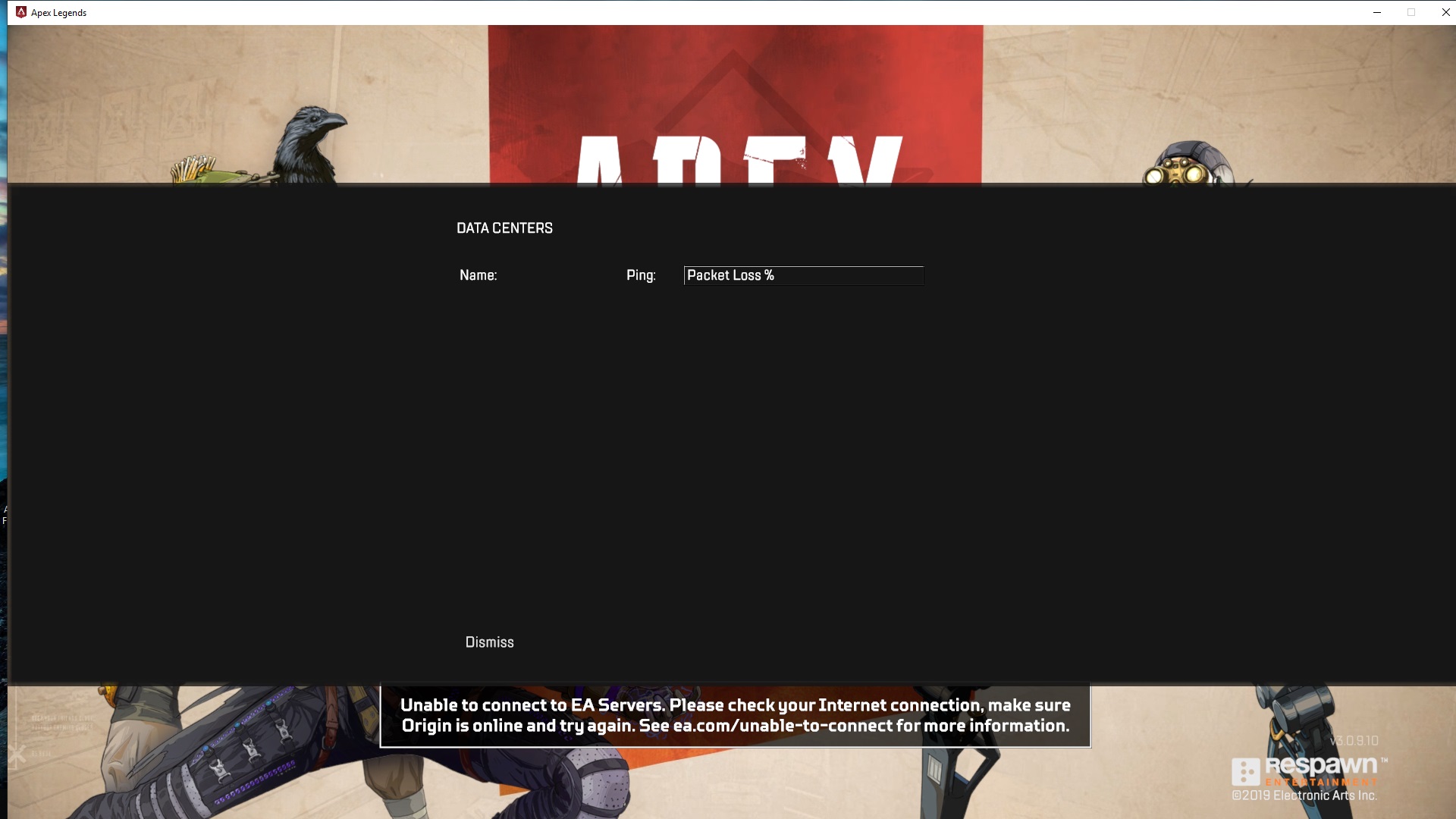
    What is strange is that I get nothing in the data center list (see the pictures linked below) whereas my internet is working perfectly, I'm online on Origin and my ports are open from what I found on EA support.

  • So this same thing is happening to me now... Except I am not able to even click on the Data Centers. any fixes for PC? I have my cloud storage off apex open but doesn't connect I have cloud storage on says it cant connect to the cloud and apex wont open. unless I click play anyway which just turns into turning cloud storage off.

  • deCooningh's avatar
    deCooningh
    6 years ago

    Same here on ps4, alot of people on Reddit having the same issue right now.. I have it over 6hrs now, couldnt find a single response from Respawn.

  • But it didnt work for me wat dns number should i put i tried 1111 then down 1001 then i changed to 8888down 8844

    please help me i really need help

Featured Places

Node avatar for Apex Legends Technical Issues

Apex Legends Technical Issues

Having issues with Apex Legends? Join here to find help with connectivity, performance issues, crashes and more.Latest Activity: 34 minutes ago
40,071 Posts