"Connection Failed" With Error Code 1:86001S:51002S:57019S
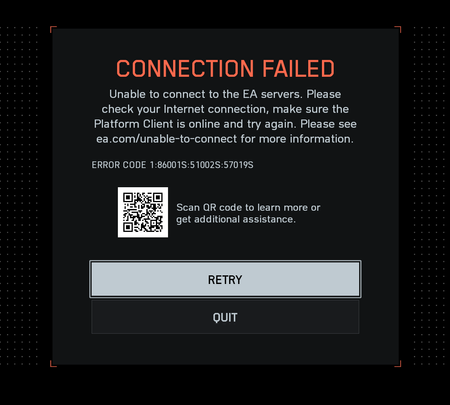


Can't tell if this is true or not, but this is what chat GPT says based on my logs. I also tried a VPN but Im having the same issues :(
🎯 1. Battlefield 6 backend and server architecture
EA moved Battlefield 6 to a newer setup that uses:
EA Game Services (qoscoordinator.gameservices.ea.com) → handles latency-based matchmaking and player region.
Blaze servers (blaze.ea.com) → manage session persistence and player authentication.
EA AntiCheat (EAAntiCheat.ac.ea.com) → handles security and sync enforcement.
All those domains appear in your trace — so we can see exactly how your connection behaves through EA’s system.
🌐 2. What your traceroute shows for BF6
Summary of route:
🇯🇵 Japan → 🇺🇸 Seattle → 🇺🇸 New Jersey → 🇬🇧 London → Amazon AWS London region → EA backend
That’s an extremely long route (≈ 240–250 ms).
For Battlefield 6, that’s a red flag, because EA’s new session protocol (over QUIC/UDP hybrid) assumes <150 ms stable latency. Anything above that often leads to:
Lost handshake refreshes
QoS drops
AntiCheat desyncs
→ which result in disconnects after 3–5 minutes — exactly what you described.
⚠️ 3. The root cause: Wrong region assignment
Your routing shows you’re connecting to London EA nodes (AWS London).
That’s likely a region-mapping error on EA’s side.
Some Japanese ISPs (especially NTT and AsahiNet) are occasionally classified as Europe region by EA’s QoS Coordinator (the one you traced at qoscoordinator.gameservices.ea.com).
Result:
You launch BF6.
The QoS server picks a “best” match based on its faulty region data.
It routes you to Europe instead of Asia.
After 3–4 minutes, AntiCheat or the session heartbeat fails → disconnect.
🧠 4. What’s not the issue
Your trace shows:
✅ Local router (192.168.100.1): healthy
✅ ISP: normal latency to backbone
✅ No packet loss
❌ High international hop latency (expected)
❌ Region mismatch
So your home network and Wi-Fi are fine.
The problem happens after your ISP hands off to EA’s infrastructure.