"Connection Failed" With Error Code 1:86001S:51002S:57019S


 Community Manager
Hey everyone!
Thanks for all your traceroute results and additional reports. I've passed those on to the team.
It looks like most of the different 1:86001S error codes are network, ISP, or system related.
We've just published a troubleshooting guide that might possibly help with your issues as well. Please give that a shot and let us know how you get on!
Still not working.

Hey folks,
I’m still getting error 1:86001S on PC and I’m out of ideas. We literally went through every single step from the official guide here in this thread — router setup, UPnP, ports, static IP, firewall, EA App cache, DNS reset, everything.
Important: I played the Battlefield 6 beta on the exact same setup and it worked flawlessly. So it feels like something changed on the live build / backend.
Here’s what we’ve already tried (so nobody repeats the same suggestions again 😅):
and also tested with ports removed + UPnP only
And yeah — still getting 1:86001S.
Since beta worked fine on the same system & network, I’m guessing this might be a server/backend issue introduced post-launch rather than user-side config.

Weird because when I get on my PS5 for REDSEC there are no issues and that's with a PS5 that is not connected to ethernet but when I want to launch BF6 on my PC with an ethernet cable on the same network as the PS5 it gets the error. This was the same case as the beta
Error 1:85009S and 1:86001S
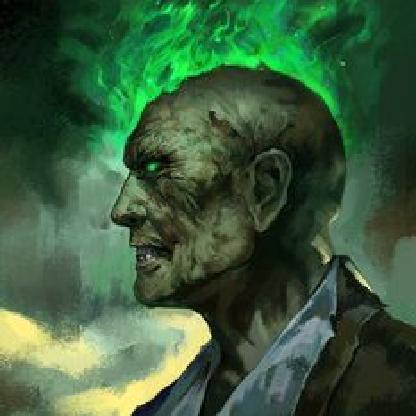
Hello, I followed all the suggested steps — assigned a static IP, enabled UPnP, and forwarded the required ports (TCP 80, 443, 9000, UDP 53, 9999). Unfortunately, the issue remains exactly the same:
Battlefield 6 Connection FAILED 1:86001S:51002S:57019S
I would like to note that during the beta I was able to play perfectly fine without any configuration changes, and I have no issues connecting in Battlefield 2042 either.
Please advise on the next steps, as the connection problem persists. Thx.

SmileKnight try putting PC IP address in router demilitarized zone (DMZ).
I tried it, but it didn't help :)
But thanks!
I'll be waiting for news again...this is just trash. I can't play the game, they're not giving me the promised rewards. EA has simply gone downhill...
I changed mine NAT to Full Cone. This didn't help at all, I also forwarded ports and turned it on UPnP.
Nothing helps except WARP.

These are stuff we the players that want to play the game have already tried and none of them seem to fix it. Its something based on your backend with the connection to the steam client, because most of the players that have the problem are on Steam
Any updates on this issue? The troubleshooting guide doesn't fix anything and after this new update nothing has changed as well. The only ways I've been able to access the game is either playing on a cloud service (Geforce Now) or on my PS5. This issue has been happening to me for months since the beta of BF6 and continues to still persist. We need more frequent updates on this issue. We've been waiting too long for a solution and I've been extremely patient but it gets to a point. This is definitely the worst experience I've had in a BF game. The game is amazing if only I can play it on my PC and not having to resort to different ways to just play a game.