Forum Discussion

EA_Barry Community Manager
2 years agoCommunity ManagerTask manager shows the current speed but the EA app is showing an average over 10mins.
As the download speed varies, I guess this can account for the different numbers.
Thanks.

Salo_MnK
2 years agoRising Veteran
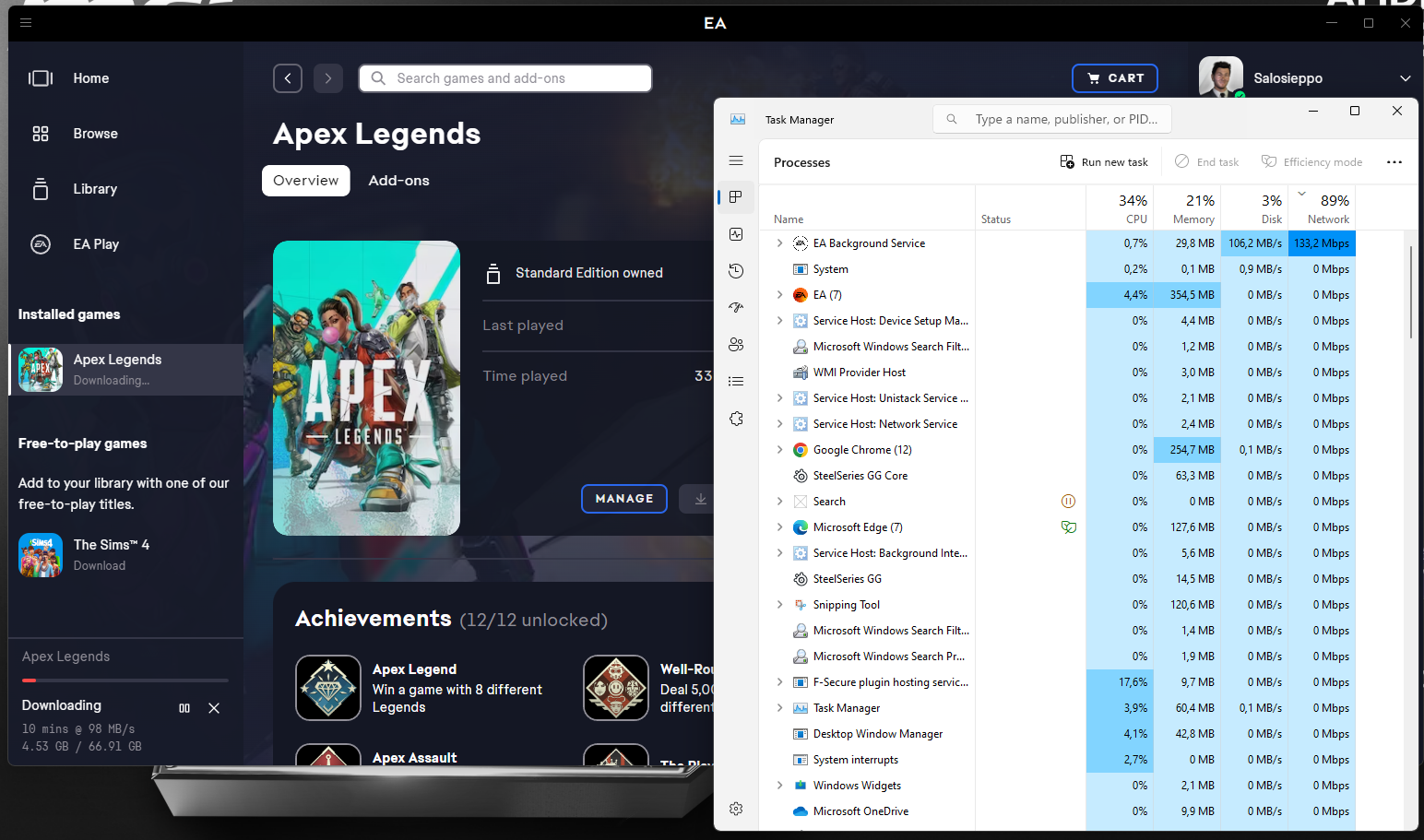
Hi, here is the situation right now on the download speeds at in the attachents. Basically EA Background Service shows 133.2Mpbs speed (Network is sorted from biggest to smallest) and at the same time Windows Task Manager shows 867Mbps transfer speed (and EA app is correctly showing the speed of about the same in megabytes). So EA Background Service is showing less data traffic as it should show. This may not be a relevant issue at all but it may have adverse effects e.g. if EA Background Service is reportring the data speeds to some EA backend to e.g. do some network traffic optimization / load balancing. As I dont know the functionality I am just bringing this information to here how I see this on my computers.
When pausing EA App download the data transfers drops immediately to zero so only app using network bandwidth during this download was EA App / EA Background Service.
I am suffering lots of packet loss and networking issues with Apex Legends (and that is the reason i did full computer reset and reinstalled all just to find out this issue (which may or may not be irrelevant)) (this may even be Windows 11 bug).
Featured Places