Forum Discussion

erisardor's avatar
erisardor
Rising Novice
6 months ago

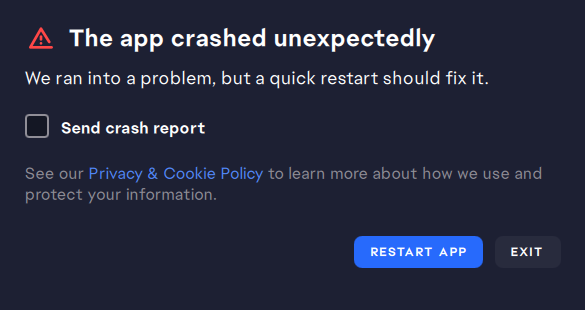
EA app closes itself/crashes when trying to open

Hi, 

Things I have tried:

  • Running as administrator
  • Uninstalling the EA app
  • Running the repair tool from the uninstaller
  • Running the 'recovery' tool when it's working (it just stops working again when i try to open it a second time after running it). 

Description of problem:

It takes around 20-50 tries to get the EA app not to crash when I try to open it so I can play Sims 4, or update games, etc. What happens is it starts to open, nothing loads, then it closes. Sometimes it's faster, sometimes it looks like it's working and then suddenly closes. I can't predict when it will decide to work or under what conditions because nothing is consistent, but it's really annoying. Please help. :(

I've attached a screenshot of how it looks before it crashes because that's all I really have. Every now and then it will say it crashed and ask me to send a crash report but almost every time it just crashes with nothing else. It also crashes when it lets me get into it occasionally and I try to run Sims 4. 

23 Replies

  • sourworm01's avatar
    sourworm01
    New Novice
    3 months ago

    Still happening for me too. No further updates from EA support after I talked to them separately.

  • Sledgeorino's avatar
    Sledgeorino
    New Novice
    3 months ago

     erisardor​ sourworm01​ CHERN1KA_TRES​ v3o60o4u1hts​ 

    okay i went to best buy a couple weeks ago and they helped me find the fix for me it was something plugged into my pc stopping it from running correctly try EVERY port being unplugged and only your monitor mouse and keyboard for me it was my keyboard that was causing the issue whenever its plugged in it stops working so i unplug it and EA works perfectly fine now and no you don't have keep your keyboard unplugged once it loads in you can plug back in whatever you unplugged

  • Raaijinn_'s avatar
    Raaijinn_
    Rising Newcomer
    3 days ago

    Sledgeorino​ THIS ! 
    It' work for me instantly, I have a custom keyboard, I don't know if it's related but i unplugged my keyboard and the EA app didn't crach

    Thanks dude ! 🙏

Featured Places

Node avatar for EA app Technical Issues & Bugs

EA app Technical Issues & Bugs

Having issues with the EA app? Join us to report bugs, and find help with downloads, DLCs, purchases, and login errors.Latest Activity: 3 hours ago
8,393 Posts