Solved
Forum Discussion


145 Replies
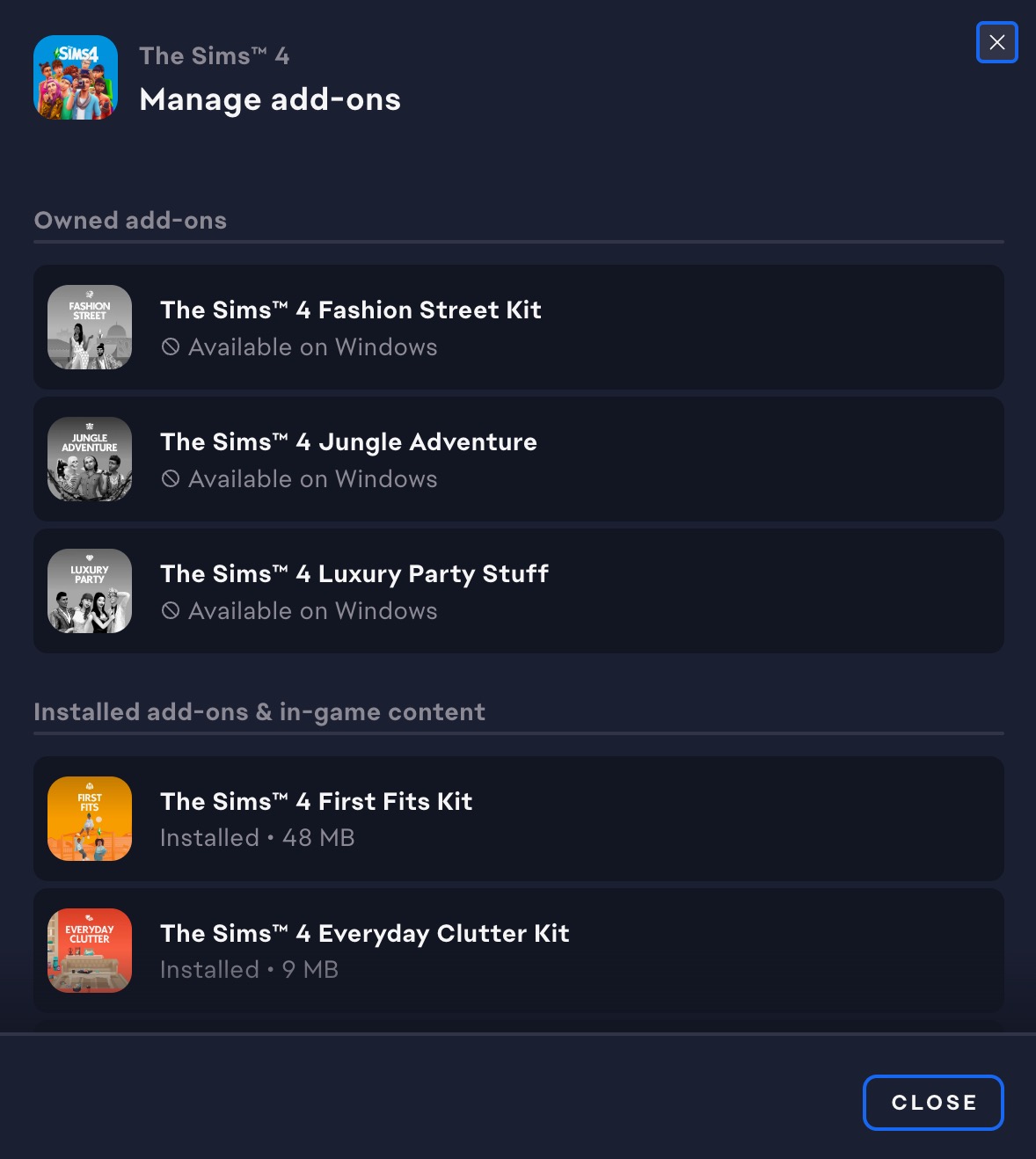
I'm having a bit of a crisis here and could use some help. So, I've bought these game packs a while ago (I think most recently 4 months ago) and for some reason, they just won't let me download them. I just made the switch from Origin to the EA app, It's driving me nuts because I can see them in my purchase history, and I definitely paid for them, but when I go to download, it's like they don't exist. I've purchased these on both the EA app and Origin. (I'm currently a Mac user)
Here's what I've tried so far:
1. Restarting my computer.
2. Logging out and back into EA.
3. Checking for any updates to Sims 4 and EA.
4. Reinstalling the EA app.None of these have worked, and I'm out of ideas. Has anyone else dealt with this and found a fix? Or maybe there's something super obvious I'm missing? Any advice would be awesome because I just wanna dive back into my Sims world.
Edit: I got the missing packs for free on Epic Games
Hiya! A while ago, there was some free DLC (something like bold lifestyle bundle) in the Epic Games App. The thing at the time was that the Epic Games are only linkable to the EA app and not to the Mac Origin app. At the time, many simmers advised Mac users to claim the offer anyway since the EA app will soon be available on MAC. Now, the EA for Mac has obviously launched, and I just tried to link my EA account to my Epic games one and enjoy the packs, but Epic Games still claims the OS is unsupported - will that be tuned? And will Mac users also be able to use those packs, seeing that I am very excited for the jungle adventures one!
Best
Antonia
I also have this issue. The chat agents are of absolutely no help. The best solution so far they can come up with for me is to tell me to request a refund from Epic, over a year later, and repurchase from the ea app. It seems a little bit like extortion to me. This is what you see?
 bella8520011 year agoSeasoned Newcomer
Same here, I have exactly the same problem
Yes, I did! However, when I tried loading the game yesterday the packs were installed, even though the EA app didn't say so. Problem solved, for me anyway!
 EA_Leeuw1 year ago
Community Manager
Hi @JenJir0821, @bella852001,
Please see the reply from @Bluebellflora. Did you get these DLCs via Epic or Steam?I have the same exact problem after changing to the EA app today. It´s also those exact packs that only are "available on windows". ☹️
- bella8520011 year agoSeasoned Newcomer
I was forced to change from my origin app to ea app as a Mac user recently, and since then 3 add-ons of the sims 4 game - that I own are no longer available to me. Until now everything worked well and I was using all 3 of them without problem but now since the change I no longer can. There is information that those packs are only available on windows but since I had them working perfectly well on my Mac for a long while I know that it's not true.
- @erinmeganxo
If you bought or claimed these packs in Epic or Steam they are not available in EA App for Mac as there is no Mac version of the game available on either platform. EA finally made mac users switch over to the EA app, just opened it for the first time and noticed three packs (Fashion Street Kit, Jungle Adventure, Luxury Party Stuff) are showing in my “owned add-ons” section but are separated from my other packs and all say ‘available on Windows’ below them, when I search them up it only lets me purchase them again, not download.


Featured Places