Forum Discussion

flopburi's avatar
2 years ago

My eafc24 won't lunch after anticheat show up.

how to fix this problem after anti-cheat shows up. it error  in white box it shows

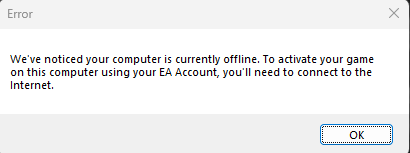
" We've noticed you computer is currently offline. to activate your game on this computer using your ea account. you'll need to connect to the internet."

but my internet is fine and stable. i do everything clear cache reinstall game and EA app but it won't fix this

7 Replies

  • Hello everyone.

    Recently I've installed Fifa 24 and can't launch it. The same situation applies to my purchased FIFA 23 but I didn't go deep when faced it, was waiting for 24.

    I've assembled a new PC with 4070TI inside it. specs are ok. On my old PC FIFA 23 launches without any problems.

    I have Windows 10 pro. Spent several nights to debug but no luck.

    I can't launch FIFA games, but Jedi Fallen Order and Apex runs well. I searched for around 50 different topics and tried all suggested solutions that I've found online. Reisntalled windows 3 times, origin 20 times, FIFA 40 times - nothing helps. I've opened several support cases but it is always the same advices - reboot the client, reboot the pc, redownload game or check integrity, reinstall windows then they stopped responiding and thats all.

    When I run the game I have this alert:

    We've notice your computer is currently offline. To activate your game on this computer using your EA Account, you'll need to connect to the Internet.

    Ofcourse I'm connected. I've checked the logs and see there this info:
    - V5.02.19.133 - Log C:\ProgramData\Origin\Logs\FC24_198235_oa_198235_OnlineActivation_Log Opened 9/25/2023 - [00:13:57 GMT]
    - Could not find the getTableData request function in the loaded library. This only affects Denuvo v2 and has no effect when using a newer version.
    - Invalid SSL Certificate. LastError: SSL Library load error. Host: proxy.novafusion.ea.com
    - License Request Server HTTP response code=408
    - License Request Server response state code=4

    I've checked the host and ping and tracert - works good:

    Pinging prd-fusion-proxy-alb-1109311942.us-east-1.elb.amazonaws.com [35.172.46.92] with 32 bytes of data:
    Reply from 35.172.46.92: bytes=32 time<1ms TTL=64
    Reply from 35.172.46.92: bytes=32 time<1ms TTL=64
    Reply from 35.172.46.92: bytes=32 time<1ms TTL=64
    Reply from 35.172.46.92: bytes=32 time<1ms TTL=64

    Ping statistics for 35.172.46.92:
    Packets: Sent = 4, Received = 4, Lost = 0 (0% loss),
    Approximate round trip times in milli-seconds:
    Minimum = 0ms, Maximum = 0ms, Average = 0ms

    Internet options:
    Use SSL 3.0 - enabled
    Use TLS 1.0 - enabled
    Use TLS 1.1 - enabled
    Use TLS 1.2 - enabled

    Nahimic service completely removed - saw that it was created some issues for others.

    Hosts file is untoched.


    GPEdit is Not configured, Proxy settings are empty (no proxy).


    Tried VPN with different countries - no luck.


    Even tried Origin with some workarounds to run it - no luck.

    So I'm stuck - its so sad that I can't use EA games. If you know anything else that I should try - please let me know.

  • I can't run FC24 or FIFA 23 on my recently assembled PC although Apex and Jedi Fallen Order work without issues. On my second PC on the same local network I can run FIFA 23 without any issue. Ofcourse I'm not trying to run them simultaneously and I have internet.

    I've tried innumerable amount of different things that I've found on the EA Answer HQ and Reddit, nothing works for me. When I launch the game I always experience the same alert window.

    We've noticed your computer is currently offline. To activate your game on this computer using your EA Account, you'll need to connect to the internet.

    I have logs at C:\ProgramData\Origin\Logs\FC24_..._Log

    Invalid SSL Certificate. LastError: SSL Library load error. Host: proxy.novafusion.ea.com

    I can ping and tracert this host without any issues. I have Windows 10 Pro with recent updates.

    I appreciate any help please.

  • aqeelbomozah's avatar
    aqeelbomozah
    2 years ago

    Hi EA Team 

    When I tried to launch FC24 game I received an error massage shows, (we've noticed your computer is currently offline. To activate your computer on this computer using EA account, you'll need to connect to the internet.

    However, My computer is healthy and working normally, I tried to launch many games all of them are working fine, I tried also FIFA 23 it work smoothly with no issues. Only FC24 shows this massage.

    Your Support is Highly needed 

    Thanks

  • I keep getting the error as of yesturday of ea saying that ''we've noticed your computer is currently offline. to activate your game on this computer ising your ea account you'll need to connect to the internet'' but heres the thing i am on he internet and always have been, i dont know how to fix this and i am looking for suggestions or reasons why this is now happening. I have not made any changes to my computer it just happened once i got back from work.


  • I'm also having this problem for over 2 weeks! Can't launch Fifa 23.

    I mean, if I'm offline how did I even login to EA App? How can you guys have this error up to this day?!?!?!

  • orpheus270's avatar
    orpheus270
    Seasoned Newcomer
    1 year ago

    Sorry I have it only in German, but this worked for me. I have Kaspersky Anti Virus.

  • darthDefined's avatar
    darthDefined
    1 year ago

    Still the same, can't run FIFA from this PC, but run normally on different.

    Windows 10, great build. I have no idea.

Featured Places

Node avatar for FC 24 Technical Issues & Bugs

FC 24 Technical Issues & Bugs

Trouble with connectivity, performance or crashes? Join the EA SPORTS FC™ 24 community forum to discuss troubleshooting.Latest Activity: 1 hour ago
20,854 Posts