Forum Discussion

yy8520541's avatar
yy8520541
Seasoned Newcomer
1 day ago

FC 27 Ultimate Team disconnects every 5 minutes after the season update

Before the season update, FC 27 worked normally on my PC. Since the update, I can enter Ultimate Team, but I get disconnected after approximately 5 minutes every time.

If I reconnect to Ultimate Team without closing the game, I get disconnected again within about 1 minute. If I completely exit and restart the game, I can stay connected for about 5 minutes before being disconnected again. This happens consistently.

My EA app works normally, and my PC's internet connection remains functional. I have tested a mobile hotspot, but the issue persists. The recent server maintenance did not fix it either.

The game itself runs normally and does not crash. My PC has 16 GB of RAM, and FC 27 uses around 5 GB, although total memory usage reaches 90–100%. I do not know whether this is related.

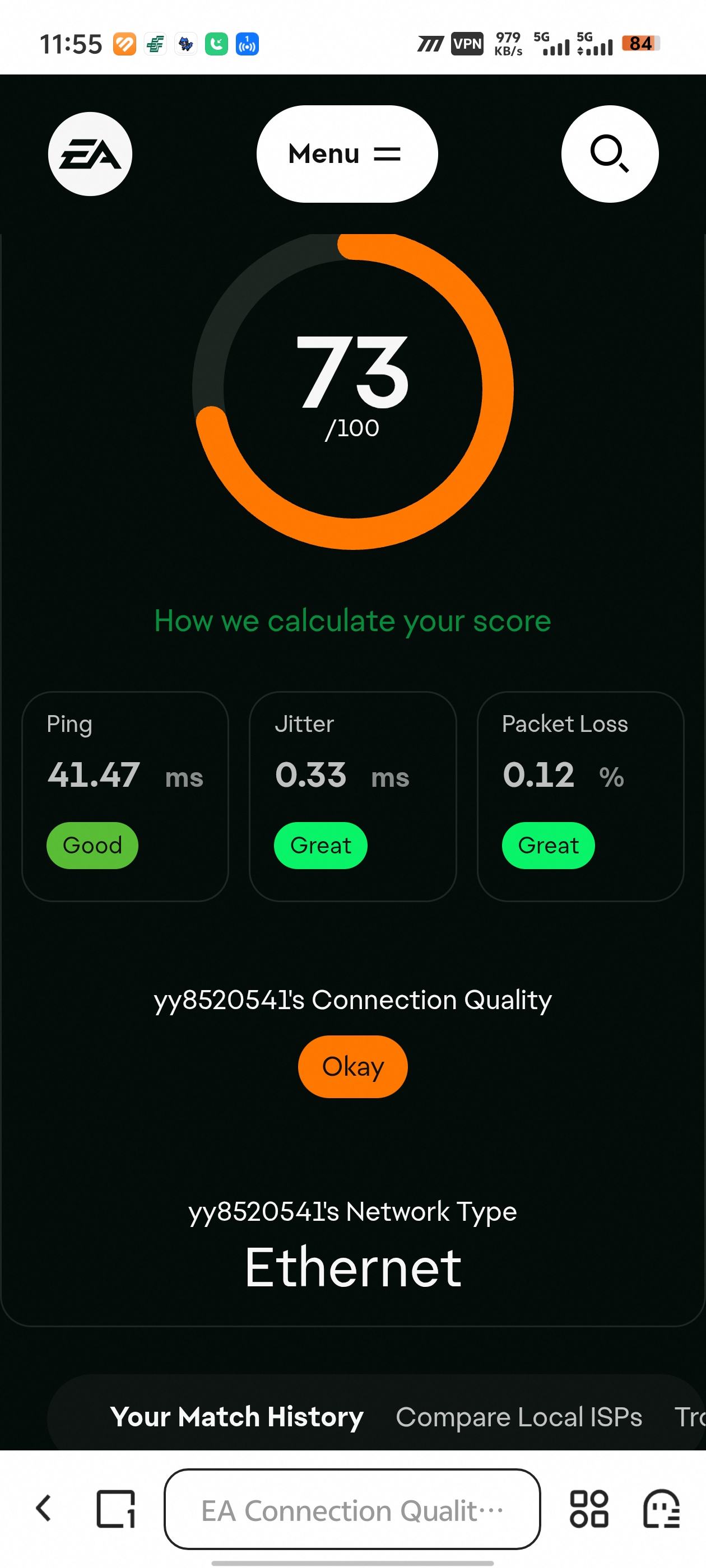
Could you please investigate whether this is a known FC 27 server, session, or client issue? I can provide a Connection Quality Report if available.

6 Replies

  • hunter2003philip's avatar
    hunter2003philip
    Seasoned Novice
    1 minute ago

    iT's not an ISP issue nor our laptops. I've been reporting the same thing since the 21st. It's an EA issue. I followed all the steps and I did whatever possible from my side. Nothing works. 

  • EA_Shepard's avatar
    EA_Shepard
    Icon for Community Manager rankCommunity Manager
    7 minutes ago

    yy8520541​ Hey,

    So it has, and we have multiple threads that have been sent over to the team on this one. Here are the most effective steps at the moment to help stabilize your network:

    • Power Cycle Local Network Hardware: Completely unplug your modem and router for 60 seconds, then reboot your PC/console to clear stale DNS route tables.
    • Switch to a Direct Wired Ethernet Connection: Wi-Fi packet drops during background server telemetry queries are the most common trigger for mid-game disconnects.
    • Flush DNS & Set Public Endpoints (PC): In Command Prompt (Admin), type ipconfig /flushdns and press Enter. In your network adapter properties, change your IPv4 DNS to Google Public DNS (8.8.8.8 and 8.8.4.4) or Cloudflare (1.1.1.1).
    • Clear Local Squad & Profile Cache: From the FC 27 Main Menu, head to Settings > Profile > Delete and delete your Squad Updates file to ensure corrupted roster caches from the update aren't desyncing your session.

    You can also run through our official connection troubleshooting guide here:
    https://help.ea.com/en/articles/technical-issues/problems-connecting-online/

  • MechCoolX's avatar
    MechCoolX
    Seasoned Rookie
    3 hours ago

    yes! I tried every possible ways to solve it but ı could not. I've used mobile data, wifi and ethernet. It occurred after 21th maintanence I think and I could not enter any match healthy, also there is problem in menus, too...

  • yy8520541's avatar
    yy8520541
    Seasoned Newcomer
    5 hours ago

    This issue has been ongoing since the Oct 21 season update. I've tested multiple networks (campus WiFi, mobile hotspot, mobile data + accelerator), switched accelerator nodes (Shenzhen, Hefei-Tokyo), and even had a friend log into my account from another city — everything disconnects at ~5 minutes. My account works fine when my friend logs in from another city, which confirms this is server-side and affects specific regions/session pools. Many other players are reporting the same issue (US, Poland, Thailand, Russia). Could you please escalate this to the network team and add it to known issues? We need a hotfix. Forum thread: 13822415

  • yy8520541's avatar
    yy8520541
    Seasoned Newcomer
    9 hours ago

    Update (Oct 25): I have now tested on campus WiFi, mobile hotspot, mobile data with accelerator, switched accelerator nodes (Shenzhen relay), and a Hefei-Tokyo relay node. Disconnect still happens at about 5 minutes every time. This confirms it is NOT a routing or link issue on my side. My PC is fully healthy (no errors in event viewer, TCP 443 to EA servers connects fine), and my account works fine when a friend logs in from another city. This is clearly server-side, affecting specific regions or session pools. Please prioritize a hotfix.

  • Miniker1907's avatar
    Miniker1907
    Seasoned Newcomer
    1 day ago

    It’s happening to me too on my PS5; I’ve already tried several things, but nothing works. I hope they fix it soon.