Forum Discussion

Amarantkando's avatar
10 years ago
Solved

ERROR C5. Needing to repair everytime

As the title says, I have to repair EVERY time I try to launch the game. This is getting ridiculous and I need to fix this. ☹️ I don't use Bitraider client, and I have tried Fixlauncher and repairing options. Please help me! ☹️

  • Hello again!
    I let my pc do this scan (I think...). It would only do this scan when I restart my pc. So I did this, and booting took a bit longer then normal. But when I was back on desktop I didnt see any test results. I dont really know how it was fixed. I just started Swtor like normal and let it repair, then after that I didnt had to repair again. Sorry, but I cant really help other people with this problem! ☹️

    [MOD EDIT - scan mentioned is a chkdsk scheduled to run on next startup of the PC, this highly likely repaired a file system error that allowed the next game repair to finally finish properly]


6 Replies

  • Have you checked the harddrive?

    Check Hard Drive For Errors And Corrupted Files

    All files can become damaged. This is just the nature of hard drives.. Do this for all hard drives that has Windows and the game installed.

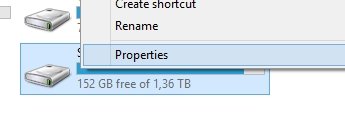
    1. Go to "This PC" in Windows and right click the hard drive and click "properties"
      Rightclick harddrive
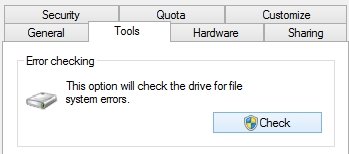
    2. Go to "Tools" and and press "Check"
      tools then scan drive
    3. Click "Scan Drive" and let it scan for errors.
    4. If it finds errors let the program fix them
      (If there are errors it could mean nothing, but it can also suggest that it might be time to format your computer and/or replace the hard drive)
    5. Reboot your computer
    6. Run the scan again
    7. Keep repeating step 3-5 until no errors are found.
  • Hello, thanks for your answer.
    I do not think this is the problem, as after I repair the launcher (which takes about 45 min - 1hour) I can play. My problem is that whenever I open the game again it gives me the error code again, so I have to repair the launcher again.
  • proxos666's avatar
    proxos666
    Hero+
    10 years ago

    @Amarantkando

    Can you post a launcher log (in the main game folder is a log folder with launcher logs) want to see if it is repairing the same things over and over again

    chkdsk is worthwhile just to be certain

  • Hello Owen!
    Sorry for my late answer, but it seems like my problem is resolved. Didnt had to repair today so hopefully it's all good now. Thanks for your answer nonetheless. 🙂
  • Carbonic's avatar
    Carbonic
    Hero+
    10 years ago

    @Amarantkando

    What ended up solving your issue? We are supposed to accept the post actually containing the solution so others looking for help with a similar issue can get help too 🙂 "I found the solution, now it works" doesn't really help others! Am kinda wondering if my harddrive scan fixed it or if Owen's launcher log idea had something informative in it?

  • Hello again!
    I let my pc do this scan (I think...). It would only do this scan when I restart my pc. So I did this, and booting took a bit longer then normal. But when I was back on desktop I didnt see any test results. I dont really know how it was fixed. I just started Swtor like normal and let it repair, then after that I didnt had to repair again. Sorry, but I cant really help other people with this problem! ☹️

    [MOD EDIT - scan mentioned is a chkdsk scheduled to run on next startup of the PC, this highly likely repaired a file system error that allowed the next game repair to finally finish properly]
Featured Places

Node avatar for STAR WARS™: The Old Republic™

STAR WARS™: The Old Republic™

Check this forum for STAR WARS™: The Old Republic™ help, or to chat with other SWTOR players.Latest Activity: 4 hours ago
19,334 Posts