[Current Issue] Sims 3 "serious error" when loading save
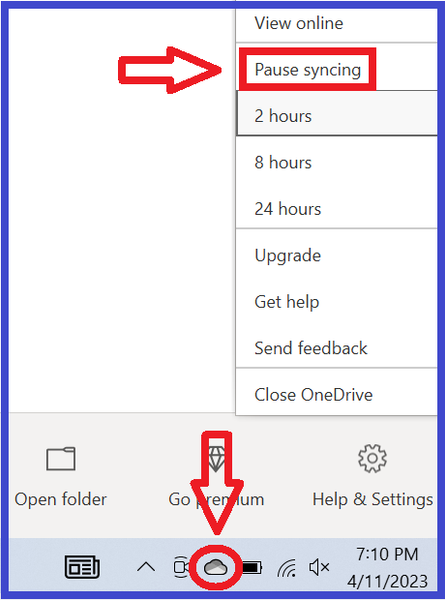


Hi since I built my new pc in December I have not been able to get the Sims 3 to work. I am getting the "a serious error has occurred while loading world" error when trying to start a new game or load an existing one and it won't let me play at all. I have tried turning off firewall, pausing syncing on one drive, taking ownership of documents on command prompt. Nothing has worked. The only thing that "worked" for a few days was creating a local windows account on my pc but it was taking up alot of storage and was creating issues with shared files and applications between accounts and I had to delete it and scrub it from my registry and file system completely to fix the issue. I don't want a local account. I want one account on my pc with my microsoft account attached to it. I don't want to have to deal with a second account and all the issues and confusion with it just to play one game that should work on my main account. Every other sims game works on my main account. This includes The Sims and The Sims 2. I do not mean the re-releases, I mean I got the original games working on my PC with workarounds and hacks and mods. It is just The Sims 3 that refuses to work. The only time i got to play it was for a few days with the local account that I don't want to have to re-create. Now you might wonder why I haven't just managed the backup settings for onedrive for the sims 3 or the documents folder but I have indeed tried that, and every time I try to go into onedrive and change settings to not backup documents folder it doesn't even give me the option, it looks like I might have to uninstall icloud or something but it looks like the folder isnt even backing up anyway so how could that fix anything? Gaining the ability to toggle something off that isnt even on.. how could that fix the issue? I have added a photo below of exactly what I encounter when attempting this, as you can see it won't even let me click on any files and according to them, DOCUMENTS ISN'T EVEN BACKED UP AS IS. This doesn't even make sense as onedrive is clearly the culprit seeing as making a local account "fixed" it. Also, according to command prompt, the directory for my documents folder does NOT include Onedrive in the path, which baffles me further as how is onedrive even the problem then. At a loss at what to do. Im afraid to do anything too drastic and irreversible that could cause other issues and/or not even work at the end of the day. Please help me.
neoromanempire The "serious error" is typically permissions- or access-related, at least these days, but borked permissions or denied access can happen for a variety of reasons. OneDrive is simply the most common offender. The concept is reinforced in your case by the fact that the local account worked even if OneDrive isn't your specific culprit.
As for why this can happen when all other games that access Documents are fine, I can't be sure. But I do know that Sims 3 generates a LOT more temp data than the other Sims games, and much of that is generated as the game starts to load a save.
For the issue at hand, do you have anything else backing up Documents (iCloud or whatever), and does pausing that syncing help? I realize you might not want to do this long-term, but it would at least be helpful to know whether it made a difference.
Separately, I can suggest an experiment to you, if you're interested. Create a symbolic link for the Sims 3 user folder pointing it elsewhere on your drive, and specifically NOT in Documents or any folder you want syncing or that a syncing service might try to reach, and not in Program Files since it's somewhat protected by default. You can just create a new folder on C called whatever you want, and put the Sims 3 folder inside that. This guide was written for Sims 4 and an external drive, but it applies here too:
If you want to try this but need more specific help, please list the new folder, and let me know if your Documents directory is not in the default C:\Users\your username location, according to Command Prompt. I take it you found the relevant command already.
I created the symbolic link and the link worked but it didn't change anything, I still get the error message trying to load a game.


