[Current Issue] Sims 3 "serious error" when loading save

@fynneatsbugs Please clear the EA App's cache:
https://help.ea.com/en-us/help/faq/clear-cache-to-fix-problems-with-your-games/
and repair the game: open your App game library, click Sims 3, and select Manage > Repair. This will undo any changes you've made to the game's program files, for example forcing recognition of your graphics card, but that's part of the point of this test. So please don't make any changes after the repair, at least not yet.
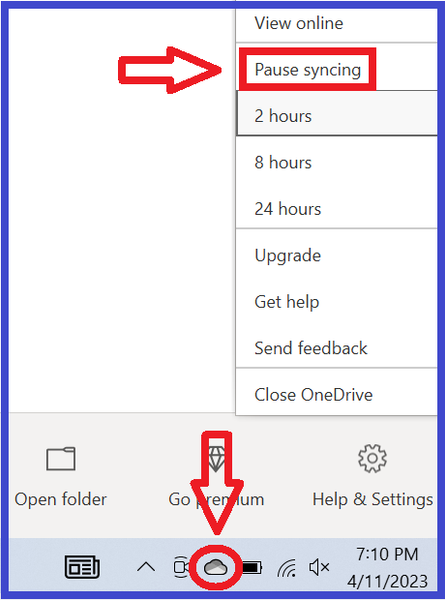
If OneDrive is running on this computer, whether you use it or not, please pause syncing before launching the game. You can do so by right-clicking the cloud icon in the lower-right corner of the screen.
And if you use a third-party antivirus, disable it (temporarily) before repairing Sims 3, and don't reenable it until you've tested the game at least once. As long as you don't do anything else at the same time, your computer should be safe.
Having a similar issue, tried the cache clear. did not work.
just downloaded the sims 3 on my pc from EA, got the starter pack from Xbox ultimate/ea play but after downloading, and trying to launch (with and without dlc selected) the game will not load. No saves at all attached. Error Message is : "A serious error has occured while loading ___ it is strongly recommended that you restart the application".
I also paused sync on onedrive to see if that was the issue too, didn't work. but maybe I need to restart the pc after doing that and clearing cache?
Update:
I have restarted pc. nothing. I have uninstalled and reinstalled sims 3, not on one drive and instead on C:,
I have played 4 with no issue before but never played 3. what are some fixes? am I missing any info I can provide?
AMD Ryzen 5 76000X 6-Core


