[Current Issue] Sims 3 "serious error" when loading save


Playing on windows and the graphics setting in game were low. When I changed them to high (changed it at main menu then saved and quit) and relaunched the game I cannot enter a world I get this error “A serious error has occurred while loading ‘sunset valley.world’. It is strongly recommended that you restart the application”. This happens with every world I have, it’s definitely related to changing the graphics setting in game because when I regenerate a new ‘The Sims 3’ file it can load but the graphics return to the lowest setting. I know my computer is capable of running high graphics but I’m at a loss for what to do. I thought maybe it wasn’t recognising my graphics card? But I’m unsure about that, I checked device config and it says for my graphics card found 0 matched 1, i dont know what that means. I have no mods or cc just a few ep’s. Any help would be appreciated!
edited title for visibility. -puzzlezaddict

So i just bought the sims 3 yesterday and downloaded it. i created my characters, bought my house, customized it then saved it. logged off and came back later that night to play again and it shows the name i saved it under but it shows a silhouette of people just not my people? then when i click on them to play it keeps saying there was an error loading my whatever the land was called... i don't have any mods or nothing just downloaded the game and played and that was it...
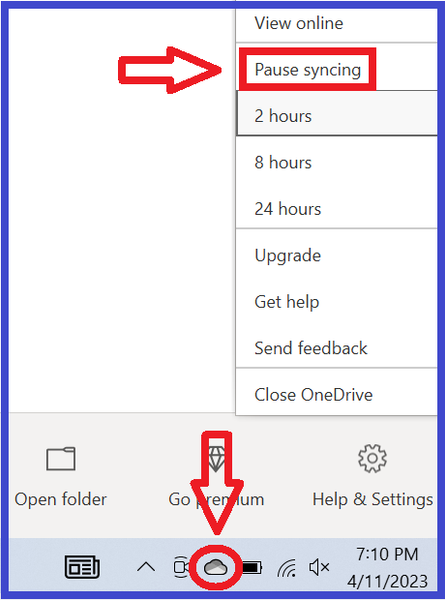
@erinbear I've merged your post with the master thread for the "serious error" when loading a world. Please see the first post on page one, specifically the OneDrive section, as OneDrive is the most common cause of this issue at the moment.


