Hello, I finally brokedown and got the boardwalk venue because I wanted to make rollercoasters so bad, but it doesnt work. I have uninstalled, reinstalled, used culvers sims3pack cleaner (none of t...
Spycoo16 Please try a different lot, and of course flatten it and place the wood flooring to keep it flat as the video describes. It's possible the lot you've been using is broken somehow.
If that doesn't help, let me know what kind of install this is: EA App, Steam, or disc.
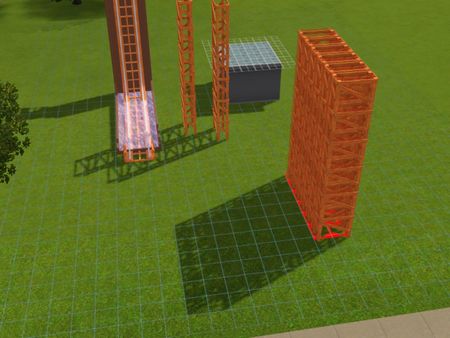
Ok I click flatten lot, then add wood but even on the surfaces without wood the one story pieces still have the squares on top to stack and the two and three story pieces dont. But yes I have tried it all. I play in riverview and twinbrook, so theyre not custom worlds, theyre official worlds.
I play through discs I got on ebay and I bought it on EA store. Its a sims3pack file thats saved into my game launcher.
5pm edit: I also used the delphy culver sims3pack cleaner and none of the files were red.
7pm Second Edit: Ok I found a small 20/30 lot in riverview, flattened the lot and did NOT put any tiles, and all levels are stackable now.
The up/down piece still sticks in the floor but it can attach. Is that ok?
Also, is it a lot issue? I feel like when I click "flatten lot" its not flattening enough? Because I went to a 64x64 lot in sunset valley, and got the same problem again, where theres no squares on top.
Sorry for all the messages but I also can only stack once. In the vid it says you should be able to go up to 5 stories, but I cant. And whatever piece I stack on top, does not have the squares for stacking.
9pm Edit: Ok another update, I elevated then flattened, then put floor on the 64x64 sunset valley lot and was able to functionally stack and use all pieces. I am pretty lost on why. I do believe u when u say the lot must be flat, im more stumped on why the lot isnt flattening on regular elevation, and why floor doesnt help stabilize things!