Forum Discussion


puzzlezaddict
6 years agoHero+
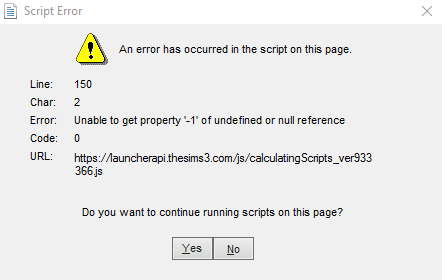
@XRaiderV17 I see that too right now; it seems like quite a few people do. But I just clicked No in the pop-up, and then my game launched normally. I didn't find any evidence that this was an actual problem.

6 years ago
so, nothing I can fix then @puzzlezaddict ? figure its server side?
- puzzlezaddict6 years agoHero+
@XRaiderV17 It almost certainly has to be something on EA's end, since it started affecting a number of systems at once. But again, just click No in the error message and go on playing. The pop-up might be annoying, but it's harmless.
I'll definitely ask about this when I get a chance; it's just that a fix from EA might take a bit of time. In the interim, there's not much you can do besides ignore it.
- 6 years ago
Someone on steam suggested using TS3w. EXE from the game folder, bypass the launcher outright. It worked. Only really need the launcher for when installing downloaded content the first place.
Given this is the exact same scenario for when I want to launch Star trek online and not bother with The Arc launcher... Kind of embarrassed that I did not think of it.
- 6 years ago
script error still presenting.
Featured Places