Sims 3 won't work
Okay, so I have desperately been trying to play "The Sims 3" for the past days, but whatever I try, the game simply won't work.
Firstly, I tried installing The Sims 3 base game using disc. I never got longer than to the launcher, where I had to update the game to play it. The problem was that the update bar dissapaeed before it ever finished, thus the game never got updated, even if I began the update on new.
Then it was suggested to download The Sims 3 content through Origin, using the product code. So I did just that. Before I downloaded the game fully, I made sure to completely delete the remaining files from my last game by following these instructions: https://bluebellflora.com/how-to-do-a-clean-uninstall-and-reinstall-on-a-mac/. When done I installed the game on new.
And magically, It actually worked! I still got error messages, but I could click away and actually play the game this time. I also have a couple of expansion packs, so I tried installing them in chronological order, as it is advised. First, "World Adventures": still an error message, but playable non the less. However as soon as I installed "Late Night", the game would not run.
So I uninstalled the whole game following the same instructions as before. Then I tried downloading the "super patch". My game got updated but simply would not go further than the launcher. I tried patch number 2: To-9355-1.67.2.024002.
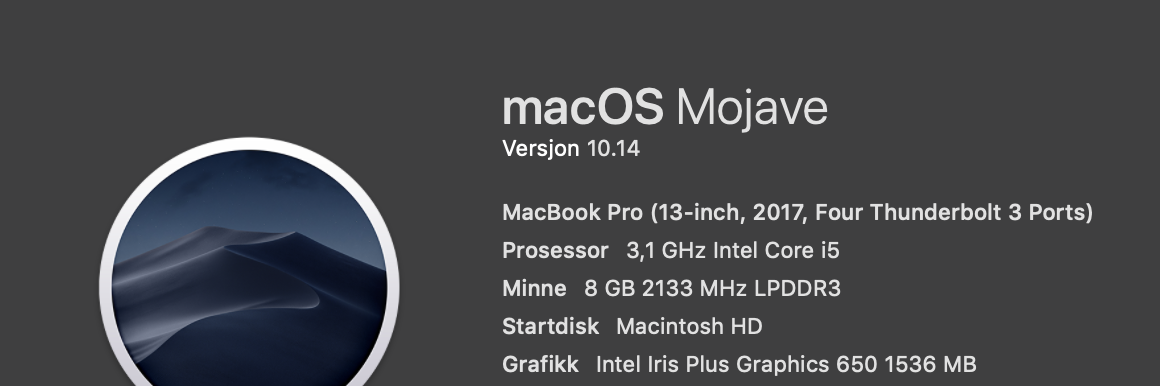
I expected there would be some complications when installing The Sims 3, as I play on a MacBook Pro (2017 model). But honestly, I have seriously no clue of what might be the problem here.
@Saratustrar I know you've done it before, but it's probably a good idea to start with another clean uninstall, just to be thorough. Then install the base game through Origin. All installs must go through Origin, as the most recent versions of mac OS X will fail to authenticate TS3 discs; you may get as far as the Main Menu, but you won't be able to play.
Once you've installed, download and run the digital version of the Super Patch (region 17). The earlier ones are region-specific due to the way disc installs work, but the digital version is necessary for an Origin install. You can find the version you need here:
https://bluebellflora.com/sims-3-manual-super-patch-for-mac-1-67/
Now make sure that the game launches and lets you start a new save. If you're still getting an unknown error, do yet another clean uninstall, create a new admin user on your computer, and install TS3 through that account. Then you can patch and make sure the game works.
The reason you saw an unknown error when you added Late Night is because that's one of the packs that doesn't install properly. (The others are Ambitions, Fast Lane, and Outdoor Living.) You'll need to apply two fixes, but they're fairly straightforward and should absolutely work. The first is to create an alias for the problem pack(s) in Applications, alongside the alias for the base game:
https://bluebellflora.com/sims-3-packs-not-showing-as-installed/
The second is to copy files from the affected packs into the folder for your newest pack by release date. If you were only installing WA and Late Night, this wouldn't be necessary, since LN would be the newest pack, but any newer pack subsequently installed won't have LN's files in it, so the game will throw an error. Again, all four listed packs are likely to be affected. Here's a video guide for moving the files:
Finally, if this process still isn't working, please provide your mac's specs, as described in the link below. Please also list the packs you'd like to install, so it's easier to be more specific about what you need to do.