The Catfishing Situation
Time and time again, this issue is probably raised—catfishing in the online Gallery. Dun-dun-dun? ♪ I know this has probably… most likely— definitely been brought up by many, many players on multiple threads and topics by now, across different platforms. But seriously, it has been going on for years. And with Lovestruck, I was hoping it’d have been remedied by with the implementation of the in-game dating app (for legal reasons, these are not real people on the app, okay?), Cupid’s Corner, distributing Sims from the Gallery.
For the sake of anonymity—and they do not deserve recognition anyway, but they, and we, know who they are—I have removed any trace that may identify these creators. Except for SIMS4DENISE, she’s cool, and she makes Sims and households without CC. However, I have kept the uploads their household name and description preview: “pretty girl”, “base game”, there’s even a user who is apparently an EA Partner. I don’t think it’s good that they represent or are some sort of partner for the game to be uploading misleading Sims, exploiting and bypassing the CC-tagging system. And yes, I have individually checked all Sims above by importing them to Create-A-Sim to see if they are the same Sims we see on their thumbnails, take my free download, I guess. :-P
A catfish Sim. The CC creators’ names are removed from the description provided by the original poster of the upload.For example, and an honest ( but slightly deceptive) one at that, this Sim has her description vaguely crediting the CC used to make her look the way she is in the thumbnails. I say “vaguely” because they’re actually just the CC creators in hashtag form, not the exact mod names.
One commented that CC was used and they are in the description if anyone’s confused. I made a reply to that which can be seen in the screenshot. (Shoutout to the people who misuse the hashtag #mccc_include by posting it in the comments.) Sure, this upload is honest about using mods, but if you notice, there is no CC-tag on the upper-left corner in the thumbnail, indicating that the uploaded Sim is modded. This allows them to appear in the regular page of the Gallery, specifically sorting the uploads to Popular Now and filtering only Households, without the need to tick the “Include Custom Content” checkbox, and effectively burying genuine vanilla/unmodded Sims—almost like SIMS4DENISE’s upload in the first image above.
Sim version of a Skyrim follower mod named Kaidan, original character by LivTempleton (inactive). CC used at the bottom of this thread.An example of a modded and properly tagged Sim is one of mine. I worked on him for a few of days. He’s based off of a custom-voiced follower (mod) for The Elder Scrolls V: Skyrim. I won’t upload him on the Gallery as I only want to share vanilla Sims and builds there, without mods. See the blue shield-style icon embedded on the upper-left corner in the thumbnail, that is the CC tag placed by default if any of the Sim in the household tray is modified in some way via mod/s. Same goes for builds that have custom furniture and decorations.
Same catfish Sim imported from the Gallery to Create-A-Sim.
Now here is the modded Sim that was used as an example, imported to CAS without any of the CC. It’s quite… Barbie, but I don’t honestly know what to feel considering that’s not how she was advertised presented in the first place—there are worse cases. Like the next one below the image on the right. (っ- ‸ - ς)
Just a quick a mention to this somewhat vague and blurry reference to how we think they do this “trick”, on Reddit.
P.S. It is not my post. Even I can’t quite understand how it works.
This second example, it doesn’t even mention any of the CCs they used to “yassify” the Sim they made. Just a bunch of inappropriate hashtags forming a wall of text in the description. Some of them even mention packs that weren’t even used to create the teen Sim (yes, teen); among the hashtags are keywords like “sexy”, “hot”, “hot guy”… “girl”? And the use of their vague (I’m sorry, I love that word) tag, “defaults used”.
If anyone says we could’ve just reported them, there’s not even a “proper” reason to report any of these uploads, only “Harassment or threats” or “Inappropriate Content”. The latter reason could be used, but there’s not enough grounds for the moderators to take down the reported upload, even with a written explanation as to why we’re reporting them in the first place. I honestly don’t know if the Gallery is even monitored at this point of the game’s lifespan.
Please, a EA/Maxis dev or mod can correct me if I’m wrong on this.
This thread shouldn’t just be a place to discuss this epidemic in the Gallery, it should also be where we should suggest how to eliminate this problem and put them back behind the modded page of the Gallery. One that I sometimes do is use the hashtag #WYSIWYG (What You See Is What You Get), which is used by Simmers who create vanilla (+ packs) Sims, strictly no CC included, unless some of the CC-users tries to slime their way into the hashtag. But that’s almost not possible as it’s sort of widely agreed that the hashtag is meant for no-CC uploads. Then again, what if we want to use other hashtags to find what we’re looking for other than #WYSIWYG but still unmodded? The Gallery’s search bar can only allow one hashtag to be used.
If you wish to know the CCs I used for my properly tagged Sim, they are:
- Lane Hair by Peachibunnii I use the up-do version.
- Halo Default Skin by magicbats reposted by @polarmoon.
- Dazzling Light by Pralinesims Maxis-match default eyes.
- Custom face tattoo I cannot share. Sorry. (◞‸ ◟)💧
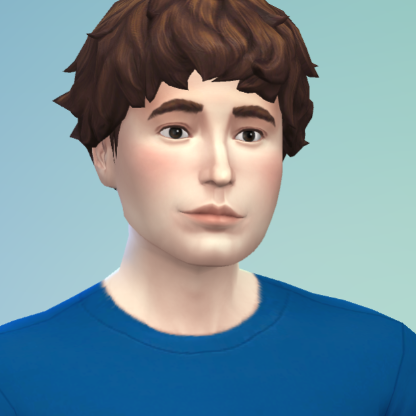
And, if you’re curious as to what he looks like without the skin and eyes overrides, and the custom face tattoo, here he is! (ノ^ヮ^)ノ*:・゚✧
Front angle of Sim version Kaidan without skin and eyes replacer mods, and no face tattoo.Three-quarter view of Sim version Kaidan without skin and eyes replacer mods, and no face tattoo.
And to those who create the misleading Sims with CCs and bombard them on the Gallery, at least make them look presentable still when without the mods, the beautifiers, the yassifiers. And an ounce of shame, I guess? There are even Simmers I used to follow who formerly uploaded vanilla Sims—albeit copy-pasted with different outfits—with only custom poses that are now using CCs and obfuscating their existence to make their Sims look better (subjective).
Lastly, I would like to thank you, the reader, for taking your time reading this piece. I hope my… personality(?) shines in my writing style, and that it didn’t—doesn’t—bore you. Alright, that’s really it from me. Ciao Bella Goth!