Solved
[patch 1.122] Game launches to black screen with main-menu words but no picture
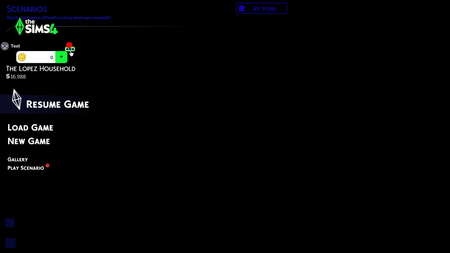


itstenneo Please see Broken and Updated Mods and CC for broken and updated UI mods. And see How to Use Mods and CC on how to manage your mods when the game updates. UI issues like this are to be expected.

hey, is this happening to anyone else? all my mods are updated and broken ones are removed but this still keeps happening to me. is there any fixes?
i haven't seen anyone else post this screen but i have the exact same screen and idk what to do im so confused 😭😭
Hi i figured it out! If you have any main menu overrides, try removing those. it worked for me!

mine Is totally black
Hi i figured it out! If you have any main menu overrides, try removing those.
I get the same thing. I can't find any update or relevant info on it online either. I figure they are just hoping we shut up n put up.

I've seen a few people comment about this. Check that your graphics card drivers are up to date. If that doesn't work, try deleting your localthumbcache file (documents > electronic arts > sims 4). A few people have said that's worked for them.
It was my main menu override hidden in one of my folders 😭 but ty for this
I have the same problem. My game only works when I remove all gameplay mods (CC still works)
Mine was staying completely black tried restarting computer bc I couldn’t close game. I removed 5 mods to test and it loaded up finally. The mods were:
I do not feel like narrowing these down tonight now that it’s in game but hope this helps.
tazahraa angelheartt Nicisoxx quino_sim Vasiamyr See the Solutions post of the topic I'm moving you into