Forum Discussion


puzzlezaddict
2 years agoHero+
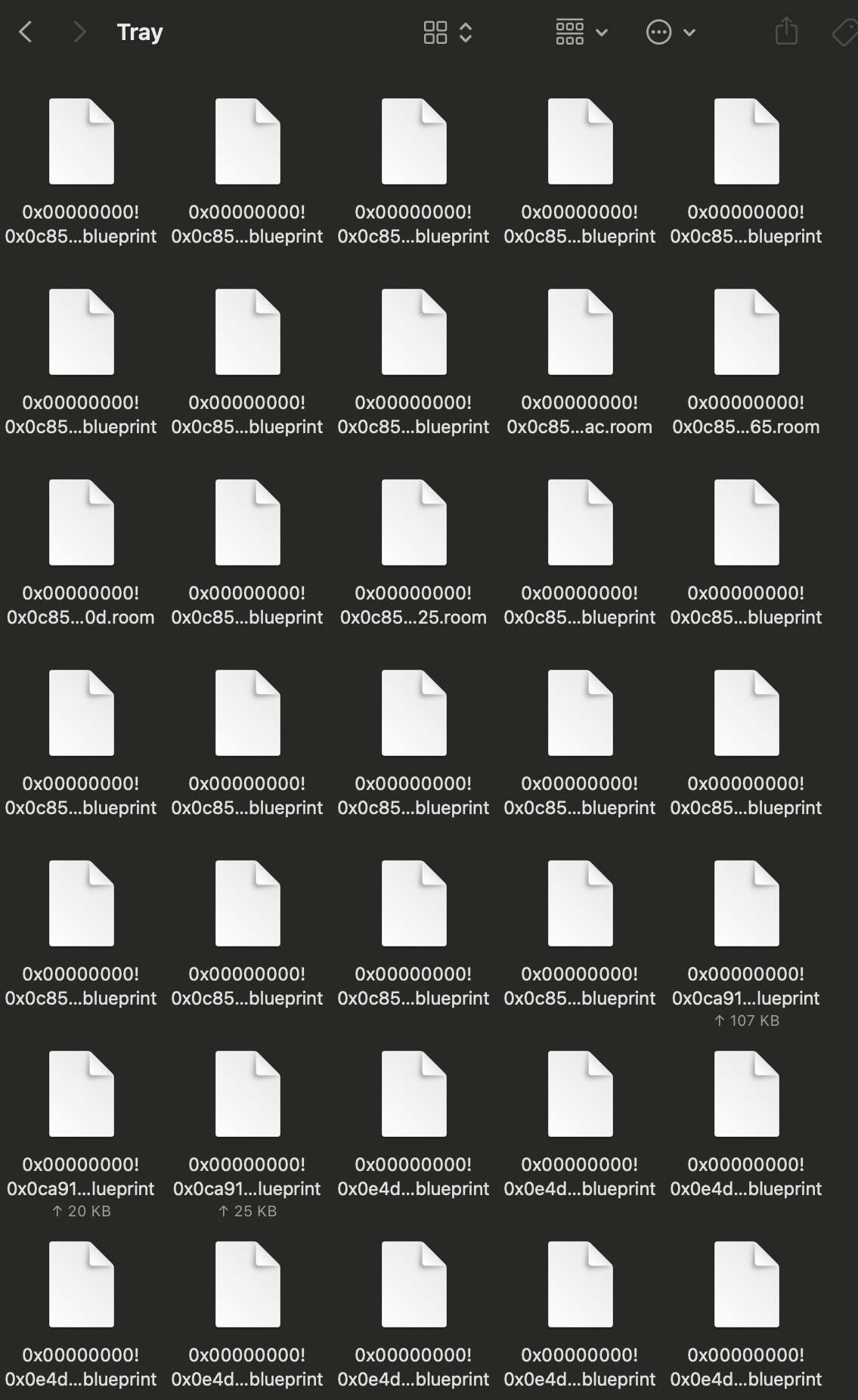
@natalie111127 Please post a screenshot of the contents of your Tray folder, as in, I'd like to see the file names themselves. You don't need to include all 539 files, just whatever fits into one screenshot.
Please also double-check (or triple-check) that you're working with the Sims 4 folder the game is reading. Here's how to find it:
https://sims4.crinrict.com/eng/2018/07/how-to-find-your-user-folder/

2 years ago
Here's the screenshot of the files in the Tray--and I triple checked, my saves are being read from the correct Sims 4 folder, so I would assume the game would read the Tray in the same Sims 4 folder, right?
 Bluebellflora2 years agoHero+@natalie111127
When you removed some of the files, did you do this per Lot/Household/Room or did you choose random files to remove? Each item in your Library has several files in the Tray folder, it’s not just one file per item. If the Library item is missing corresponding files it won’t work.
Do you have a backup of the Tray folder using Time Machine or a manual backup?
Could you post another screenshot of the Tray folder but this time clearly showing the path bar at the bottom of the Finder window. You can enable this in Finder preferences.- 2 years ago
I removed all of the files from the Tray and put them into a different folder, then moved sets of files with similar names back into the Tray in groups of 5-10 to see if they would work if there were fewer files in the Tray. I assumed files with similar names (files starting with 0x00000000!0x0c85...) were corresponding files, is there a different/better way to tell which files correspond with each other? I also tried to put half of the files back (about 250 files) and still nothing was showing up in my Library. Unfortunately I don't think I have a backup ☹️
- Bluebellflora2 years agoHero+
@natalie111127
Yes. The only way to successfully find a specific Lot/Household/Room in the Tray folder is to sort by date modified in Finder. All files for a specific item will have the exact same date and time. But that is probably too late now because you’ve been moving files around so much.
Your Sims 4 folder needs to be directly in your Documents folder, not in iCloud Drive. This thread explains further https://answers.ea.com/t5/Technical-Issues-Mac/READ-FIRST-Saves-CC-Mods-or-Library-items-disappeared/td-p/10242133
Featured Places