Game crashing or not loading especially after updating? Post here.


My game has been crashing for a few weeks, and so far, no forum or advice has fixed the issue. Here are the details:
I am using a 24-inch iMac from 2021 with an Apple M1 chip. macOS version Sequoia 15.4.1, 16GB memory, and 626.32 GB out of 994.66 GB for storage.
I'm pretty sure an error message like this would only show up with a software issue or corrupted game?????Current game folderchgid20071252 wrote:I have renamed my main file to create a new file, I have deleted all my mods, and I've had no luck so far.
What file have you renamed? Please read the instructions in the opening post to rename the Sims 4 folder. Deleting Mods is irrelevant if you rename the Sims 4 folder as the Mods folder is inside the folder you are renaming so the game ignores it.
chgid20071252 wrote:I'm pretty sure an error message like this would only show up with a software issue or corrupted game?????
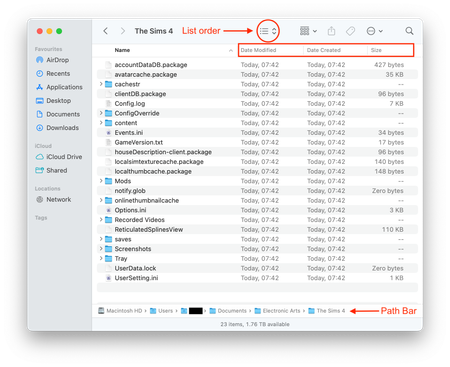
Correct. I've never seen that before. Where is that screenshot from, a Finder window? Please post a screenshot of the entire Finder window, not just a screenshot of the app showing error. Make sure the file path is clearly visible, instructions on showing the path bar in the opening post.
Hi, I want to take a second to thank you so much for your help.
Bluebellflora wrote:What file have you renamed? Please read the instructions in the opening post to rename the Sims 4 folder. Deleting Mods is irrelevant if you rename the Sims 4 folder as the Mods folder is inside the folder you are renaming so the game ignores it.
I'm so sorry, I misspoke. I renamed the sims 4 folder, not a file. I just named it sims 4 old, and it did create a new sims 4 folder, but this didn't help. However, I didn't mention that the folder was in Documents.
The screenshot I posted was also from my Documents, where I kept the app and the Sims 4 folder. I wanted to give an update: I moved the sims 4 folder to my desktop, and moved the sims 4 app into my applications, then repaired the game through the EA app. After running the game, UserData.lock started uploading to icloud, but it won't fully upload. the attached finder screenshot is what the page has looked like for at least 30 minutes now-- but at least this is different. Any advice?
This is why I ask for the path bar to be clearly showing in the Finder window because I can see if your Documents folder is local or in iCloud, which it is, and which will be causing the issue. It saves a lot of back and forth when troubleshooting when providing all the info asked for 🙂 Stop your iCloud from pushing your Documents folder to the cloud, all the info you need is here - [READ FIRST] Saves, CC/Mods or Library items disappeared? iCloud issues | EA Forums - 10979712 then we can try to get your game properly working.
Also, if you move the game installation you should change the location in EA App > Settings > Download.