Forum Discussion

20 Replies
Hello!
I am also having issues with an unrecognized video card when I open the game up. This happens whenever I add custom content to the game now but it wasn't always this way and I was previously able to have the custom content and the mods without any issues. I believe this is the information you will need to help me;
Intel HD Graphics 615:
Chipset Model: Intel HD Graphics 615
Type: GPU
Bus: Built-In
VRAM (Dynamic, Max): 1536 MB
Vendor: Intel
Device ID: 0x591e
Revision ID: 0x0002
Metal: Supported, feature set macOS GPUFamily2 v1
Displays:
- @lisar0416
Are you happy editing the GraphicsCard.sgr file in the game files? There will be an update soon that will require them to be re-edited - https://answers.ea.com/t5/Technical-Issues-Mac/The-Sims-4-macOS-Notarization-FAQ/m-p/8876253#M29009
If your game works without CC it's more likely the CC that is the issue. Yes I am okay with that. What is weird about it is that the custom content was working fine and then all of a sudden it was not. Also I am unsure where to find the GraphicsCard.sgr file because I’ve searched for it and did not see it
- @lisar0416
Great! Can you open the Config.log file in your Sims 4 folder and see what the Found and Matched values are under the === Graphics device info === section? Let's check that first before editing the file 🙂 === Graphics device info ===
Number: 0
Name (driver): Intel HD Graphics 615
Name (database): [Found: 0, Supported: 1]
Vendor: Intel
Chipset: Vendor: 8086, Device: 591e, Board: 00000178, Chipset: 0002
Driver: macOS Metal driver, Version: 0.0.0.0
Driver version: 0
Monitor: 00000000
Texture memory: 1536MB
Vertex program: 3.0
Pixel program: 3.0
Hardware TnL: 0
Opt. features: -d24s8Thanks 🙂
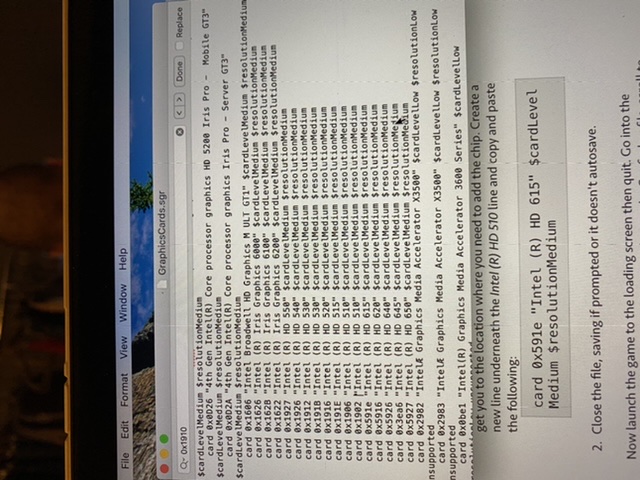
- Open the GraphicsCards.sgr file using TextEdit. You can find it by right clicking on the Sims 4 in your Applications folder > Show Package Contents > Contents > Resources. Press CMD and F to bring up the search function and type in 0x1902. This will quickly get you to the location where you need to add the chip. Create a new line underneath the Intel (R) HD 510 line and copy and paste the following:
card 0x591e "Intel (R) HD 615" $cardLevelMedium $resolutionMedium
- Close the file, saving if prompted or it doesn't autosave.
Now launch the game to the loading screen then quit. Go into the Electronic Arts > The Sims 4 folder and open the Config.log file, scroll to the top and see if your card has now been found. Under the Graphics device info bit it should now correctly identify your card and show [Found: 1, Supported: 1].
If it doesn't show Found:1 let me know, we may need to tweak the entry a bit.
- Open the GraphicsCards.sgr file using TextEdit. You can find it by right clicking on the Sims 4 in your Applications folder > Show Package Contents > Contents > Resources. Press CMD and F to bring up the search function and type in 0x1902. This will quickly get you to the location where you need to add the chip. Create a new line underneath the Intel (R) HD 510 line and copy and paste the following:
I am unable to locate SIms 4 in my applications folder.
- @lisar0416
Check both Applications folders. Macintosh HD > Applications and Macintosh HD > Users > [your user account] > Applications I am unable to find either of those. Does it matter if my sims 4 is on origin??
Nevermind I was able to find the Sims 4 application and drag it into the applications folder
However, I am unable to search for 0X19102 to locate the file that I need to add to
- @lisar0416
In the GraphicsCards.sgr file? I have just edited the file path to find the file in my post here - https://answers.ea.com/t5/Technical-Issues-Mac/Mac-Unrecognized-Video-Card-Sims-4/m-p/8926043#M29564 It still says 0 Found, 0 Supported
- @lisar0416
Ok. Are you happy you entered the line correctly in the GraphicsCards.sgr file? Could you screenshot it so I can check? Yes I’ve attached my GraphicsCards.sgr where I added it and a picture of the Config.log and sorry I meant to say Found 0 and Supported 1
I tried that and it still showing up like this;
=== Graphics device info ===
Number: 0
Name (driver): Intel HD Graphics 615
Name (database): [Found: 0, Supported: 1]
Vendor: Intel
Chipset: Vendor: 8086, Device: 591e, Board: 00000178, Chipset: 0002
Driver: macOS Metal driver, Version: 0.0.0.0
Driver version: 0
Monitor: 00000000
Texture memory: 1536MB
Vertex program: 3.0
Pixel program: 3.0
Hardware TnL: 0
Opt. features: -d24s8Urgh! Ok. One last try - Intel (R) HD Graphics 615
Still not working =/
- @lisar0416
Then I have no more suggestions I'm afraid. Let's hope EA add your chip to the .sgr file.

Featured Places