Forum Discussion
The Sims 4 for Mac – Startup Crash / Immediate Exit Before Main Menu
Environment
Hardware
- MacBook Pro (Apple M4)
Operating System
- macOS Tahoe 26.5.1
EA App
- Version 13.735.0.6248
Game Version
- The Sims 4 (Build 1.124.63.1220)
Summary
The Sims 4 consistently fails during startup before reaching the Main Menu.
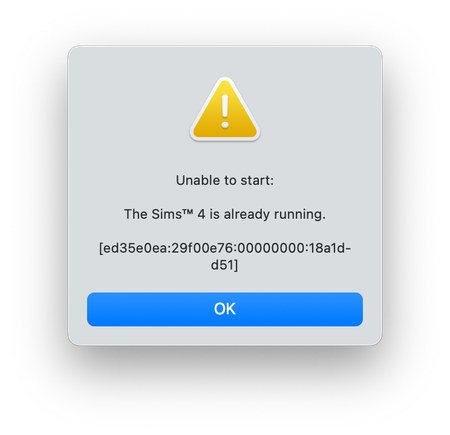
The EA App launches successfully, the Sims Dock icon appears briefly and bounces as expected, but the game exits during initialization. The EA App then reports:
"Unable to start: The Sims 4 is already running."
The issue is fully reproducible.
Timeline
The game previously worked successfully on this same Mac.
The issue began without any intentional changes to Mods, Custom Content, or save files after previously being able to launch and play successfully.
Reproduction Steps
- Open EA App.
- Click Play.
- The Sims 4 Dock icon appears briefly.
- The icon disappears before a game window or Main Menu appears.
- EA App reports:
- "Unable to start: The Sims 4 is already running."
This occurs every launch attempt.
Troubleshooting Completed
The following were completed without resolving the issue:
- Complete uninstall/reinstall of EA App
- Complete uninstall/reinstall of The Sims 4
- Game Repair
- Verified complete installation (~26 GB)
- Verified Apple notarization
- Verified code signature
- Verified no quarantine attributes
- Verified Gatekeeper approval
- Removed all Mods and Custom Content
- Tested with clean Sims 4 user folder
- Tested without save files
- Tested using a brand-new macOS user account
- Tested launching natively (Apple Silicon)
- Tested launching under Rosetta (Intel/x86_64)
- Tested launching directly from Terminal
- Verified required frameworks are present
- Verified executable contains both arm64 and x86_64 architectures
The issue reproduces identically under all conditions above.
Observed Behavior
When launched directly from Terminal, the executable exits immediately.
Terminal output consistently contains:
Launch -1
cp: logReader.html: No such file or directory
No additional output is produced.
The executable exits before creating the Main Menu.
macOS Crash Information
Earlier during troubleshooting, macOS generated crash reports containing:
- Exception Type: EXC_BAD_ACCESS (SIGSEGV)
- Exception Subtype: KERN_INVALID_ADDRESS
- Crash occurs during early startup
- Crash occurs before gameplay or save loading
More recent launch attempts exit immediately without generating a new macOS crash report.
EA App Behavior
EA App successfully launches the executable.
The Sims process briefly exists and appears in Activity Monitor before exiting.
EA App then reports:
"The Sims 4 is already running."
EA Desktop logs indicate the session completed successfully even though the game never reaches the Main Menu.
Additional Technical Findings
- Application bundle is complete.
- Executable is a universal Mach-O binary (arm64 + x86_64).
- Required framework (libActivation.dylib) is present.
- Application is notarized and accepted by Gatekeeper.
- No quarantine attributes exist.
- The issue reproduces outside the EA App when launching the executable directly from Terminal.
Because the issue reproduces after a complete reinstall, with a clean user profile, without Mods/CC, and without save files, this does not appear to be caused by user data or installation corruption.
The issue reproduces after a complete reinstall of both the EA App and The Sims 4 and is independent of user data, Mods, save files, or the launching method.
Attachments Included
- macOS Crash Report(s) (EXC_BAD_ACCESS / SIGSEGV)
- lastCrash.txt
- EADesktop.log
- EABackgroundAgent.log
- Terminal output showing:
- Direct executable launch
- Launch -1
- cp: logReader.html: No such file or directory
- Screenshots of:
- "The Sims 4 is already running"
- Activity Monitor showing The Sims process
- Dock icon briefly appearing before exit
Hi LadySprat1
I merged your post with the main thread. Please check out the first post.