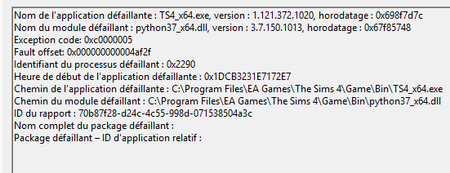
Crashes every hour, Code 0xc0000005 python37_x64.dll


Cissouryne Your dxdiag doesn't list any Sims 4 errors at all, probably because they've been crowded out by some generic Windows update errors. Even though these are unlikely to be the reason the game is crashing, it's best to clean them up anyway. So please run a couple of basic checks of your Windows system files:
Restart your computer, open Windows Settings > Update & Security, click the box to check for updates, and if any install, restart again afterwards.
These python errors often happen on high-end Intel processors that the motherboard overclocks by default, especially on high-end boards. Sometimes a BIOS update fixes it, so please look for a newer BIOS for your board. I believe this is your model:
https://www.msi.com/Motherboard/pro-z790-p-wifi/support
But double-check the board itself or its documentation. Your dxdiag lists your current BIOS version as H.70, which is not how MSI lists versions on its support site, so I can't be sure whether you have the most recent version installed. But that version is from August, so if you've updated the BIOS since then, you should have the latest version.
If updating the BIOS doesn't help, or you have the newest version already, boot into BIOS and disable CPU Turbo Boost, which should be somewhere under Advanced settings.
Hello !
Thanks for your answer.
I tried to update my bios, but my usb key had some random problem, and the update didn't make it. I had to flash it, to come back to version 70, it was painfull and scary, but the problem was the key.
So with your help (and chatgpt as advisor), I went to the BIOS to disable every micro-overclocking asset, as CPU Turbo Boost, Intel Boost Technology, XMP...
Since I did these actions, I could record and play during 4 hours without any crash, but in vanilla. I just started to test with mods and cc, it's been an hour now, wait and see.
If I see any instability, I'll update my BIOS. IDK if I should do it too if it's stable, what do you think ?
At any rate, thanks for your help ! It's really better than 3 days ago so we are in the good direction.